Lead scoring ranks leads by how likely they are to buy, with points for who they are and what they do. HubSpot lead scoring keeps those on two separate axes. A fit score says whether a contact or company is the kind of customer you want. An engagement score says whether they’re showing interest right now. A combined score keeps both and labels every record from A1 (right customer, very active) to C3 (poor fit, quiet).
A score only helps when sales agrees on what it means. Agree the threshold that hands a lead to sales before you set a single point. Score few signals that predict a deal, and let engagement points fade. Skip scoring altogether while your team can still look at every new lead by hand.
Plans
Marketing Hub or Sales Hub, Professional or Enterprise. Contact scores need Marketing Hub, deal scores need Sales Hub
Where
Marketing > Lead Scoring
Score types
Fit (properties), engagement (events) and combined (both, with A1 to C3 labels)
Number of scores
Up to 5 in Professional, 50 in Marketing Hub Enterprise, 10 in Sales Hub Enterprise
Decay
Engagement points can fade by a percentage every 1, 3, 6 or 12 months
Old HubSpot Score
Stopped updating on 31 August 2025, with no move to the new tool
Most common fault
One number for everything, email opens counted as interest, and no agreement with sales on what happens at the threshold
Does your team need lead scoring?
Lead scoring sorts leads when there are more than sales can look at. If your sales team reads every new enquiry within a day anyway, a score adds rules to maintain and decides nothing new.
Your situation
What we recommend
Why
Under about 50 new leads a month, one or two sales reps
No score yet. A view of new leads, sorted by company size, checked every morning
A person reads 50 leads faster than a team agrees on points
No clear picture of your best customers yet
A fit score only, with three or four properties
Engagement points without a fit axis push busy browsers to the top
More leads than sales can call, a known target customer
A combined score with a threshold and a hand-off workflow
HubSpot’s scoring tool is built for this case
Several products or regions with different buyers
One combined score per product or region
A good fit for one product is a poor fit for another
Our view from projects. The numbers are a guide, not a rule.
A second check: look at the last 20 deals you won. If you can't say what most of them had in common before they bought, you're not ready to score. Write that down first, because that list is your fit score.
Fit score and engagement score: why two scores beat one
A single number hides the difference that matters most. A managing director at the right company who visited your pricing page once scores lower than a student who opened every newsletter. Two scores keep that apart.
Fit uses properties: industry, company size, country, job title, buying role. The fit score answers whether you want this customer at all, and it rarely changes.
Engagement uses events: form submissions, meetings, page visits, email clicks, webinars. Engagement shows interest right now, moves daily and should fade over time.
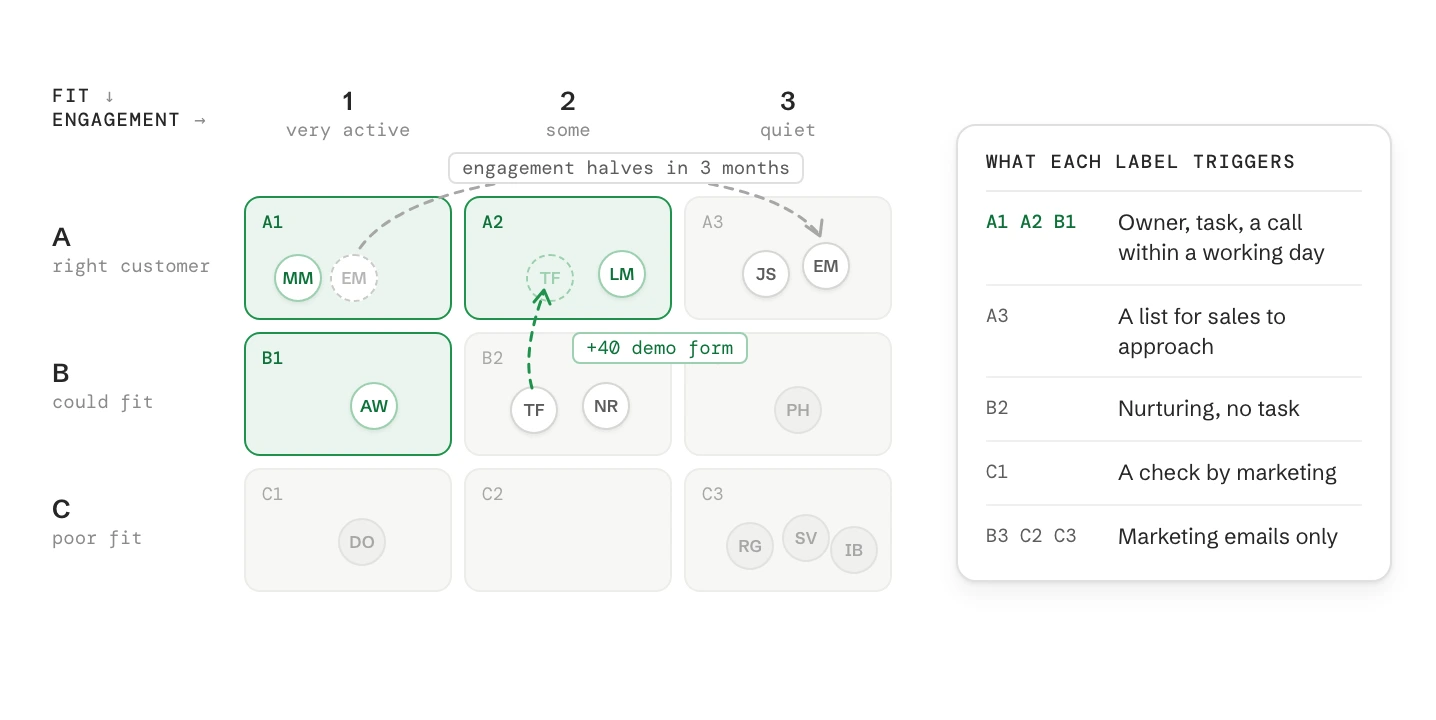
Combined keeps both scores and adds a label from A1 to C3. The letter is fit (A high, C low), the number is engagement (1 high, 3 low).
What each label should trigger
Label
What it means
What happens
A1, A2, B1
Right customer and interested
Marketing qualified lead: an owner, a task, a call within one working day
A3
Right customer, quiet
No MQL. A list for sales to approach directly, and targeted content
B2
Good fit, some interest
Nurturing. Sales sees them in a saved view, but no task
C1
Very active, wrong profile
A check by marketing: student, competitor, job seeker or missing company data
B3, C2, C3
Little fit or little interest
Marketing emails only
The nine labels come from HubSpot. Which label triggers what is your decision, and the most important one in the whole set-up. Make it with the head of sales in the room.
A lead scoring model for B2B: criteria and points
We start from this model for a B2B company that sells to manufacturers with 50 to 999 staff in Germany, Austria and Switzerland. Change the criteria to fit your own customers and keep the structure. Each axis runs to 100, so a score reads like a percentage.
Fit score (properties, up to 100 points)
Rule
Points
Why
Company industry is one of your three target industries
+25
Most of your won deals come from there
Company has 50 to 999 employees
+20
Big enough to need you, small enough to decide quickly
Company is in Germany, Austria or Switzerland
+15
Where you sell and deliver
Job title contains Managing Director, CEO, Head of, Geschäftsführer or Leiter
+20
Someone who can say yes
Buying role is Decision Maker or Budget Holder
+20
Set by sales after the first call, so fit improves with real knowledge
Company has fewer than 10 employees
−30
Too small for your offer
Email domain is a free mail provider (gmail.com, gmx.de, web.de, t-online.de, bluewin.ch)
−15
Often private interest, not a business enquiry
Company rules use the associated company’s properties. A company property that is empty scores nothing, so fill industry and size before you score.
Engagement score (events, up to 100 points)
Rule
Points
Group and decay
Submits the demo or contact form
+40
Buying signals, up to 70, half every 3 months
Books a meeting
+30
Buying signals
Visits the pricing page
+15
Buying signals
Downloads a guide or checklist
+10
Interest, up to 30, half every month
Attends a webinar
+10
Interest
Clicks a link in a marketing email
+3
Interest
Unsubscribes from all marketing email
−20
Interest
Opens a marketing email
0
Not scored, see the mistakes below
Two event groups, each with its own limit. A busy newsletter reader tops out at 30 points, so interest alone never reaches engagement level 1.
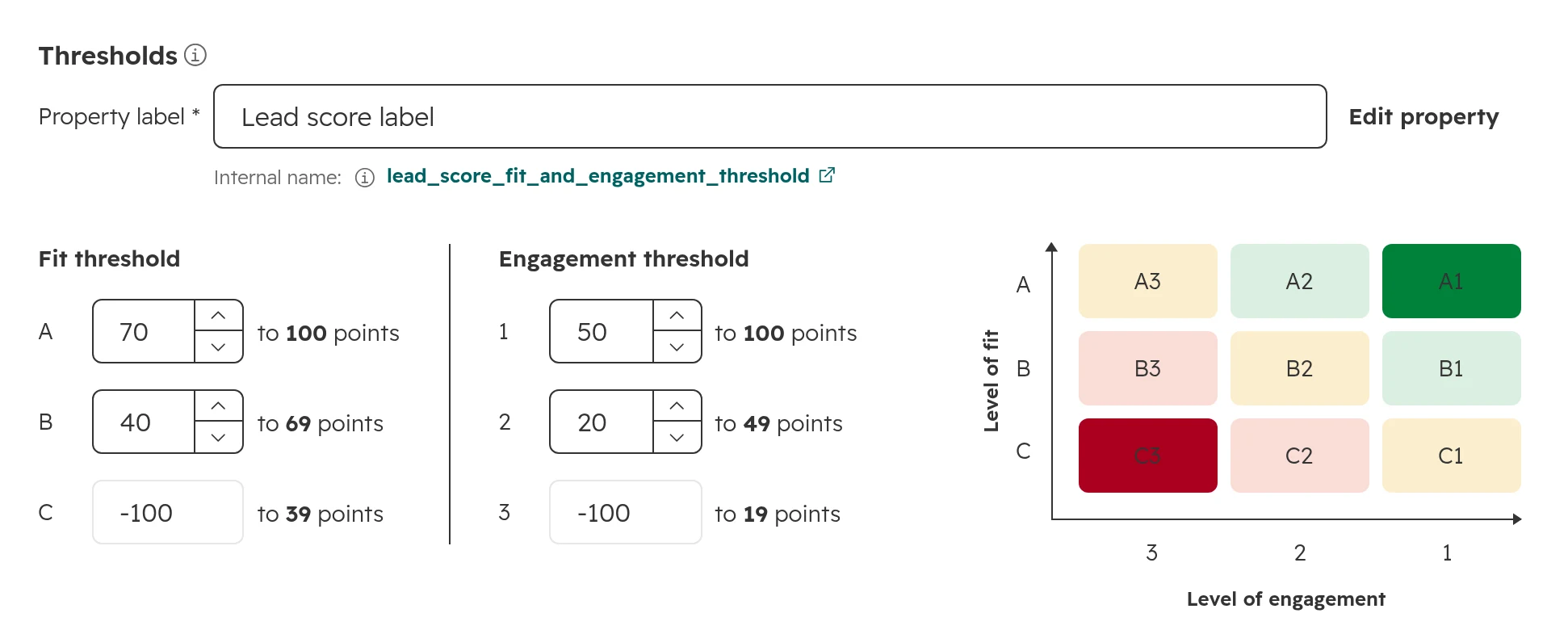
With thresholds of 70 and 40 on fit and 50 and 20 on engagement, a managing director at a 180-person machine builder in Stuttgart who requests a demo and looks at the pricing page scores 80 for fit and 55 for engagement, and lands in A1. The same activity from a six-person shop in Leeds lands in C1 and goes to marketing for a check.
Keep it to about ten rules for the first three months. Every rule you add later should change who reaches sales. If it doesn’t, leave it out.
How to set up lead scoring in HubSpot
Agree the model and the hand-off with sales first. Building it then takes about an hour.
Step 01
Create a combined score
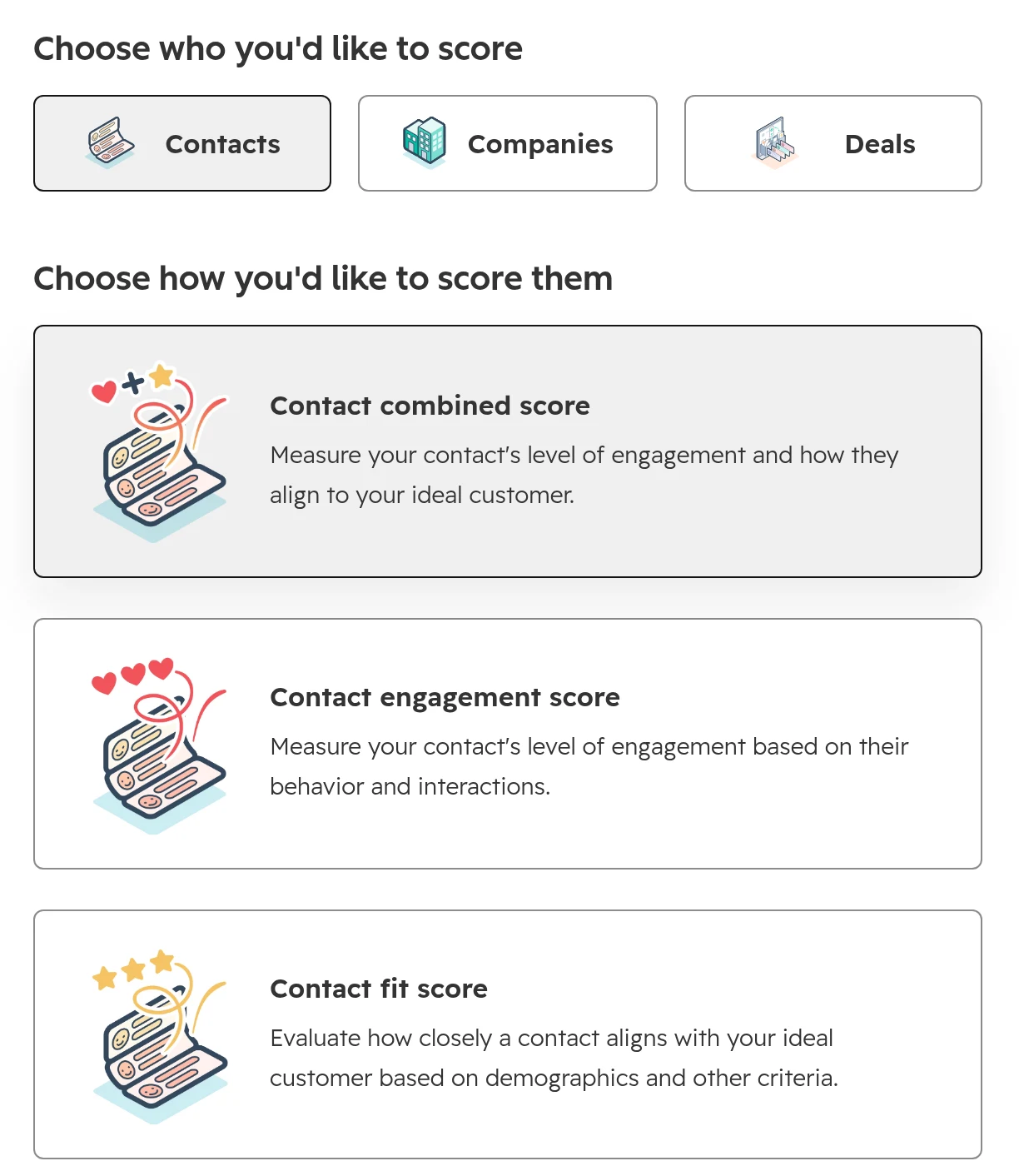
Go to Marketing > Lead Scoring and click Start from scratch. Choose Contacts, then Contact combined score. Score companies instead if you sell to buying groups and want one score per account.The score type. A combined score keeps fit and engagement apart and adds the A1 to C3 label.
Step 02
Build the fit groups
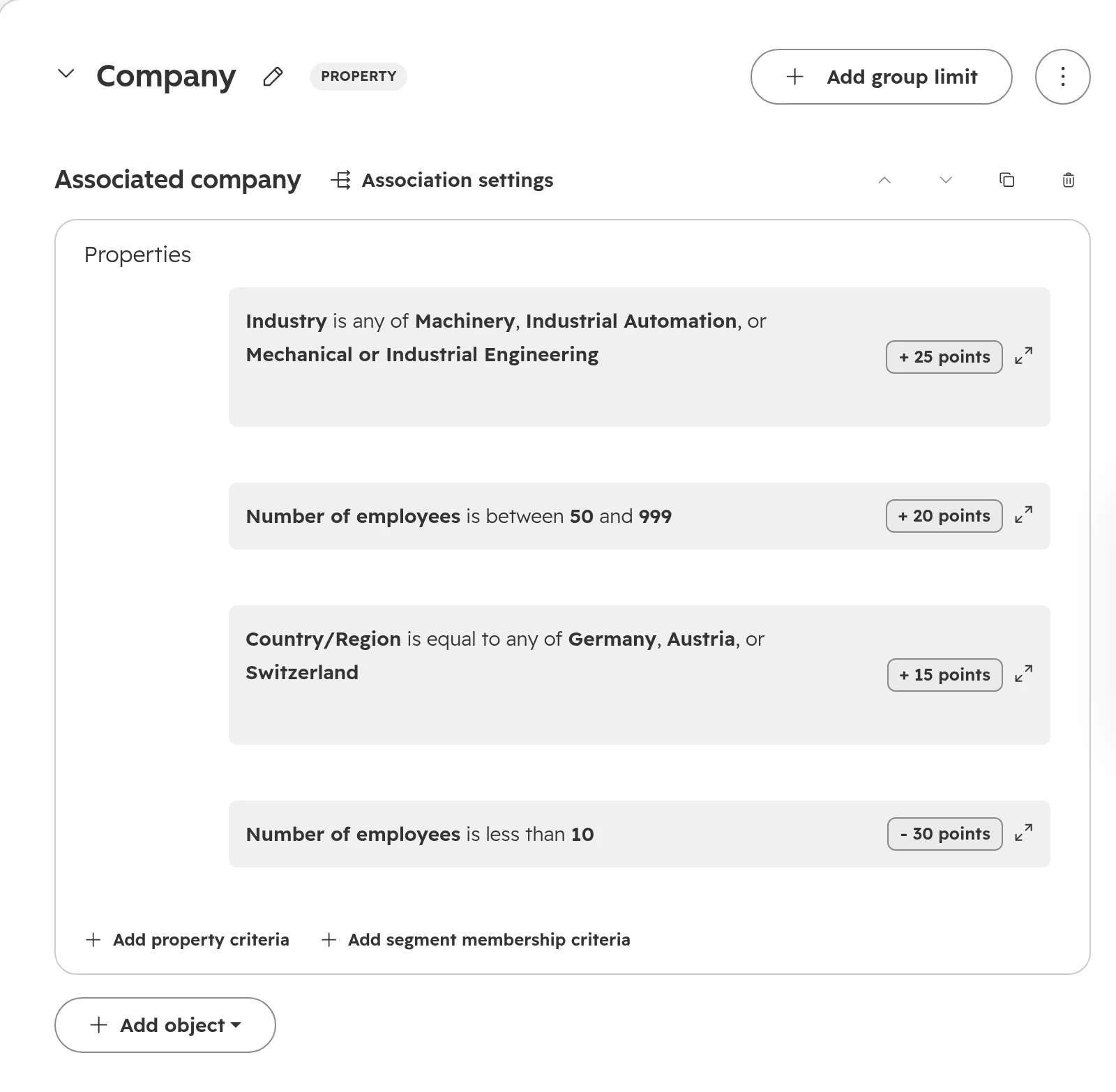
Click Add property group. Name it, click Add object and choose Associated company for company rules or Contact for the person. Add one rule per criterion with its points. Use Subtract for the penalties. Several values in one rule score once, unless you switch to Score individually.The company part of the fit score: three rules that add points and one that subtracts them.
Step 03
Build the engagement groups
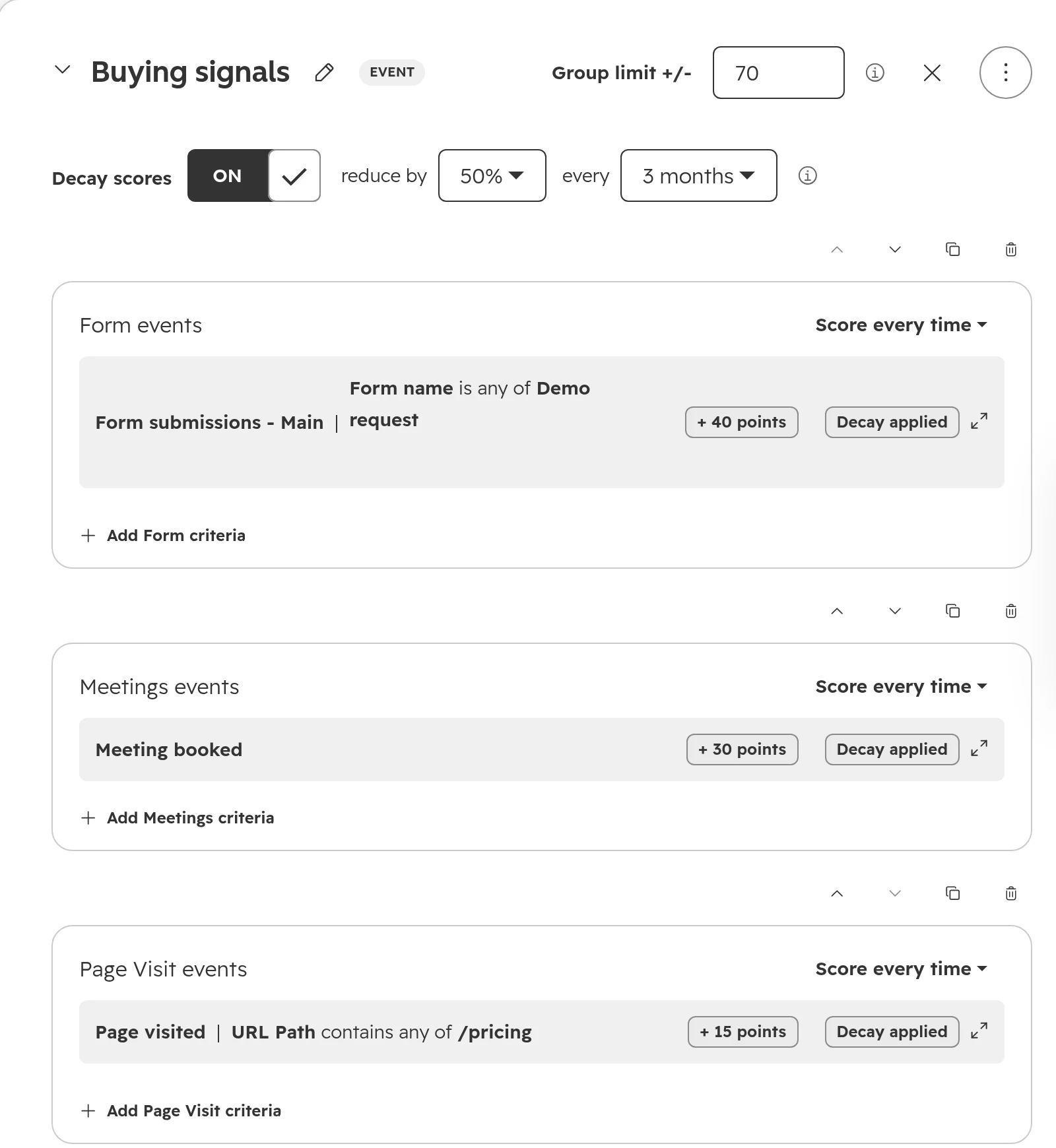
Click Add event group, then Add event criteria. Pick the event, for example Form, Meetings or Page Visits, and filter it, for example a URL path that contains /pricing. Set a group limit, so one kind of activity can’t fill the whole score.The buying signals group: a limit of 70 points and decay of 50% every three months, applied to every rule in the group.
Step 04
Turn on decay
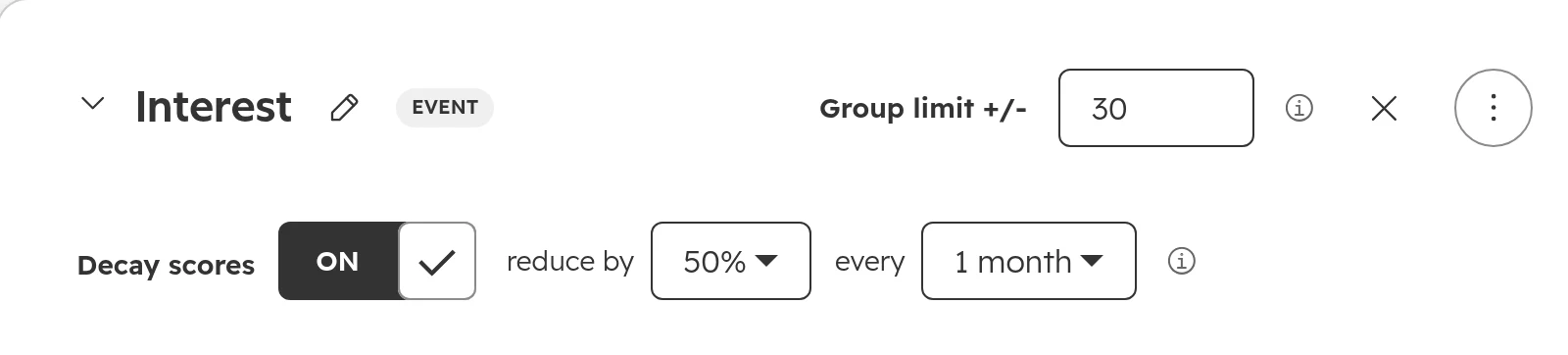
In each event group, switch on Decay scores and choose how much and how often. The setting applies to every rule in the group. HubSpot counts a month as 30 days, decays every event on its own, and applies decay to past activity too when the score is turned on.Decay is set per event group. Light signals like email clicks fade by half every month here.
Step 05
Set the thresholds
Open the Settings tab. Rename the score properties so people know what they mean, then set the thresholds for fit and engagement. HubSpot writes the label, A1 to C3, into its own property.Thresholds for fit and engagement, and the grid of labels they produce.
Step 06
Test before you turn it on
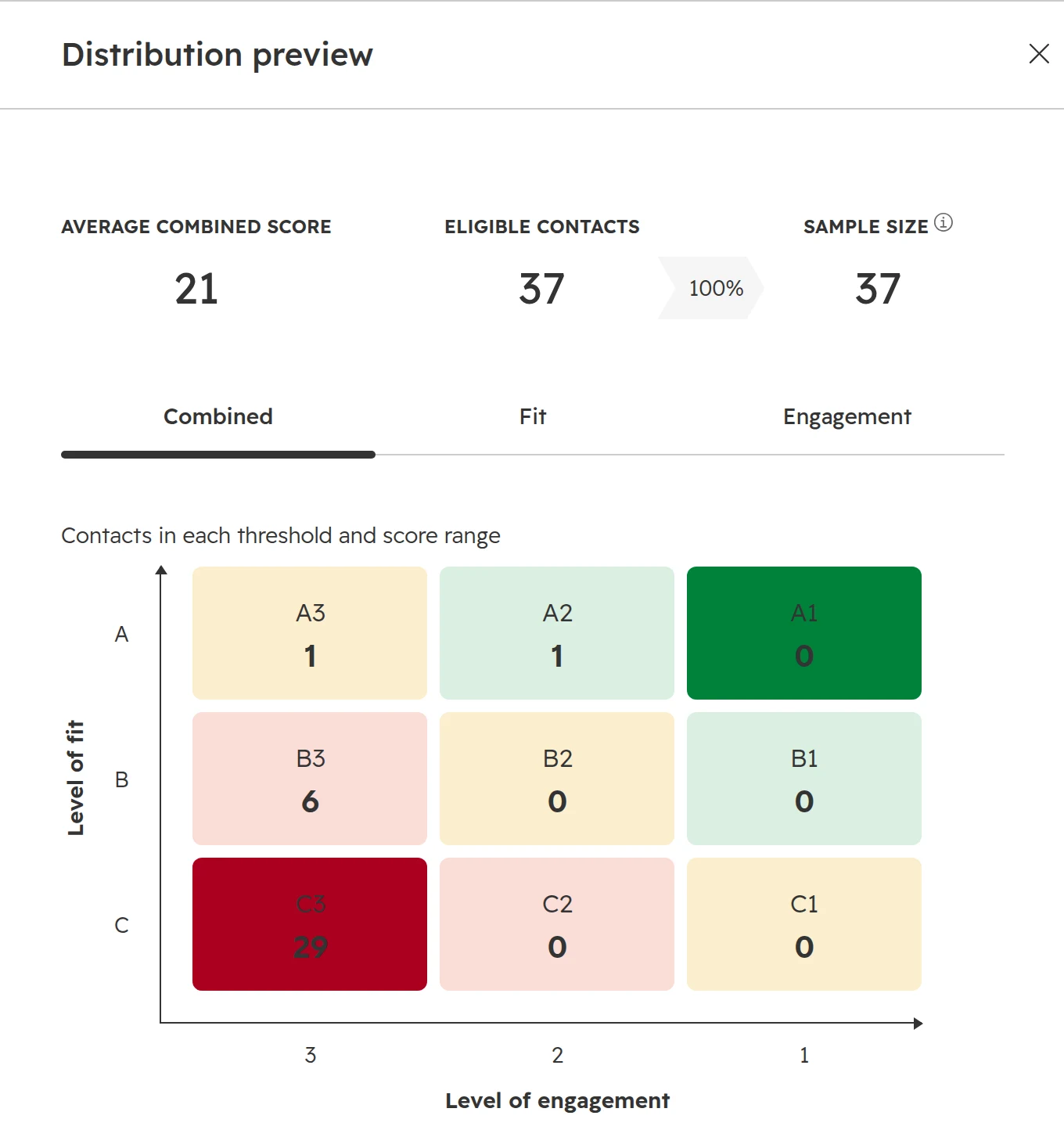
Click Test a contact and check three people you know: a recent customer, a poor fit and someone active but unsuitable. Then click Preview distribution. If more than about a fifth of your contacts would land in A1, A2 or B1, raise the thresholds.The distribution preview before the score goes live. In a real portal, look at how many contacts land in A1, A2 and B1.
Step 07
Turn it on
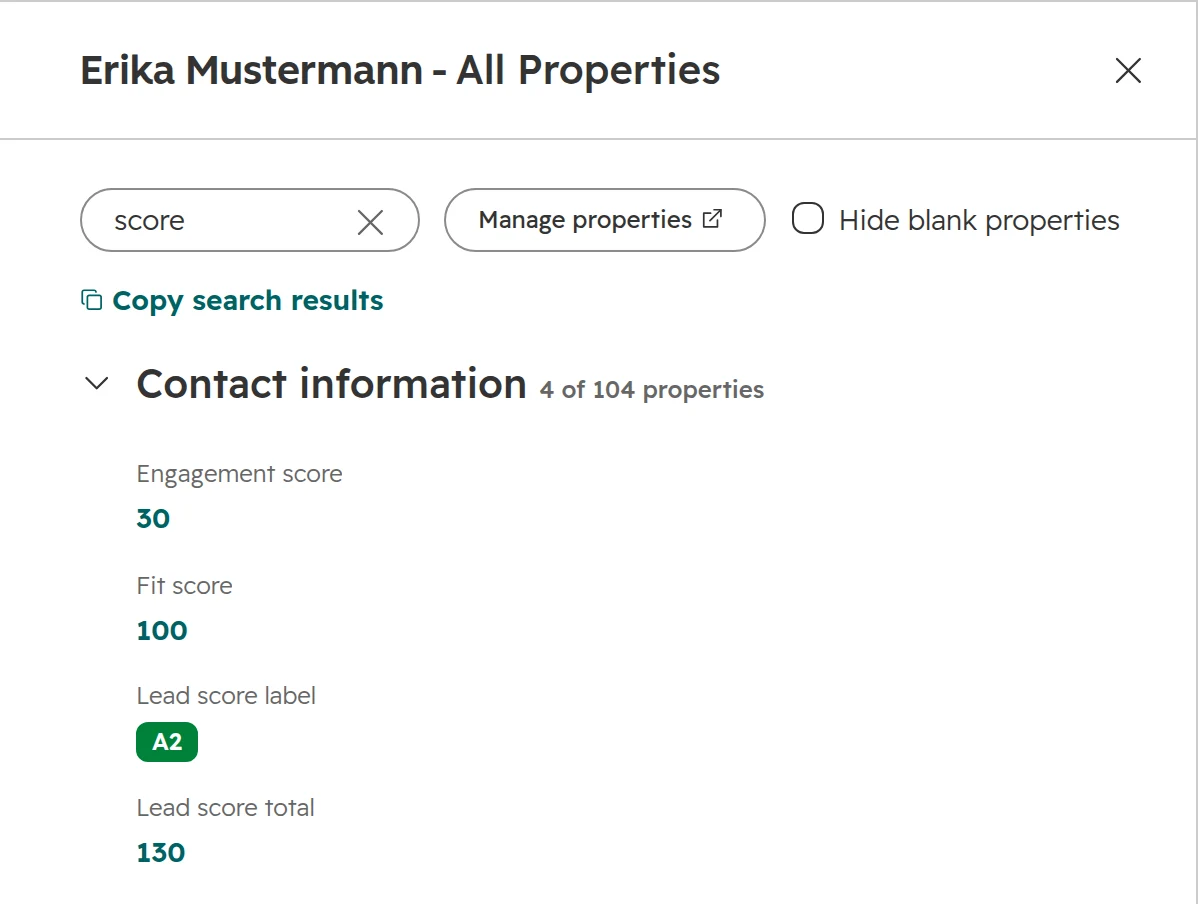
Click Review and turn on. HubSpot scores every contact straight away, including their past activity, which can take up to 30 minutes. Turn on the hand-off workflow only after that, as described below.A contact after the score has run: fit 100, engagement 30 from a booked meeting, label A2.
The score threshold that hands a lead to sales
The hand-off workflow turns a score into work: it marks the lead as qualified, gives it an owner and creates a task. Without it, the score is a number on a record that nobody acts on. Build it like this.
Step 01
Trigger on the label, and only for leads
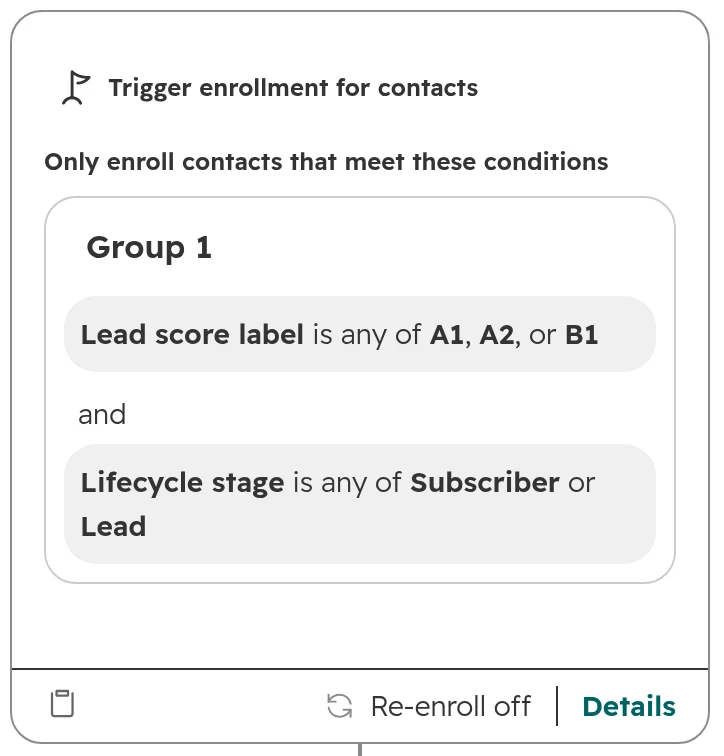
Enrol contacts when the score’s label property is any of A1, A2 or B1, and the lifecycle stage is Subscriber or Lead. Changing a threshold later then needs no change in the workflow. If “Set lifecycle stage when a deal is created” is switched on in your lifecycle settings, a contact with a deal is already an Opportunity, so this keeps open deals and customers out too.The trigger: the label from the score, limited to contacts who aren’t in sales yet. Re-enrolment stays off.
Step 02
Set the stage, the owner and a task
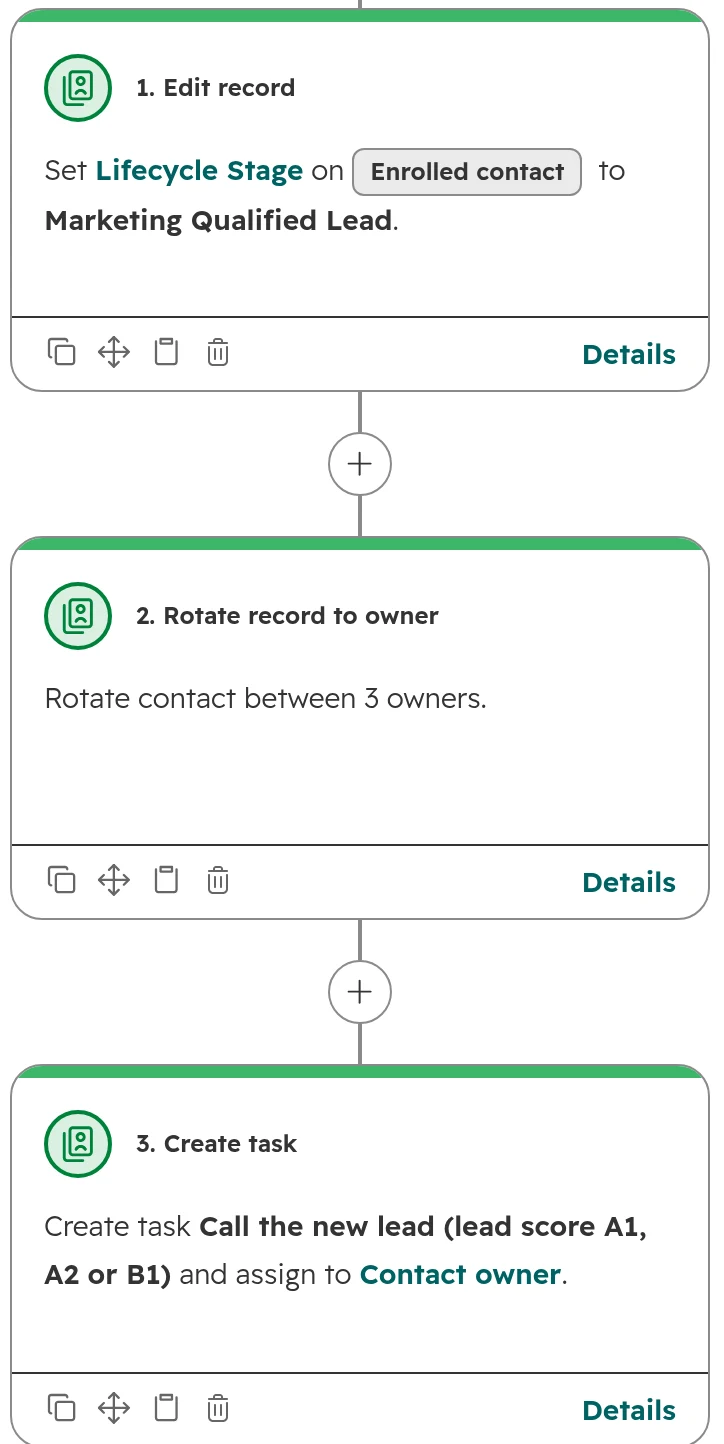
Set the lifecycle stage to Marketing Qualified Lead, assign an owner by rotation or territory, and create a call task due the next working day. Keep re-enrolment off, so a lead is handed over once.Three actions: the stage, an owner from the rotation, and a call task for that owner.
Step 03
Let sales answer
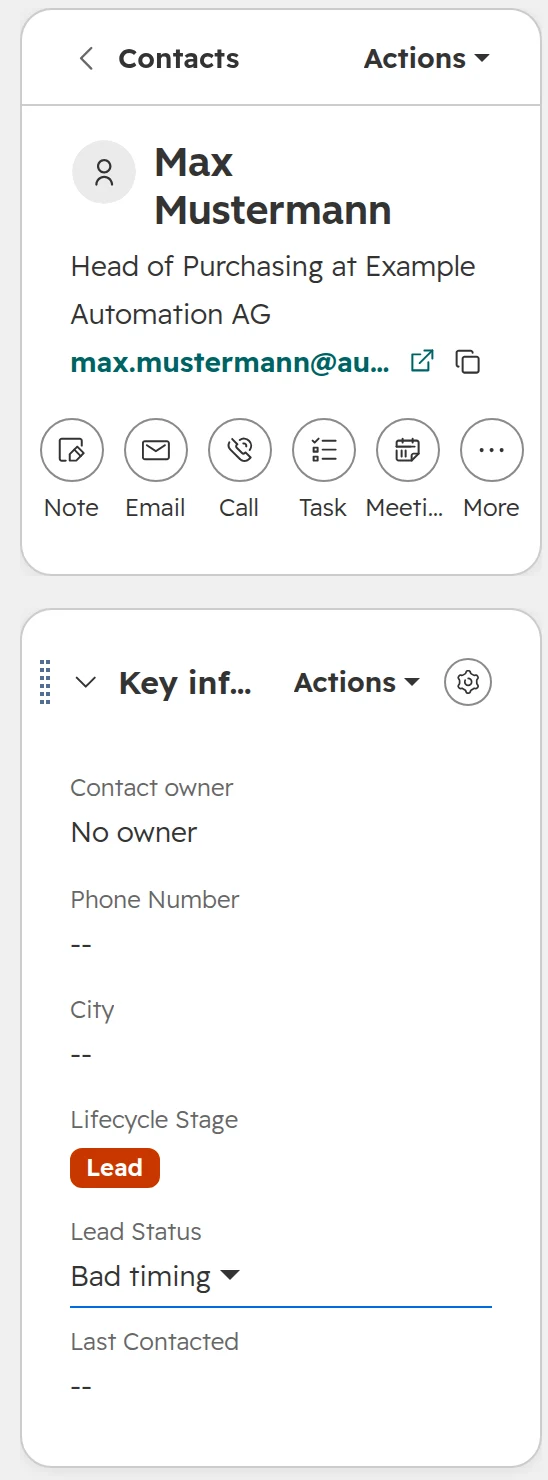
Sales accepts the lead and moves it to Sales Qualified Lead, or rejects it with a lead status such as Unqualified or Bad timing. The accepted and rejected leads are what you tune the points with in the monthly review.A lead sales didn’t take on: the stage stays Lead, the lead status says why.
Score decay: how fast engagement points should fade
Without decay, a contact who was busy two years ago stays a hot lead forever. Decay takes a share of each event’s points away at a fixed interval: 1, 3, 6 or 12 months. It runs in straight steps, so 50% every month takes 10 points to 5 after one month and to 0 after two.
Signal
Our setting
Why
Demo request, meeting, pricing page
50% every 3 months
Strong signals stay relevant for a quarter, about one B2B buying cycle
Downloads, webinars, email clicks
50% every month
Light interest is gone within two months
Fit properties
No decay
HubSpot can’t decay property rules. Keep the data current instead
Match the interval to your sales cycle. If your deals take nine months, three months is too fast for the buying signals. Decay doesn’t work on segment membership rules: use a date filter inside the segment instead.
Lead scoring mistakes that make sales ignore the score
Scoring email opens. Apple Mail and many company security filters open emails automatically. Opens tell you almost nothing, so score clicks, form submissions and meetings instead.
Points nobody agreed. Marketing sets the points, sales doesn’t trust them and goes back to gut feeling. Build the model with two or three of your best reps, from deals they actually won.
Too many rules. Forty rules nobody can explain. A rep should be able to say why a lead is A1 in one sentence. The Lead score card on the record shows the history, but only for a model people understand.
One score for everything. A single number mixes the right customer with the busy browser. Keep fit and engagement apart, at least until the team trusts both.
The old score still runs. HubSpot stopped updating the old score properties, such as HubSpot Score, on 31 August 2025. Workflows and lists that still use them work with frozen numbers. Find them under Settings > Properties, field type Score, in the Used in column.
Scoring empty data. If half your companies have no industry or size, the fit score mostly measures your data entry. Fill the core company properties first, and clean up duplicates, because each duplicate collects its own points.
Never reviewing it. Compare the score with won and lost deals every month for the first three months, then every quarter. Change the model once a month at most, so you can see what each change did.
Lead scoring in Germany, Austria and Switzerland
The cookie banner hides page visits. With an opt-in cookie banner, HubSpot sets no tracking cookies until the visitor accepts. Page visits before consent, and from everyone who declines, never reach the contact. Give page visits few points and weight forms and meetings more.
Free mail domains. GMX, web.de and t-online.de are as common here as Gmail. Subtract points for them only if you sell to companies with their own domain. Owners of small businesses often use them for work.
Job titles in two languages. Your contacts write Geschäftsführer, Managing Director, GF or Inhaber. “Contains Geschäftsführer” also catches Geschäftsführerin. Better still: a dropdown for the role in your forms, so the rule doesn’t depend on spelling.
Lead scoring is profiling under the GDPR.Article 4(4) GDPR counts the evaluation of a person’s interests and behaviour as profiling. Mention it in your privacy policy, and stop scoring a person who objects to direct marketing, as Article 21(2) allows. As long as a person decides what happens with a lead, the stricter rules for decisions made only by machines don’t apply.
What HubSpot lead scoring can’t do, and what you do instead
Limit
What it means
Way out
Plans and objects
No scoring tool in Free and Starter. Sales Hub alone scores companies and deals, not contacts.
With Sales Hub only, score the company and show it on the contact
Number of scores
5 in Professional, 50 in Marketing Hub Enterprise, 10 in Sales Hub Enterprise.
One combined score per product or region, not one per campaign
Calls
Only calls made through HubSpot’s own calling count as call events.
Score meetings, or log calls from your phone system through HubSpot calling
Decay
Only on events, in fixed steps of 1, 3, 6 or 12 months, not on segment membership.
A date filter in the segment, for example a form in the last 30 days
Lifecycle stage
A falling score doesn’t move the lifecycle stage back.
A lead status such as Bad timing, or a workflow that clears the stage first
AI scores
Need Marketing Hub Enterprise and at least 50 contacts, 25 that converted and 25 that didn’t.
Use “Discover rules” in Professional, then decide the points yourself
We don’t start in the scoring tool. We start with the deals you won and lost, because the model has to explain them.
Step 01
Look back
Twelve months of won and lost deals: which companies, which roles, which first contact, how long they took. That is the draft of the fit score.
Step 02
Agree the hand-off
Thresholds, what each label triggers and how quickly sales follows up, agreed with marketing and the head of sales in one meeting.
Step 03
Build and test
The score, the properties it needs, the hand-off workflow, a view for sales and a report of MQLs by label, tested on real contacts before anything goes live.
Step 04
Tune it with sales
A short review every month for the first quarter: rejected leads, deals that came from low scores, and one change at a time.
Frequently asked questions
What is lead scoring?
Lead scoring ranks leads by how likely they are to buy. Points for who a lead is (fit) and what they do (engagement) add up to a score, and a threshold decides which leads go to sales.
How is the lead score calculated in HubSpot?
HubSpot adds the points of every rule a record meets, group by group. Each group can have its own limit, and the whole score has a limit, by default −100 to 100. Engagement points can fade over time. A combined score keeps a fit score, an engagement score and their total.
Is lead scoring available in HubSpot Starter?
No. The lead scoring tool is in Marketing Hub and Sales Hub Professional and Enterprise. In Starter you can sort leads by hand with properties and views.
What is a good lead score threshold?
One that sends sales about as many leads as they can call within a working day. Start with the labels A1, A2 and B1 and check the distribution preview before you turn the score on. Adjust after a month, based on the leads sales rejected.
What happened to the old HubSpot score?
HubSpot stopped updating the old score properties on 31 August 2025 and didn’t move them to the new tool. Workflows, lists and reports that still use them work with frozen values and need a new score.
What is the difference between a fit score and an engagement score?
A fit score rates properties such as industry, company size and job title. An engagement score rates actions such as form submissions, meetings and page visits. Fit says whether you want the customer, engagement says whether they’re interested now.
Should email opens count in lead scoring?
No. Apple Mail and security filters open many emails automatically, so opens don’t show real interest. Score clicks, form submissions and meetings instead.
Does HubSpot still have predictive lead scoring?
No. The old predictive and manual scores are retired, and the old score properties stopped updating on 31 August 2025. The new tool has AI scores in Marketing Hub Enterprise, which need at least 50 contacts: 25 that converted and 25 that didn’t. In Professional, “Discover rules” suggests events to score, and you decide the points.
Can HubSpot score companies and deals, not just contacts?
Yes. Contact scores need Marketing Hub, company scores work in Marketing Hub or Sales Hub, and deal scores need Sales Hub, each in Professional or Enterprise. A deal score is always a combined score.
How fast should engagement points decay?
Buying signals such as a demo request, a meeting or a pricing page visit: 50% every 3 months. Light signals such as downloads, webinars and email clicks: 50% every month. Match it to your sales cycle: with nine-month deals, three months is too fast for the buying signals.
What does the GDPR say about lead scoring?
Lead scoring is profiling under Article 4(4) GDPR. Mention it in your privacy policy, and stop scoring a person who objects to direct marketing, as Article 21(2) allows. As long as a person decides what happens with a lead, the stricter rules for decisions made only by machines don’t apply.
A score your sales team acts on
We check your fit criteria, engagement signals and hand-off live in your portal. You keep the findings, whether we work together or not.