HubSpot API: what you can build, what it takes to run, and how to brief it
The routes to connect HubSpot with your ERP, shop or own tools, the limits and 2026 changes that decide the build, and a checklist for briefing a developer.
Updated · 14 minutes·By Matthew Labrooy, Managing Director
The HubSpot API lets your other systems read and write HubSpot data, and lets HubSpot tell them when something changes. Every HubSpot plan has it, including the free CRM, and API calls cost no extra fee. What your plan decides is how many calls you get, which objects you can reach and whether workflows can run code.
Build on the API only for a job that an app from the HubSpot Marketplace or a tool like Make or Zapier can’t do. Then decide who owns the code, because HubSpot releases a new API version every March and September, and older versions stop being supported in 2027.
Access
A service key for simple data jobs, an app built as a HubSpot project for webhooks or cards. New legacy private apps can’t be created after 26 October 2026
Limits
190 calls per 10 seconds on Professional and Enterprise. 625,000 calls a day on Professional, 1,000,000 on Enterprise, 250,000 on Free and Starter
Batch
Up to 100 records per call, so a daily limit covers millions of record changes
Editions
CRM data on every plan. Custom objects Enterprise. Code and webhooks inside workflows need Data Hub Professional
Versions
Dated versions since March 2026, now 2026-09. v4 unsupported from 30 March 2027, v1 to v3 and legacy apps from September 2027
Owner
Every integration needs a named person who reads its error log and HubSpot’s developer changelog
What is the HubSpot API?
The HubSpot API is how other software talks to your HubSpot account without a person clicking. The API works in three directions, and most projects need more than one.
Direction
What happens
Typical use
Your system calls HubSpot
Reads, creates or updates contacts, companies, deals, tickets and other records
Your ERP sends customer numbers and open items, your shop creates contacts and orders
HubSpot calls your system
A webhook sends a message the moment something changes
A deal is won, and the ERP gets the order within seconds
Your code runs inside HubSpot
A workflow runs a few lines of code, or a card on the record shows data from elsewhere
Check the ERP customer number before a deal can go to the ERP, show credit limit and overdue amount on the company
As of October 2026.
The API is a set of web addresses at api.hubapi.com, one family per object, with the data as JSON. A developer needs an access key with the right permissions (HubSpot calls them scopes), the documentation at developers.hubspot.com and a test account. HubSpot gives developers free test accounts with a 90-day trial of many Enterprise features.
The HubSpot MCP server is a different thing: it lets AI assistants such as ChatGPT or Claude work in HubSpot, and our HubSpot MCP guide covers it. Apps in the HubSpot Marketplace use the API too, but someone else builds and runs them.
What can you build with the HubSpot API?
The HubSpot API can move almost any data in or out of HubSpot. These are the jobs companies ask for most, and the part of HubSpot each one uses.
Job
Example
Built with
Sync with the ERP
Customer numbers, prices, open items and order status into HubSpot, won deals out as orders
CRM APIs, batch calls, webhooks or a workflow action for the push
Orders from a shop or portal
Each order creates or updates the contact, company and an order record
CRM APIs for contacts, companies and orders, with an ID from the shop as the key
Data from other systems on the record
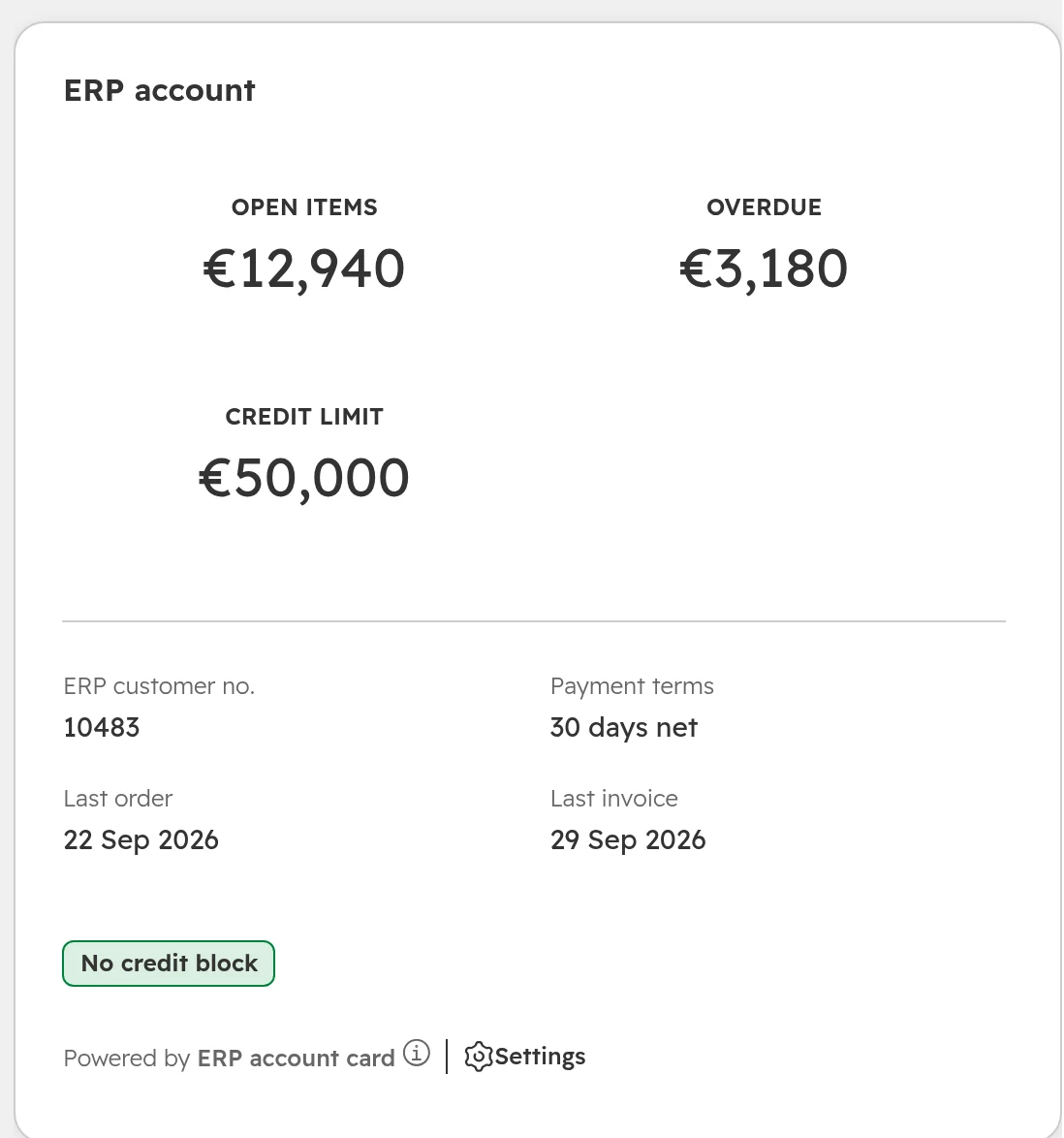
Credit limit, overdue amount and last invoice on the company, without copying every invoice
An app card on the record page
Your own record types
Machines, contracts or sites with their own fields and links
Custom objects API (Enterprise)
Reporting outside HubSpot
Deals and their contacts in Power BI or a data warehouse
Exports API for large reads, associations for the links between records
Steps HubSpot can’t do itself
Check a number in another system, calculate a value, format a field
A custom code action in a workflow (Data Hub Professional)
Conversation data
Full chat and email threads for analysis or archiving
Conversations API, generally available since September 2026
As of October 2026.
The ERP guide covers which ERP data to bring in and who owns each field.
What the API won’t do for you
Undo. There is no rollback. If an integration writes wrong values to 20,000 contacts, you repair them from property history or an export. Test on a copy first.
Skip your edition. An API for a feature your subscription lacks, such as custom objects below Enterprise, answers with an error.
Bypass your rules. Since API version 2026-09, conditional required properties and required fields on record creation also apply to API writes. A call without them fails.
Match records for you. The API writes what it’s sent. Duplicates come from integrations that create instead of looking up first; our duplicates guide shows the rules that stop them.
Everything you can click. A few settings still have no endpoint. Pipeline rules and object tags only got one in September 2026. Check the API reference before you plan a feature on it.
Which HubSpot integration route fits: marketplace app, Make or Zapier, workflow code or your own code
Choose the route by the job, then by who will look after it. Your own code comes last, because you carry its upkeep for as long as it runs.
Route
Fits when
Breaks when
Who maintains it
An app from the HubSpot Marketplace
It covers your system and the objects you need. Many ERPs, shops and phone systems have one
Your system is customised, or you need your own matching and logic
The vendor, on a subscription
Make, Zapier or n8n
A few clear triggers, such as a form to Slack or a won deal to a sheet, in modest volumes
Flows multiply without alerts, or a tool built for triggers is asked to keep two databases in step
Your team or your partner
A custom code action in a workflow
One step HubSpot can’t do, short and on records already in a workflow
The job takes longer than 20 seconds, or the logic grows into a sync
Whoever owns the workflow, with the code kept outside HubSpot
Your own integration on the API
Volumes in the hundreds of thousands, your own matching keys, systems on your own servers, or a card on the record
Nobody owns it after go-live
Your developer or your partner, with a named owner
As of October 2026.
Many teams start with Make or Zapier and stay there for years, which is fine for simple flows. When an integration has to keep HubSpot and another system in step both ways, or carry large volumes, move it to a sync app or your own code before the flows multiply.
HubSpot API access: service keys, apps and the end of legacy private apps
Every API call carries an access key. Since September 2026 there are three current ways to get one, and the one most guides still describe, the private app, is being retired.
Access
Use it for
Can do
Can’t do
Service key
An internal sync, a script or a tool like Make on your own account
API calls with the scopes you tick, a call log, rotation with seven days’ overlap
Webhooks, cards or anything beyond API calls. Public beta as of October 2026
App built as a HubSpot project, static token
Your own integration in one account that also needs webhooks or a card
API calls, webhooks, app cards and pages, workflow actions
Install in more than one standard account
App built as a HubSpot project, OAuth
An integration you install in several accounts or list in the marketplace
Everything above, per installing account
Run without a server that handles the OAuth sign-in
Legacy private app
Existing integrations only
Keeps working for now
New ones can’t be created after 26 October 2026; support ends September 2027
As of October 2026. Accounts created from 28 September 2026 can’t create legacy private apps at all.
Give each key only the scopes its job needs. A sync that reads companies and deals gets read scopes for companies and deals, nothing else. A leaked read-only key can’t change your data, and a wrong write is refused.
Step 01
Create a service key
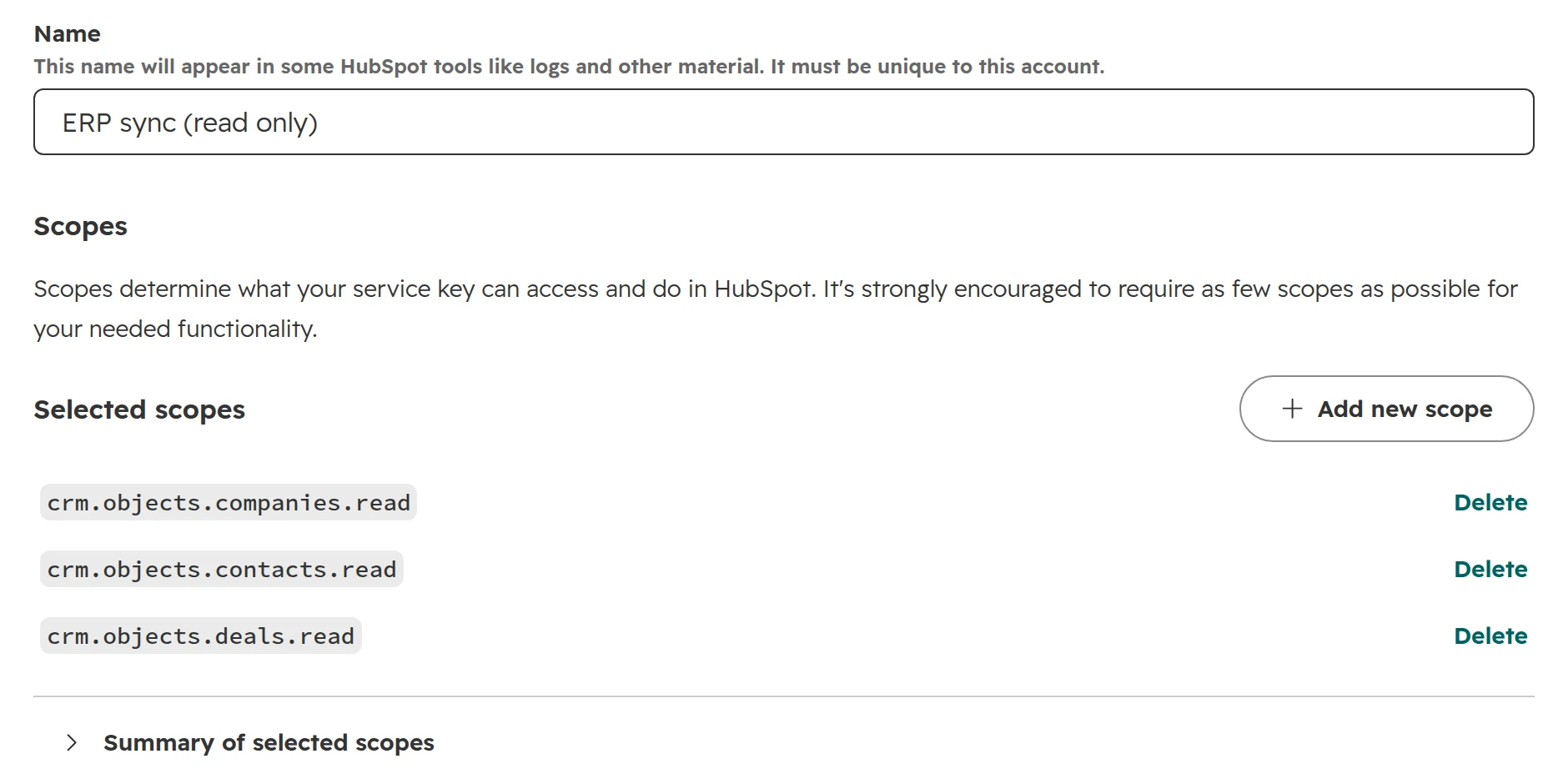
Go to Development > Keys > Service Keys and click “Create service key”. Name it after the job and the system, such as “ERP sync (read only)”, because the name shows in logs. Only Super Admins and users with the Developer tools access permission can create one.A service key named after its job, with three read scopes.
Step 02
Tick only the scopes the job needs
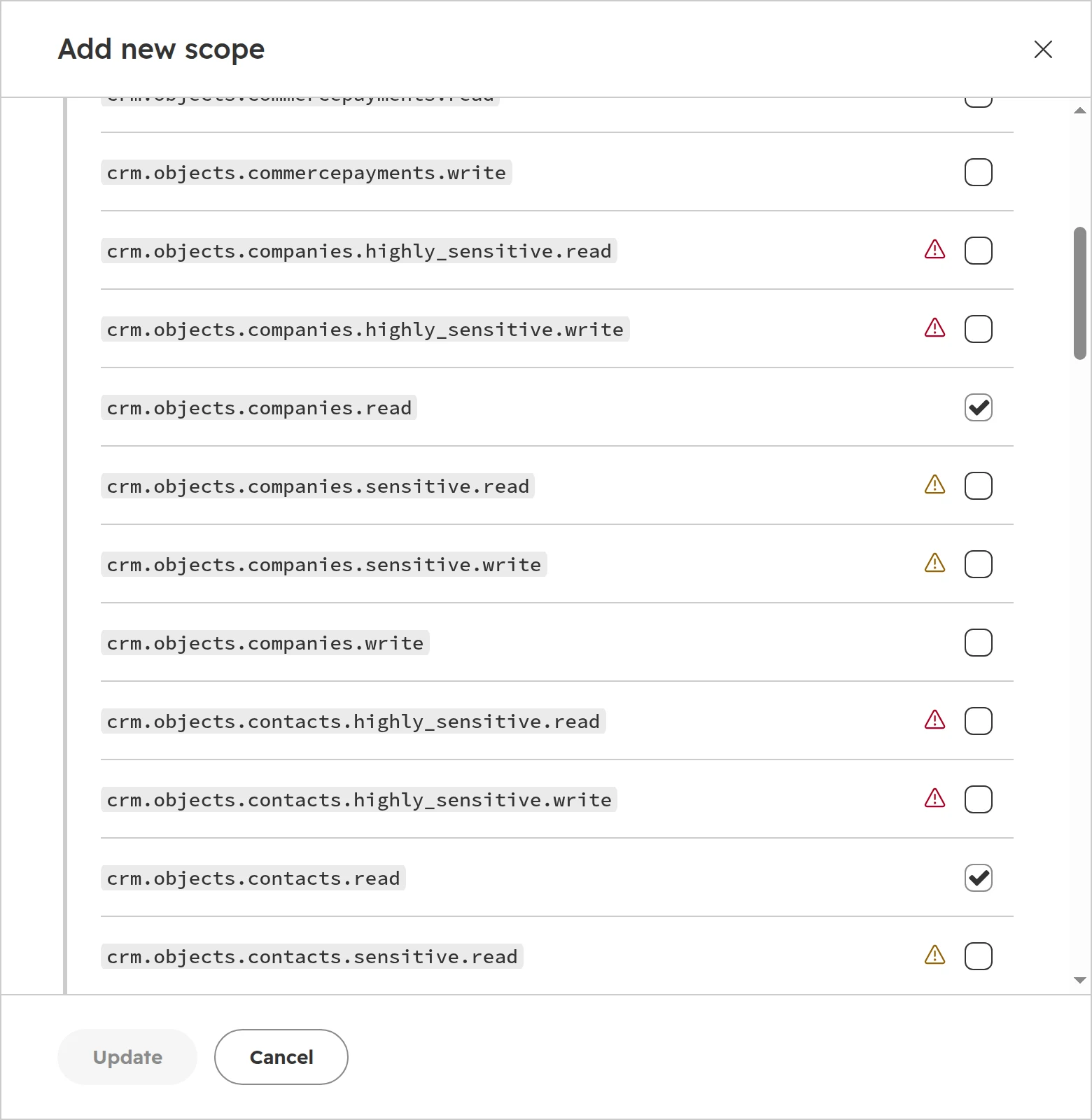
Click “Add new scope”, search for the object and tick the read or write scope. Scopes with a warning sign reach sensitive or highly sensitive data; leave them off unless the job needs exactly that data.Read scopes ticked, sensitive scopes left off.
Step 03
Hand the key over safely
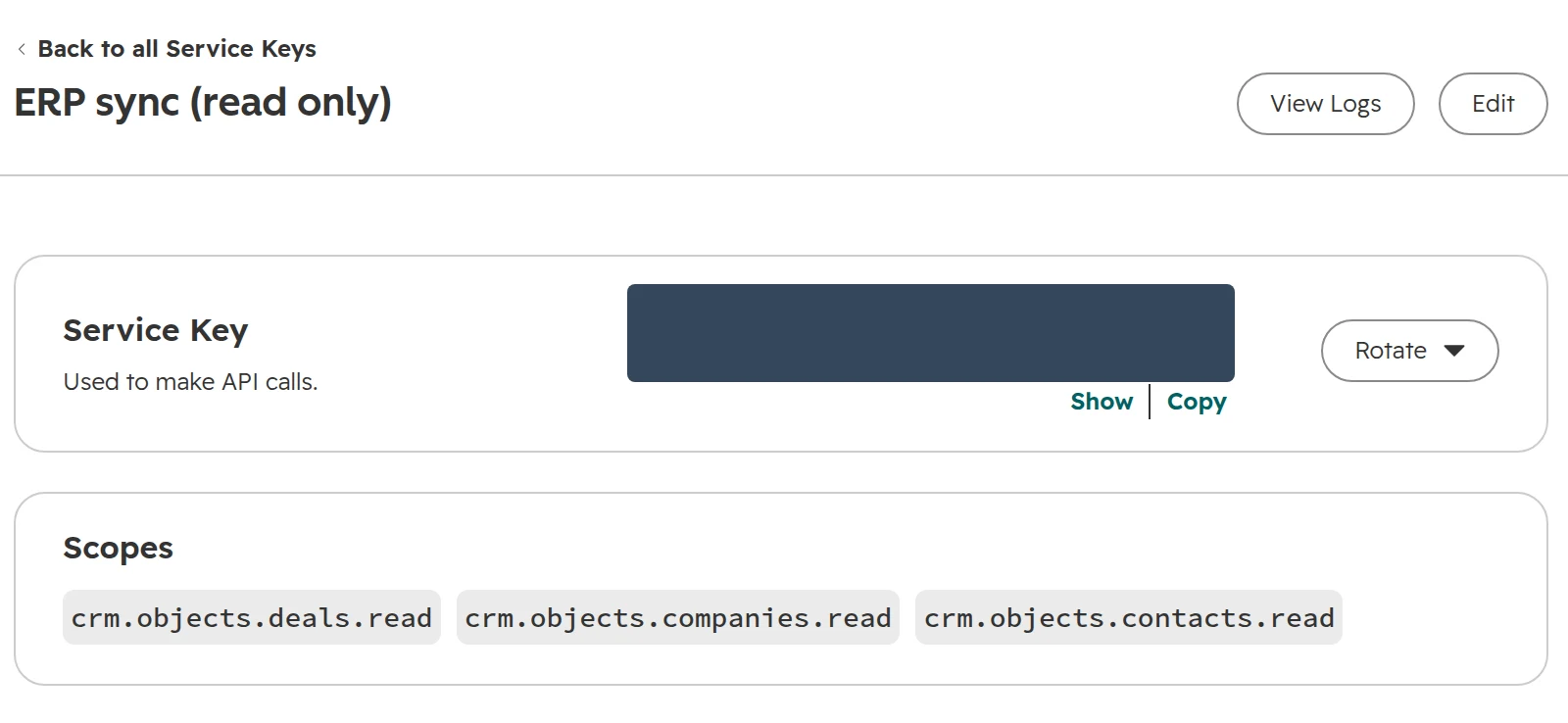
Click Create. The key is hidden until someone clicks Show, and only admins see it. Give it to your developer through a password manager, never by email or chat. Plan a rotation every six months: “Rotate and expire later” gives seven days to switch.The key page: rotate here, and check which scopes the key holds.
Step 04
Read the call log
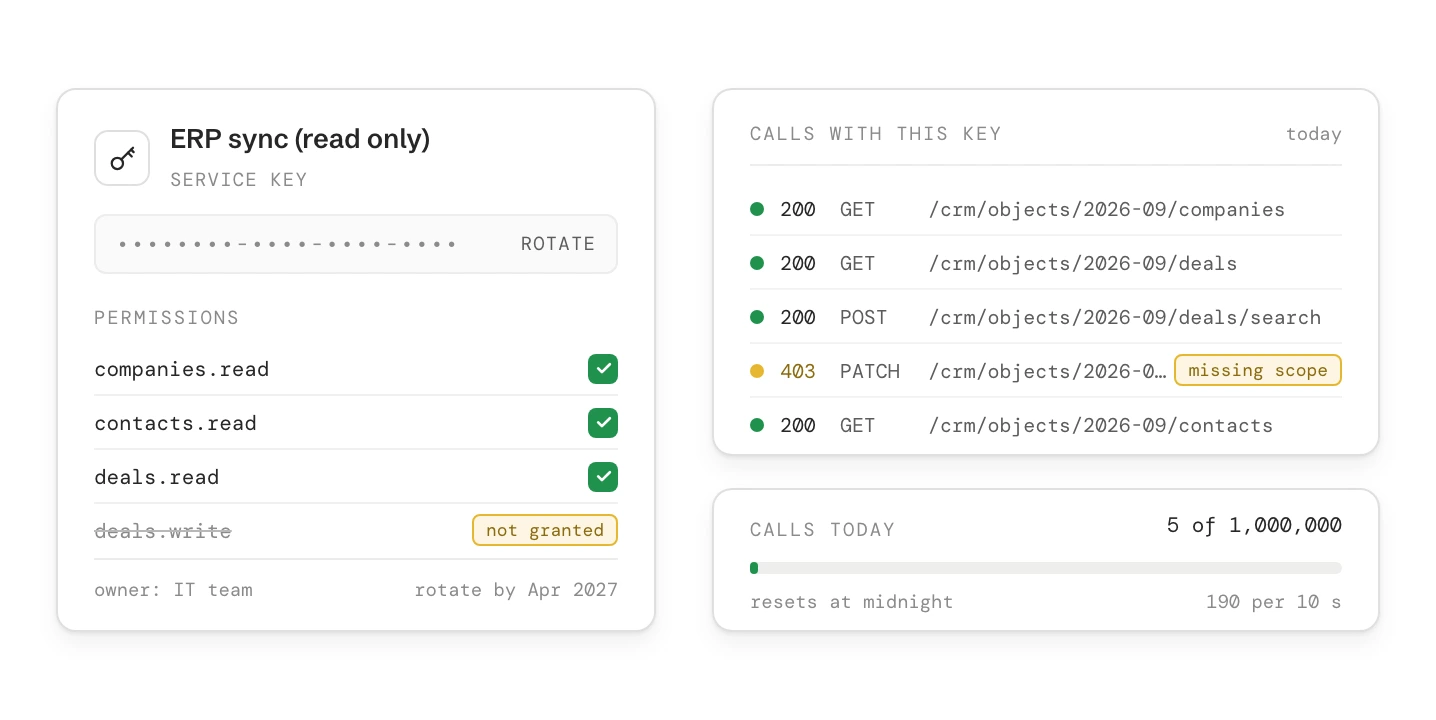
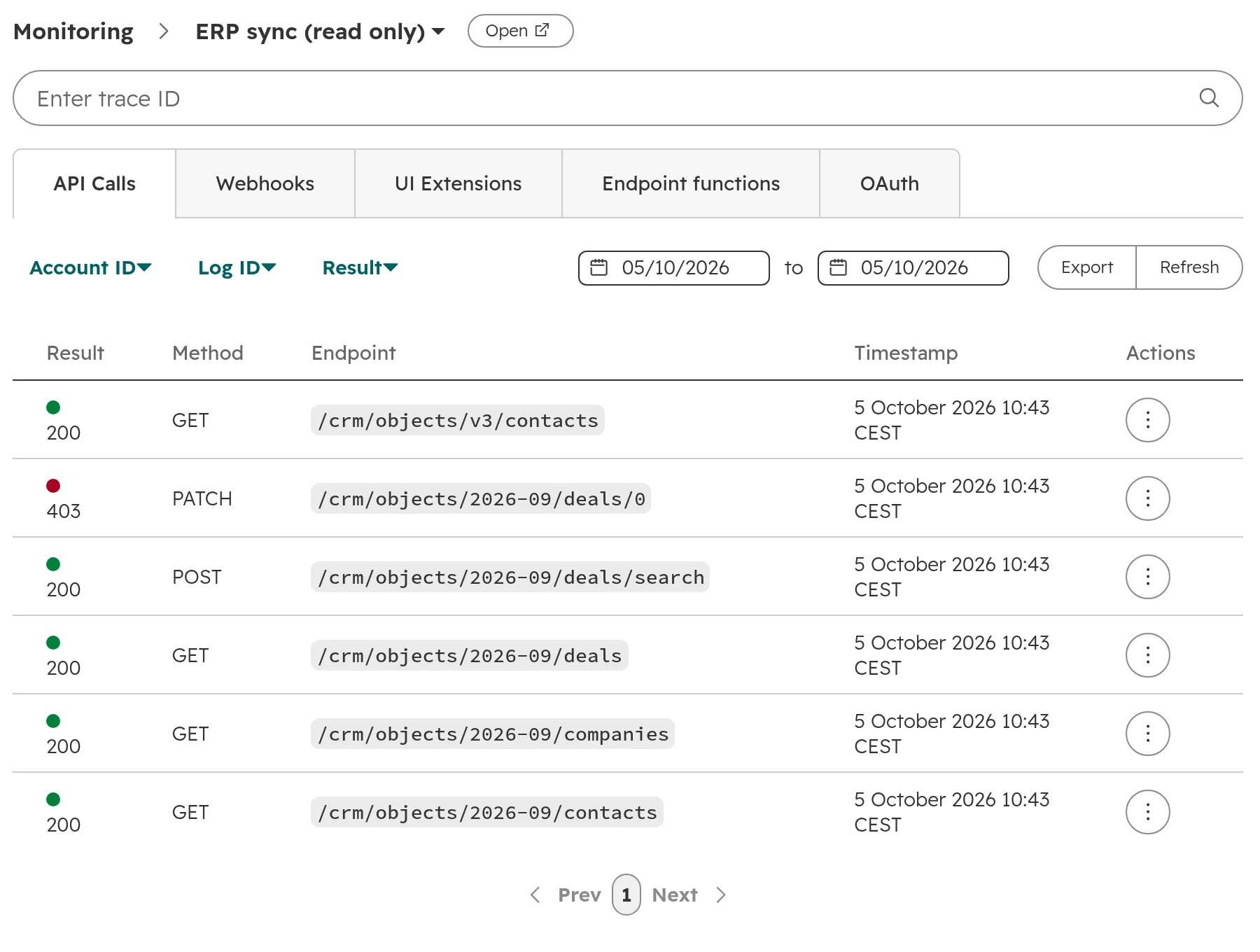
Click View Logs. Each call shows its result, method and address for the past 30 days. A 403 means the key lacks a scope; here a write was refused because the key can only read. HubSpot stores no request content for successful calls, so log what you send in your own system.A read-only key at work: five reads succeed, one write is refused.
Step 05
Watch the daily usage
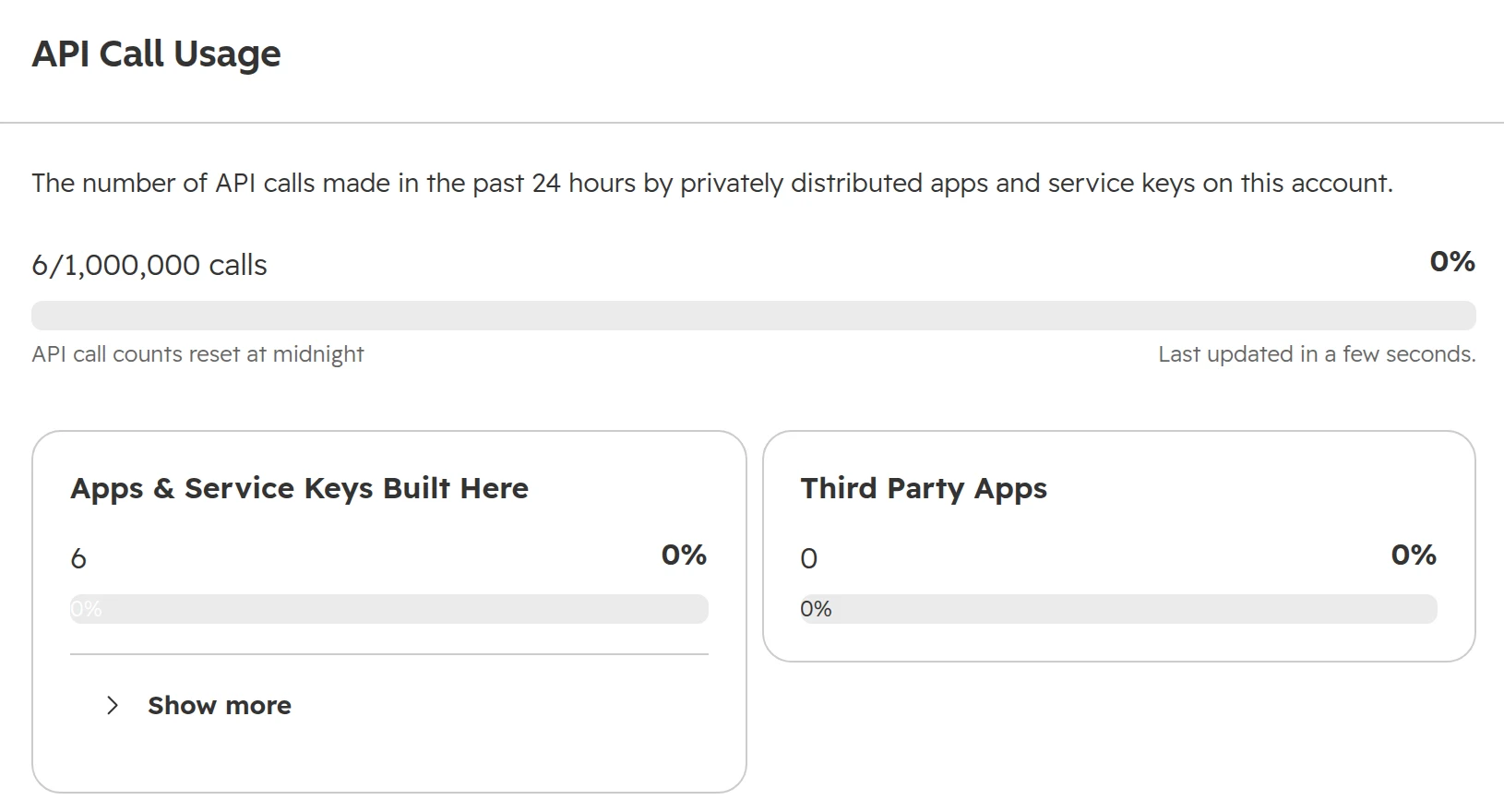
Under Development > Monitoring > API Call Usage you see the calls of the last 24 hours against your daily limit, split into apps built in your account and third-party apps. All your private apps and keys share one daily limit.Usage against the daily limit, here on an Enterprise account.
HubSpot API rate limits by edition
HubSpot’s usage guidelines limit calls per 10 seconds for each app and per day for the whole account. The day resets at midnight in the time zone set in your account. Over the limit, calls fail with error 429 until the window passes.
Edition
Per 10 seconds, per app
Per day, per account
With batch calls of 100 records
Free and Starter
100
250,000
Up to 25 million record reads or writes a day
Professional
190
625,000
Up to 62.5 million
Enterprise
190
1,000,000
Up to 100 million
Any edition with the API limit increase add-on
250
+1,000,000 per add-on, at most two
Up to 100 million more per add-on
App from the marketplace (OAuth)
110 per installing account
Not in HubSpot’s table
Set by the app’s vendor
As of October 2026, for apps installed in one account and service keys. The highest edition in the account counts.
The daily limit is rarely the problem. The usual causes of 429 errors are integrations that update one record per call, read every record again each night instead of only the changed ones, or lean on search.
Search has its own limit: five requests per second per account, 200 records per page and 10,000 results per query. A sync that finds every record by search hits it first.
Batch everything: create, update and read up to 100 records per call.
Read only what changed: filter by last modified date, or let webhooks tell you.
Large exports: the exports API returns a whole object in one file.
Webhooks sent by workflows don’t count against the API limit.
Which HubSpot APIs need which edition
Most CRM APIs work on every plan, the free CRM included. A few follow the feature they belong to.
App cards on records, webhook subscriptions in an app
Every plan
Workflows API
A Professional subscription with workflows
Leads, forecasts, sequences
Sales Hub Professional
Custom code and “Send a webhook” in workflows
Data Hub Professional or Enterprise
Custom objects and their schemas, custom events
An Enterprise subscription
Serverless functions in your own app
An Enterprise subscription
As of October 2026, from HubSpot’s list of APIs by tier and its feature pages.
The Data Hub guide covers what else Data Hub Professional brings and when it pays.
A webhook doesn’t need Data Hub. The workflow action “Send a webhook” does, but an app built as a HubSpot project can subscribe to record changes on any plan. The app route takes a developer; the workflow action takes a few clicks.
HubSpot webhooks and custom code: calling other systems from a workflow
With Data Hub Professional, a workflow can run your own JavaScript or Python and call any web address. Workflow code covers short checks and pushes without a server of your own. The example checks that a won deal’s company has an ERP customer number, then sends the deal to the ERP.
Step 01
Store the key as a secret
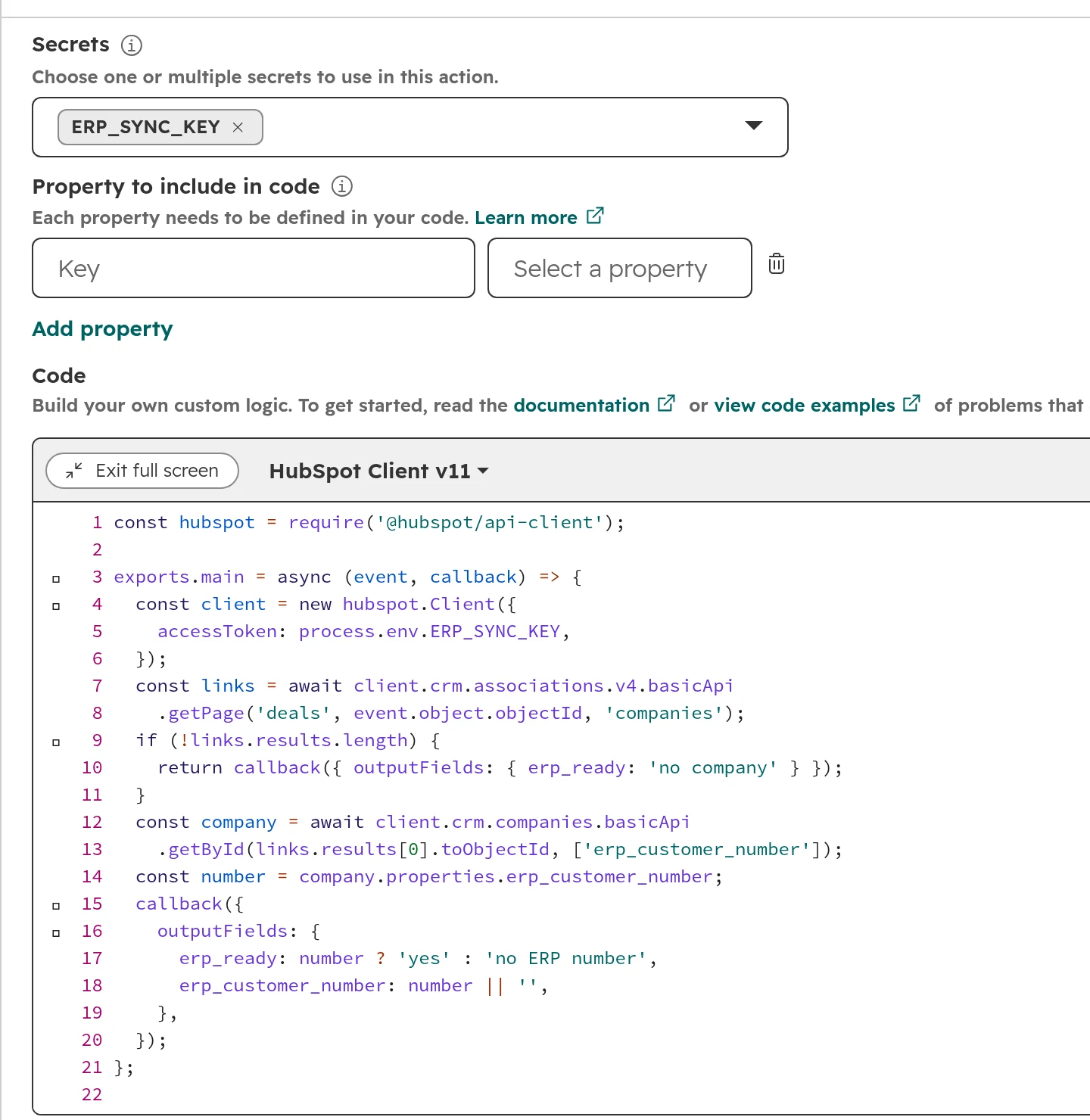
In the custom code action, click “Add secret” and paste the service key there. The code reads it as process.env and the key never appears in the code. All secrets of one action together may be up to 1,000 characters.The code uses the secret and returns two values for later steps.
Step 02
Return values for later steps
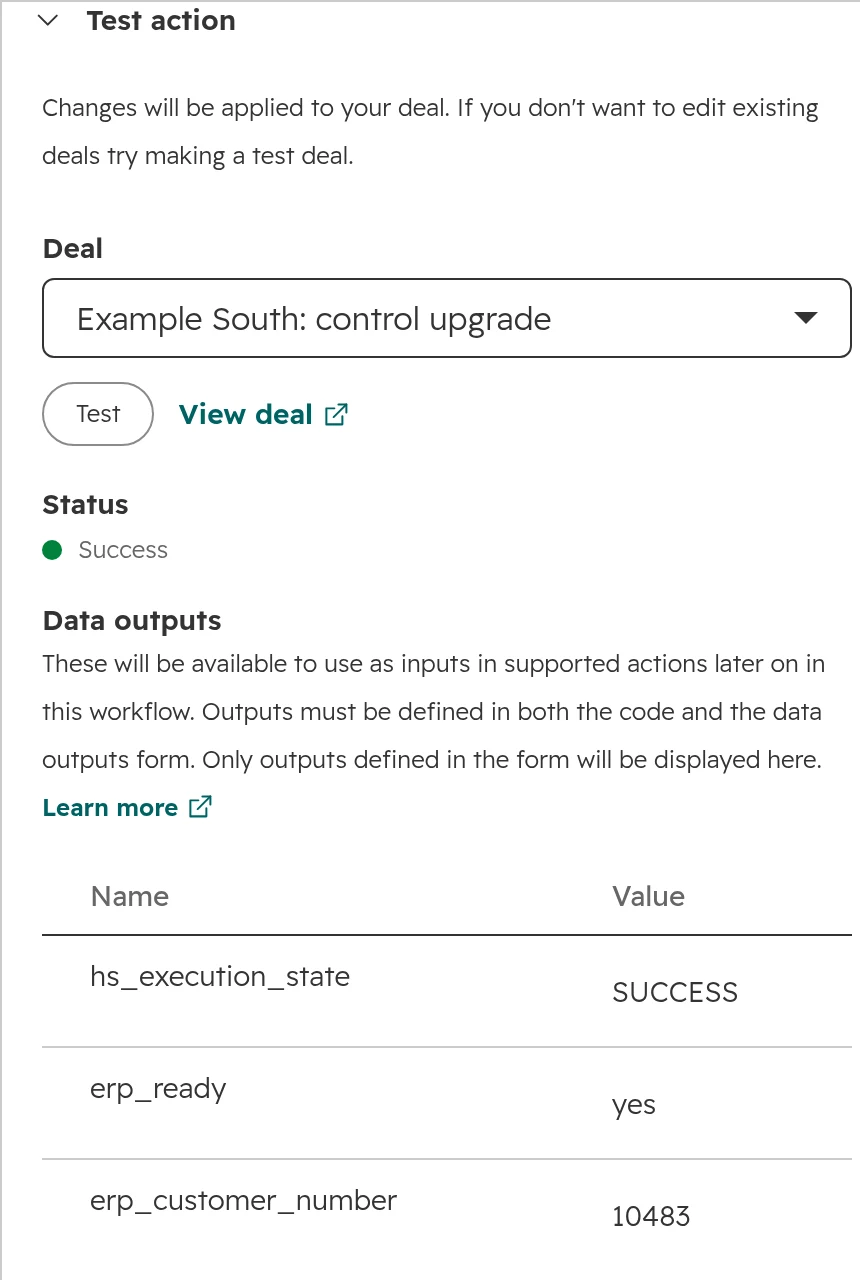
Define outputs, such as erp_ready and erp_customer_number. Later actions and branches use them, for example to stop a deal without an ERP number before it reaches the ERP.Test on a real record before switching the workflow on. Tests change the record.
Step 03
Send the deal with a webhook
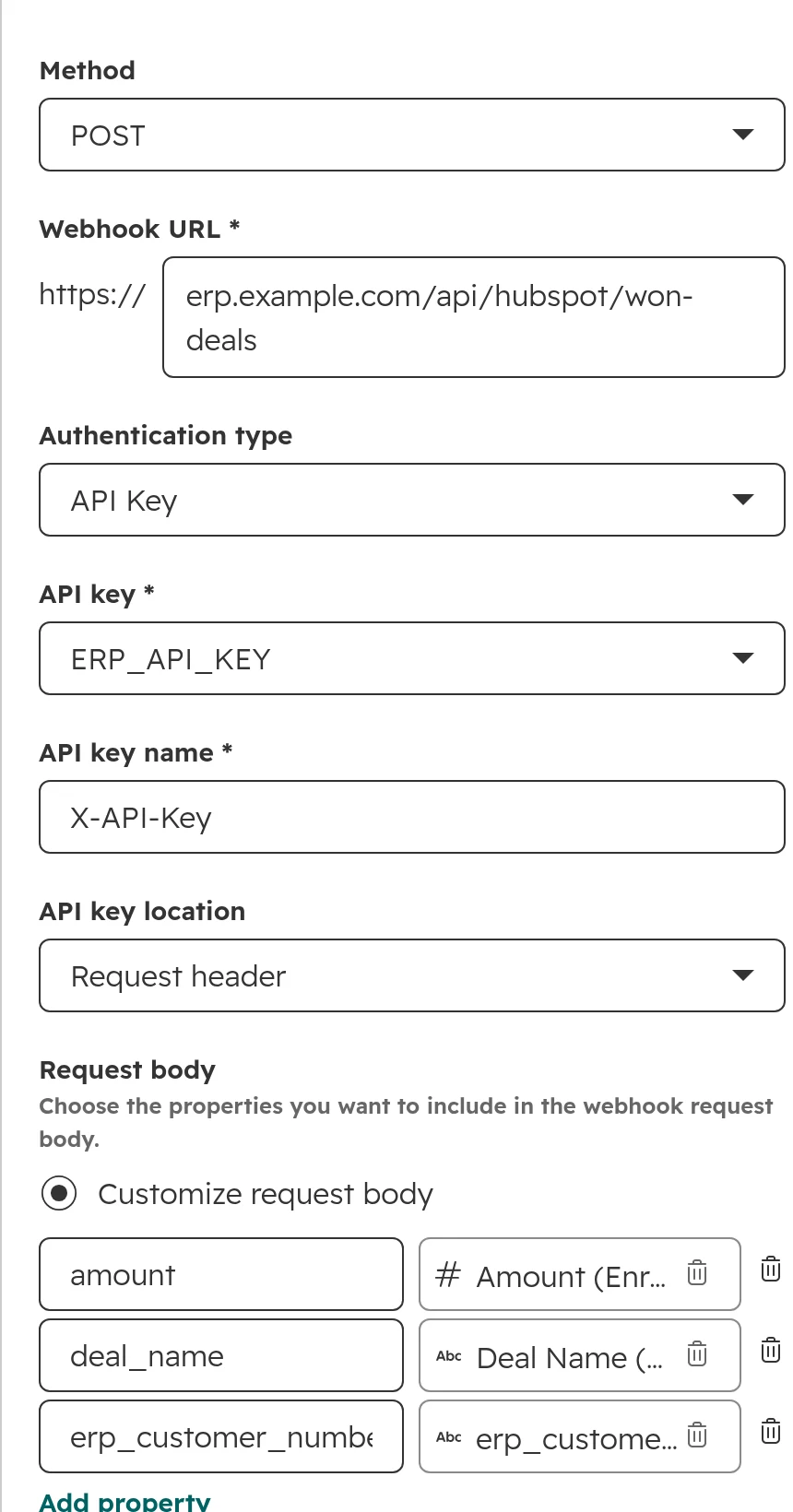
Add “Send a webhook”: method POST, the address your ERP listens on, an API key from a secret in the request header, and only the fields the ERP needs. HubSpot retries a failed call for up to three days.The body carries three named fields from the deal.
Limits to plan around
20 seconds and 128 MB per run. Nightly files and large jobs don’t belong here.
Rate errors retry for up to three days, but only if the code throws the error. Code that swallows it marks the run as done.
No version control. The code lives in the workflow. Keep the source in your Git repository, keep the action short and put the logic in a library you test there.
Every enrolment is a run. A workflow that enrols 50,000 records at once makes 50,000 runs and their API calls.
For sales automation without code, our sales workflows guide shows what standard workflows already do.
App cards: show data from other systems on the HubSpot record
An app card is a small screen your developer builds into the record page. The card shows data that lives elsewhere, so sales sees the credit limit or the last invoice without copying every invoice into HubSpot. App cards work on every plan.
Step 01
Build the app as a project
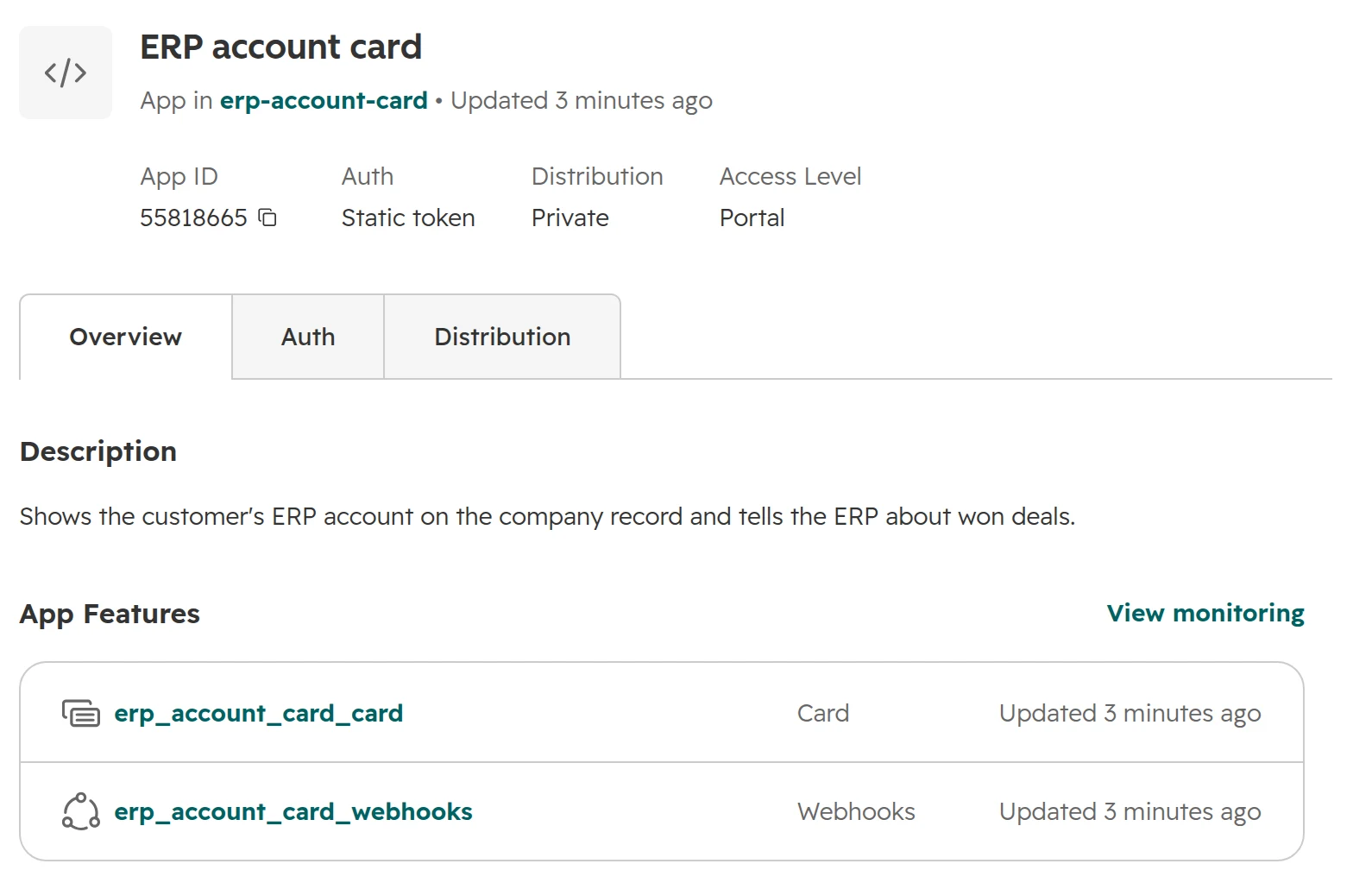
Your developer creates a project with the HubSpot command-line tool on platform version 2026.09, with a card and, if needed, webhook subscriptions. The project lists its parts and its build history under Development > Projects.One project: the app, its card and its webhook subscriptions.
Step 02
Install it in your account
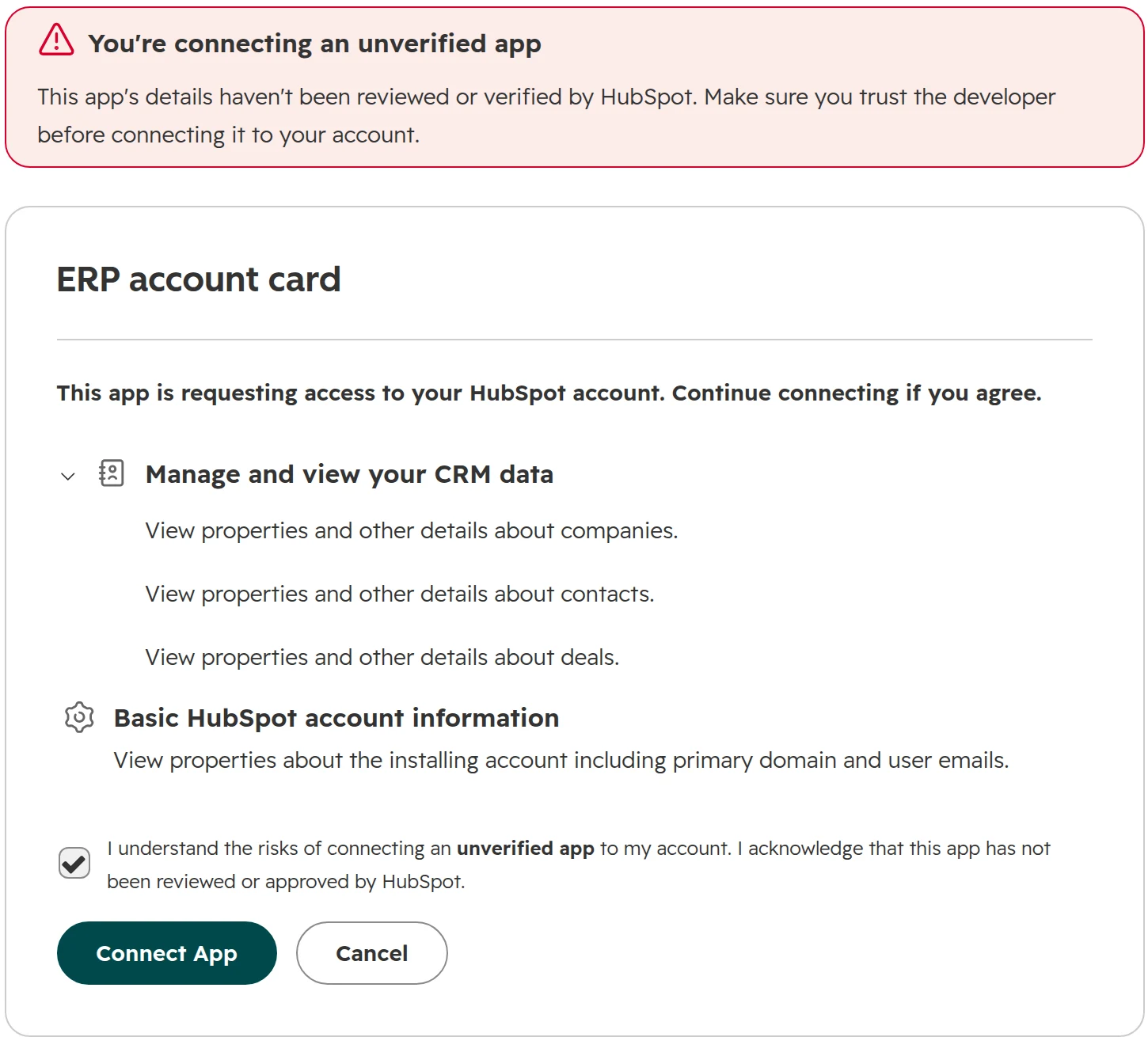
On the app’s Distribution tab, click “Install now”. HubSpot lists the scopes the app asks for and warns that the app isn’t verified, which is normal for your own app. Check the scopes before you tick the box.Read the scopes before installing your own app.
Step 03
Subscribe to the changes you need
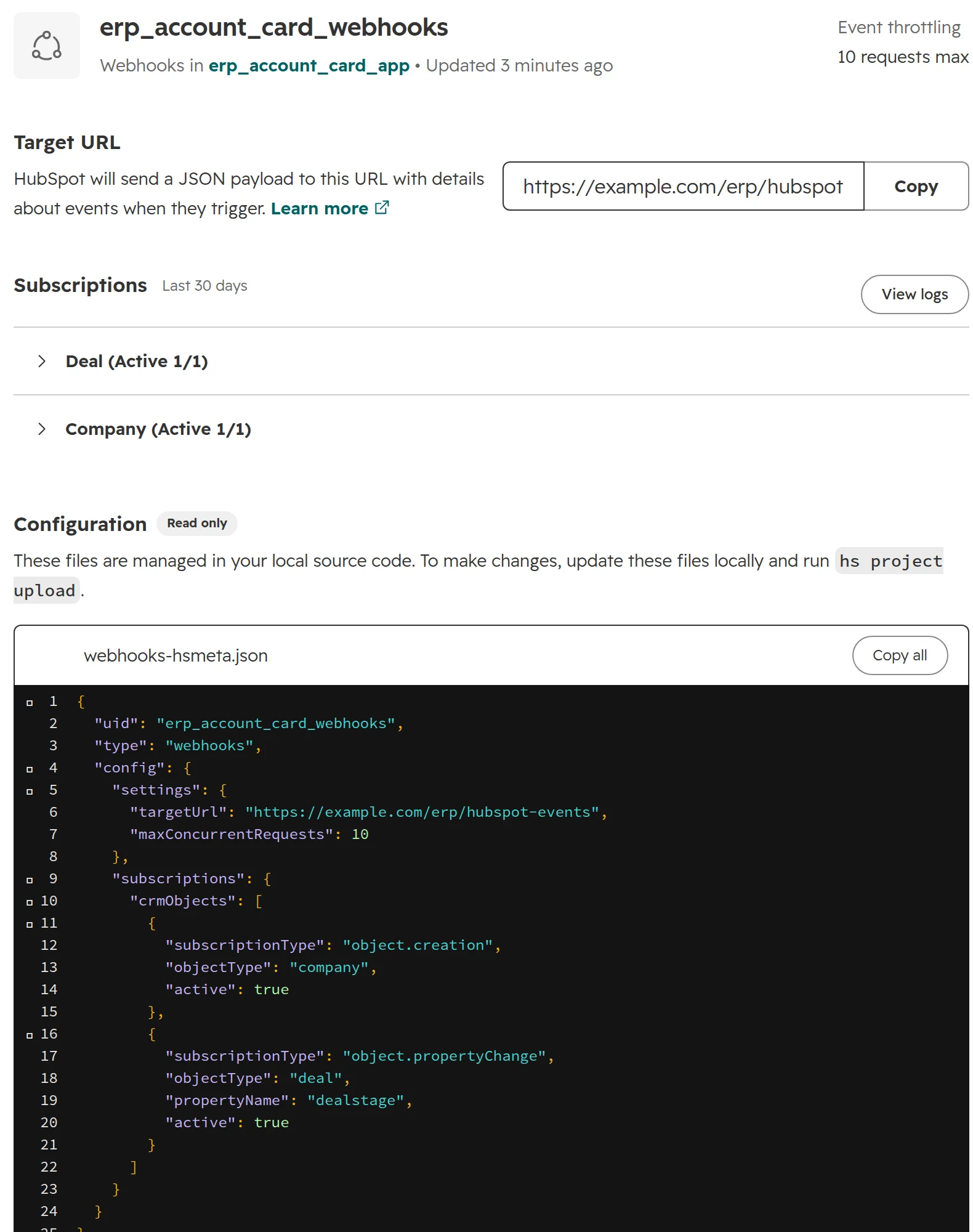
Webhook subscriptions sit in the project file: here a company created and a deal stage changed. HubSpot sends them to your server as they happen. Up to 1,000 subscriptions per app.Webhooks in an app: on any plan, defined in code.
Step 04
Place the card on the record
In the record layout editor, add the card where sales looks first. Your developer can show the values in each user’s language and number format, as here.An app card on the company: the ERP’s numbers where sales works.
A card that only shows HubSpot data needs no server. A card that fetches data live from your ERP needs a backend your developer hosts, or HubSpot’s serverless functions, which need Enterprise.
HubSpot API versions in 2026, and the 2027 deadlines
Since March 2026, HubSpot names API versions by date, such as /crm/objects/2026-09/contacts, and releases a new one every March and September. Each is supported for 18 months. The old numbered versions are being phased out.
Date
What happens
What to do
30 March 2026
Dated versions start with 2026-03
New code uses the newest dated version
8 September 2026
Version 2026-09: API writes must meet conditional required properties and required fields on create
Test writes against your portal’s rules before switching an integration to 2026-09
26 October 2026
Older accounts can’t create new legacy private apps
Use a service key or a project app for anything new
4 December 2026
Pipelines API v1 switched off
Move to the current pipelines API
30 March 2027
v4 APIs, such as associations v4, become unsupported
Move v4 calls to the dated version
September 2027
v1 to v3 APIs, legacy private and public apps become unsupported
Migrate code and app type; HubSpot shows affected apps under Development > Migrations
As of October 2026, from HubSpot’s developer changelog.
An unsupported API isn’t switched off on that day. HubSpot stops fixing it and no longer guarantees that it works. For an integration your order process depends on, treat the date as a deadline. HubSpot announces breaking changes about 90 days ahead in the developer changelog, which is why someone has to read it.
Move integrations straight to the newest dated version. A stop at v3 or v4 on the way means migrating twice. The Migrations page detects old calls when they run, so a quarterly export that didn’t run this month won’t show up. Check the code as well.
What breaks in HubSpot integrations, and who owns the code
These are the failures we see most in HubSpot integrations after go-live. Few of them start in the code.
What breaks
Why
What stops it
Old contacts suddenly count as new leads
The integration updates fields that start workflows, which re-enrol thousands of records
List the workflows each written field triggers, and test the first sync in a sandbox
A form or the ERP feed stops writing
Someone renamed a dropdown option or a property label in HubSpot
Integrations use internal names and values; rename labels only, add options instead of changing them
Duplicates after every sync
The integration creates records instead of looking them up by a fixed key
Match on an ID from the other system, stored in a unique property
The integration fails after an employee leaves
Its legacy private app or key was tied to that person
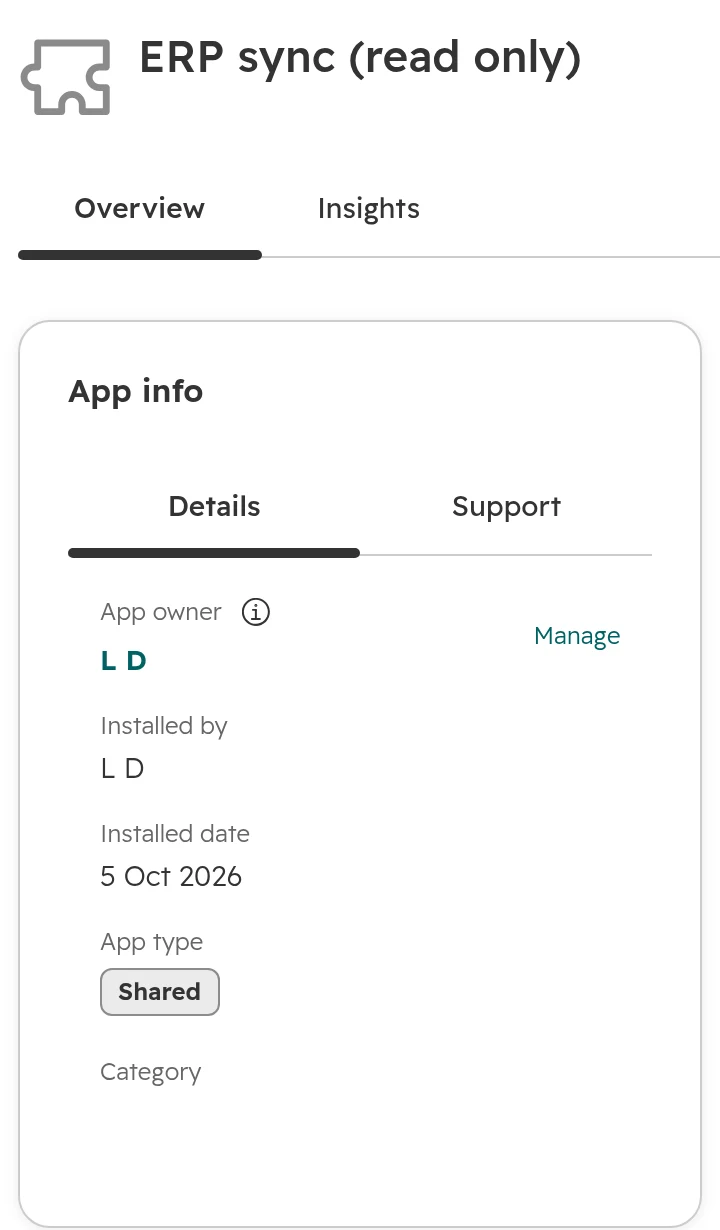
Create keys under an admin account kept for integrations, and set the app owner under Connected Apps
Errors nobody sees
The log keeps 30 days, and nobody looks
Alerts on failed calls to a named person, and a log of your own
Writes fail after a version upgrade
Version 2026-09 enforces required fields the integration never sent
Read the required fields, test against your rules, then upgrade
From projects we see and HubSpot’s documentation, as of October 2026.
HubSpot API errors and what they mean
The call log shows a code for each failed call. The four in this table come from the limits, scopes and rules above.
Error
What it means
What to do
429
The app went over its limit per 10 seconds or the account over its daily limit. Search allows five requests per second
Batch the calls and read only changed records. The daily count resets at midnight in your account’s time zone
403, MISSING_SCOPES
The key lacks the scope for this call, such as a write with a read-only key
Add the scope only if the job needs it
400, VALIDATION_ERROR
Since version 2026-09: the write misses a required field or a conditional required property
Send the required fields, or change the rule in HubSpot
USER_DOES_NOT_HAVE_PERMISSIONS
The user who created a legacy private app has been removed from the account
Move the job to a service key created under an admin account kept for integrations
As of October 2026, from HubSpot’s developer documentation.
Since autumn 2026, every connected app in HubSpot has a formal owner, set to whoever installed it and changeable by an admin. When you deactivate a user, HubSpot warns you if they own or installed an app.
Each connected app shows its owner. Change it before that person leaves.
How to brief a developer for a HubSpot integration
Answer these twelve questions before anyone estimates the work, so every offer prices the same job.
01The job in one sentence, from the user’s view: “Sales sees open items and the credit block on the company before quoting.”
02The systems and their versions, and whether each is in the cloud or on your own servers.
03Each field, its owner and direction: which system is right for it, and whether it flows one way or both.
04The matching key: the ID that links a HubSpot record to the other system’s, never a name.
05Volumes: records today, changes per day, the busiest hour.
06How fast it must be: seconds, hourly or nightly.
07Errors: what happens when a record fails, who is told, and how.
08Access: service key or app, with which scopes, created in your account.
09Your HubSpot rules: required fields, conditional properties and workflows that the integration will trigger.
10Test plan: a sandbox or test account, test records, and who signs off.
11Ownership: who owns code, hosting, keys and documentation, and who reads HubSpot’s developer changelog afterwards.
12Version: the newest dated API version and platform 2026.09, nothing legacy.
HubSpot API projects in Germany, Austria and Switzerland
ERPs on your own servers. Many ERPs here, from SAP to smaller systems, run on premises. HubSpot can only call them if IT opens an interface; otherwise the integration pulls from HubSpot instead. Clarify this first.
Data processing. A middleware tool, a hosting provider or a developer’s server processes your customer data. Check where it runs and that a data processing agreement is in place. Your data protection officer decides; our EU data centre guide shows what HubSpot itself stores where.
Works council. If an integration records what employees do, for example call or login data, involve the works council before it goes live.
Formats. HubSpot’s API sends numbers with a dot and dates in ISO format. German formats belong in the display only, as in the card above.
How we go about HubSpot API projects
Our order of work on a HubSpot API project, from the brief to the handover.
Step 01
Map the job
The fields, owners, keys and volumes from the brief above, in one table, agreed with the people who use the data.
Step 02
Check the shelf
Marketplace apps, HubSpot’s own sync and existing tools in your stack, tested against the table.
Step 03
Build the gap
Only what nothing else covers, on the newest version, with read-only keys where reading is enough, and error alerts.
Step 04
Hand it over
Code in your repository, keys in your account, a named owner and a short runbook for what to do when it fails.
Frequently asked questions
Does HubSpot have an API?
Yes. Every HubSpot plan, including the free CRM, includes the API for contacts, companies, deals, tickets and most other records. Some APIs follow their feature’s edition, such as custom objects on Enterprise.
Is the HubSpot API free?
There is no fee for API calls. The limit grows with your edition: 250,000 calls a day on Free and Starter, 625,000 on Professional and 1,000,000 on Enterprise, as of October 2026. An add-on raises it further.
What replaced HubSpot private apps?
Service keys for simple data jobs, and apps built as HubSpot projects for anything with webhooks or cards. Older accounts can’t create new legacy private apps after 26 October 2026. Existing ones keep working but lose support in September 2027.
What is a HubSpot service key?
A HubSpot service key is an access key for API calls in one account, with only the scopes you tick. Super Admins and users with the Developer tools access permission create it under Development > Keys > Service Keys. A service key can’t receive webhooks or show cards, and it is in public beta as of October 2026. HubSpot recommends rotating it every six months.
Do I need Data Hub for HubSpot webhooks?
Only for the workflow action “Send a webhook”, which needs Data Hub Professional. An app built as a HubSpot project can subscribe to record changes on any plan, but someone has to build and host it.
Can HubSpot call other systems’ APIs?
Yes. With Data Hub Professional, a workflow can send a webhook or run custom code that calls any web address. An app built as a HubSpot project can send webhooks on record changes on any plan.
What are the HubSpot API rate limits?
For apps in your own account and service keys: 100 calls per 10 seconds on Free and Starter, 190 on Professional and Enterprise, and a daily limit per account of 250,000, 625,000 or 1,000,000. Search allows five requests per second. Batch calls carry up to 100 records. Over the limit, calls fail with error 429 until the window passes.
How do I get data out of HubSpot through the API?
Read records in batch calls of up to 100, filtered by last modified date so only changes come back. For a whole object, the exports API returns one file. Links between records, such as a deal’s company, come from the associations API, because the deal record doesn’t hold them.
Which HubSpot API version should I use in 2026?
The newest dated version, 2026-09 as of October 2026. The numbered v4 APIs become unsupported on 30 March 2027, v1 to v3 in September 2027.
Can I connect HubSpot without a developer?
Often, yes. Check the HubSpot Marketplace for an app for your system first, then tools like Make or Zapier for simple flows. A developer is worth it for large volumes, your own matching rules, systems on your own servers or data on the record.
Build only what an app can’t do
We look at your systems and connections live in your portal and tell you which route fits. You keep the quick wins, whether we work together or not.