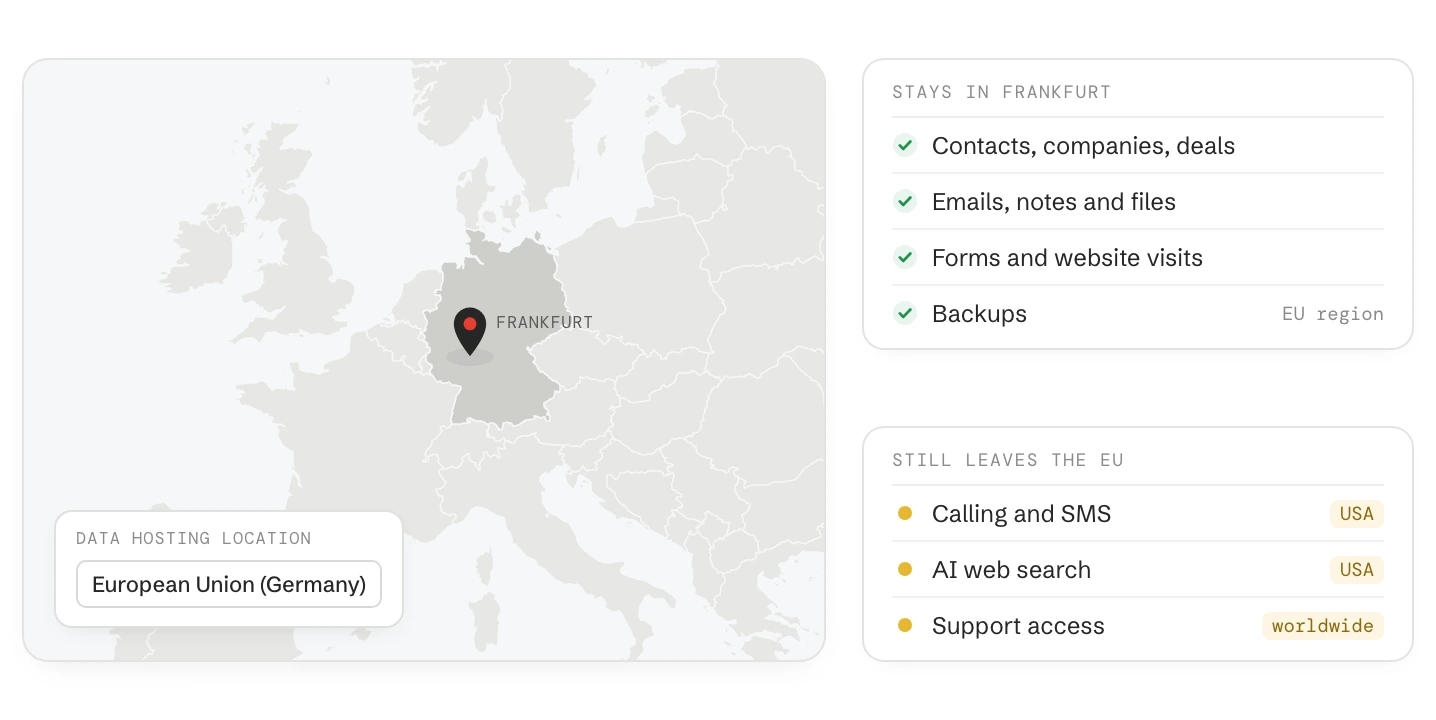
A HubSpot portal hosted in the EU keeps its CRM data, emails, files and backups in Germany, on Amazon Web Services (AWS) in Frankfurt. Some data still leaves the EU: HubSpot’s usage analytics, support access, calling and SMS, WhatsApp, payments, video, AI web search and every app you connect.
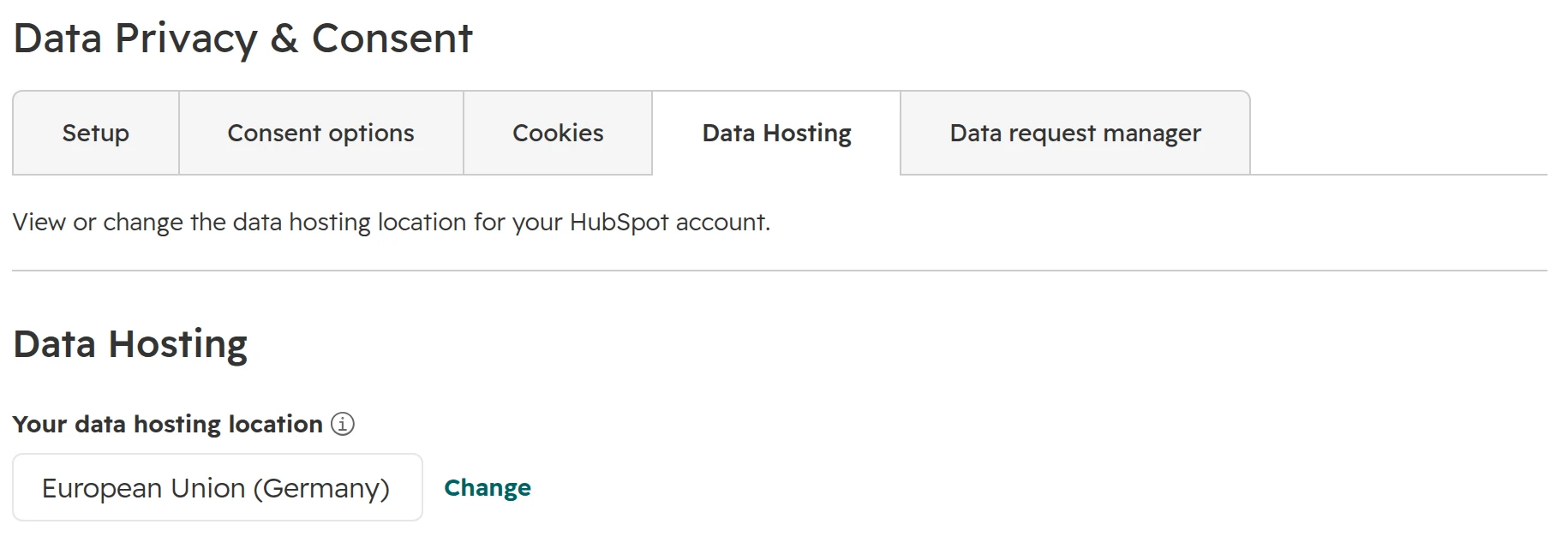
Check where your portal is hosted under Settings > Privacy & Consent, tab “Data Hosting”. A paid portal in the US East data centre can move to the EU free of charge, with 24 to 36 hours offline. Then decide on three switches that share your data with HubSpot: AI model training, intent data and enrichment.
Where
Frankfurt, Germany, on Amazon Web Services. Backups stay in the EU region
Who is hosted there
Paid sign-ups from an EU IP address since July 2021, and portals that moved. Free-only accounts sit in the USA
Check
Settings > Privacy & Consent, tab “Data Hosting”. EU portals open at app-eu1.hubspot.com
Move
Paid portals in US East only, free, 24 to 36 hours offline, one week’s notice. No way back
Still leaves the EU
Usage analytics, support access, Twilio calling and SMS, WhatsApp, Stripe, video, AI web search, apps
DPA (AVV)
Part of HubSpot’s terms, accepted with them. A signed PDF is on legal.hubspot.com/dpa
What HubSpot stores in the EU data centre
When your portal is hosted in the EU, HubSpot stores and processes your customer data in Germany, on Amazon Web Services (AWS) in Frankfurt. Copies for backup and disaster recovery stay inside the EU region. EU hosting covers what you and your contacts put into HubSpot: records, emails, notes, files, forms, website pages and their analytics.
For portals hosted in the EU. From HubSpot’s sub-processor page and hosting FAQ, as of October 2026.
HubSpot’s terms set two limits. The hosting location doesn’t cover apps, beta features, consulting, HubSpot’s own content such as enrichment data, or usage analytics. And HubSpot gives no warranty that a hosting location meets your data residency requirements. Whether EU hosting is enough for you is for your data protection officer to decide.
How to check where your HubSpot portal is hosted
Step 01
Open the Data Hosting tab
In HubSpot go to Settings > Privacy & Consent, tab “Data Hosting”. “Your data hosting location” shows European Union (Germany), United States (East or West), Canada or Australia.The Data Hosting tab. “Change” opens the migration panel.
Step 02
Look at the address bar
A portal hosted in the EU opens at app-eu1.hubspot.com. Useful when you only have a link from a colleague or an agency.
Step 03
Check the order form
Under Account & Billing, tab “Transactions”, Orders, the order form names the hosting region. If it says North America, the Data Hosting tab shows which US data centre.
Since July 2021 a paid sign-up gets the data centre that matches the IP address it signed up from. A portal that started on free tools is hosted in the USA, even for a company in Munich. To move it, upgrade to a paid plan, then schedule a migration.
What leaves the EU even when your portal is hosted there
EU hosting covers where HubSpot stores your data. Some features send data to providers or HubSpot teams outside the EU. Most apply only when you use the feature, so this list is also a list of decisions.
What leaves the EU, by feature
Feature
Where data goes
What you can do
HubSpot calling and SMS
USA, through Twilio. Twilio keeps your HubSpot phone numbers on US servers
Use a phone system with EU hosting through its HubSpot app
WhatsApp in the inbox
USA, through Meta
Connect it only where customers expect WhatsApp
HubSpot payments
USA, through Stripe
Applies to every payment collected through HubSpot
Videos hosted in HubSpot
USA, through Mux
Host videos on an EU platform and embed them
Inbox previews in the email editor
USA, through Litmus
Applies only when you run a preview
Spam protection on forms (reCAPTCHA)
USA, through Google
Applies only to forms with reCAPTCHA turned on
AI features: Breeze Assistant, agents, content and summaries
EEA regions, through OpenAI, Google, AWS and, from 16 October 2026, Baseten
Settings > AI: choose which data AI may read
AI features that search the web
USA, through Bright Data and Exa, from 16 October 2026
Same AI settings. Check which agents search the web
Apps and AI connectors (ChatGPT, Claude, Copilot)
Wherever the app’s provider processes data
Approve apps centrally, check each provider’s DPA
HubSpot support, onboarding and security staff
HubSpot teams in other countries, including the USA, India and Singapore
Turn off HubSpot employee access
Your own users abroad
Wherever they log in from
Limit logins to trusted IP addresses (Starter and up)
For portals hosted in the EU. HubSpot sub-processor page, last changed 16 September 2026, and hosting FAQ. As of October 2026.
For transfers to the USA, HubSpot’s DPA uses the EU-U.S. Data Privacy Framework and the EU Standard Contractual Clauses. HubSpot, Inc. is certified under the Data Privacy Framework. To hear about new sub-processors, subscribe to HubSpot’s updates: you get 30 days’ notice and can object.
Connecting ChatGPT, Claude or Copilot to HubSpot sends CRM data to that AI provider, outside HubSpot’s hosting. What the connectors can read and which permissions to give is in our guide HubSpot MCP: connect HubSpot to ChatGPT, Claude or Copilot.
Three HubSpot settings that share your data, and where to turn them off
Apart from hosting, HubSpot uses some customer data to improve its own products. Three switches control this, in three different places. Turning off one doesn’t turn off the others.
Switch
What it allows
Where to change it
AI Model Training. On by default
HubSpot trains its own AI models on your account’s data, for example forecasts, spam detection and deal predictions. Not shared with other customers. Opting out applies from then on, not to past training
Settings > AI, tab “Access”, at the bottom
Intent data access. On by default
HubSpot uses data from your website’s tracking code (IP address, pages, visit times) to improve its products, including buyer intent
Settings > Tracking Code, tab “Advanced Tracking”
Data enrichment. Off until a Super Admin turns it on or enriches records
The first name, last name and business email of verified enriched records may be added to HubSpot’s commercial dataset. Continuous enrichment alone adds nothing
Settings > Data Enrichment
Defaults as HubSpot documents them, as of October 2026. Check your own portal.
Step 01
AI: decide what AI may read
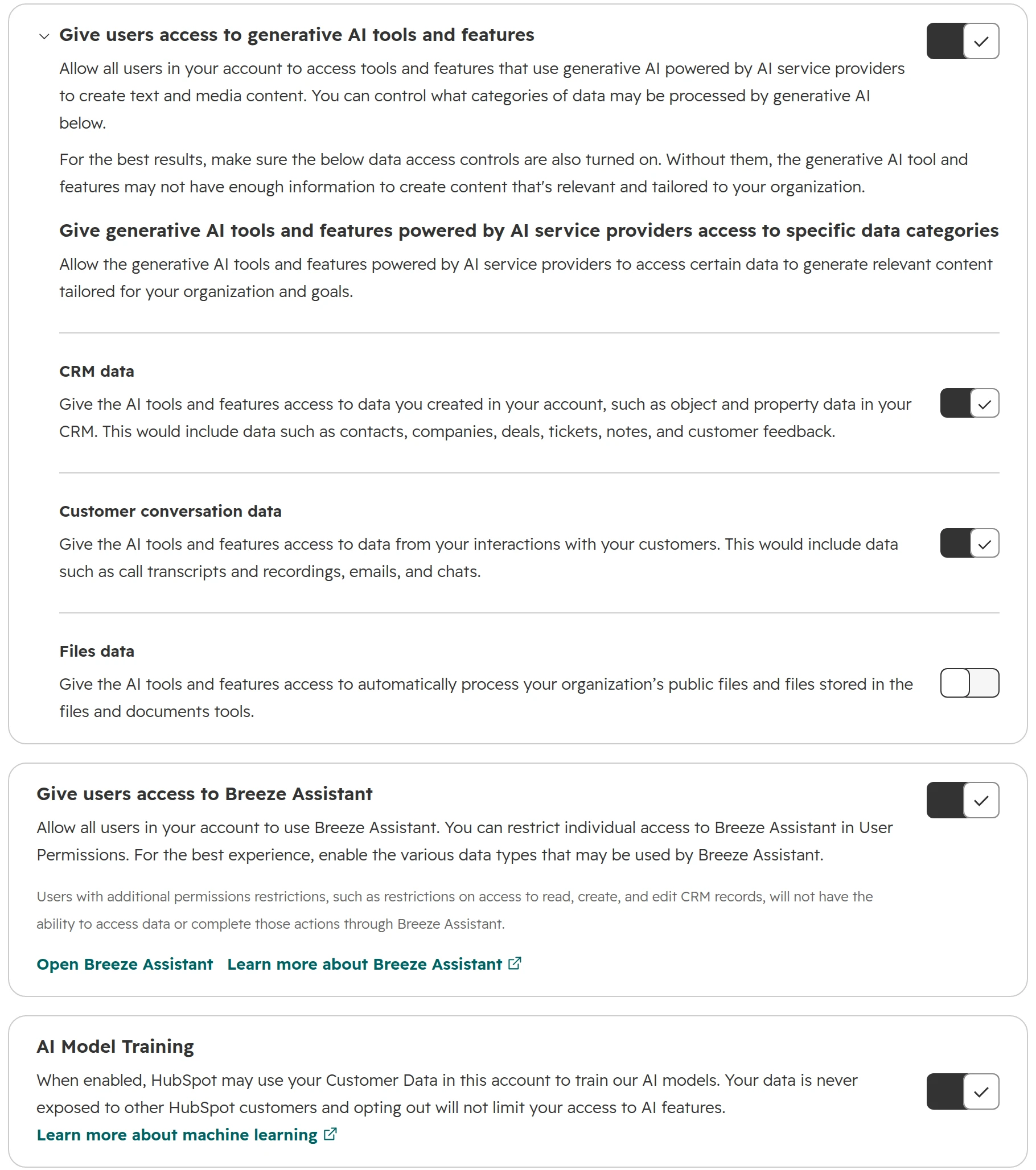
Settings > AI, tab “Access”. “Give users access to generative AI tools and features” turns all generative AI on or off. Below it are three data categories: CRM data and customer conversation data are on by default, files data is off. “AI Model Training” sits at the bottom.The AI settings as HubSpot ships them. AI Model Training is a separate switch at the bottom.
Step 02
Website tracking: intent data
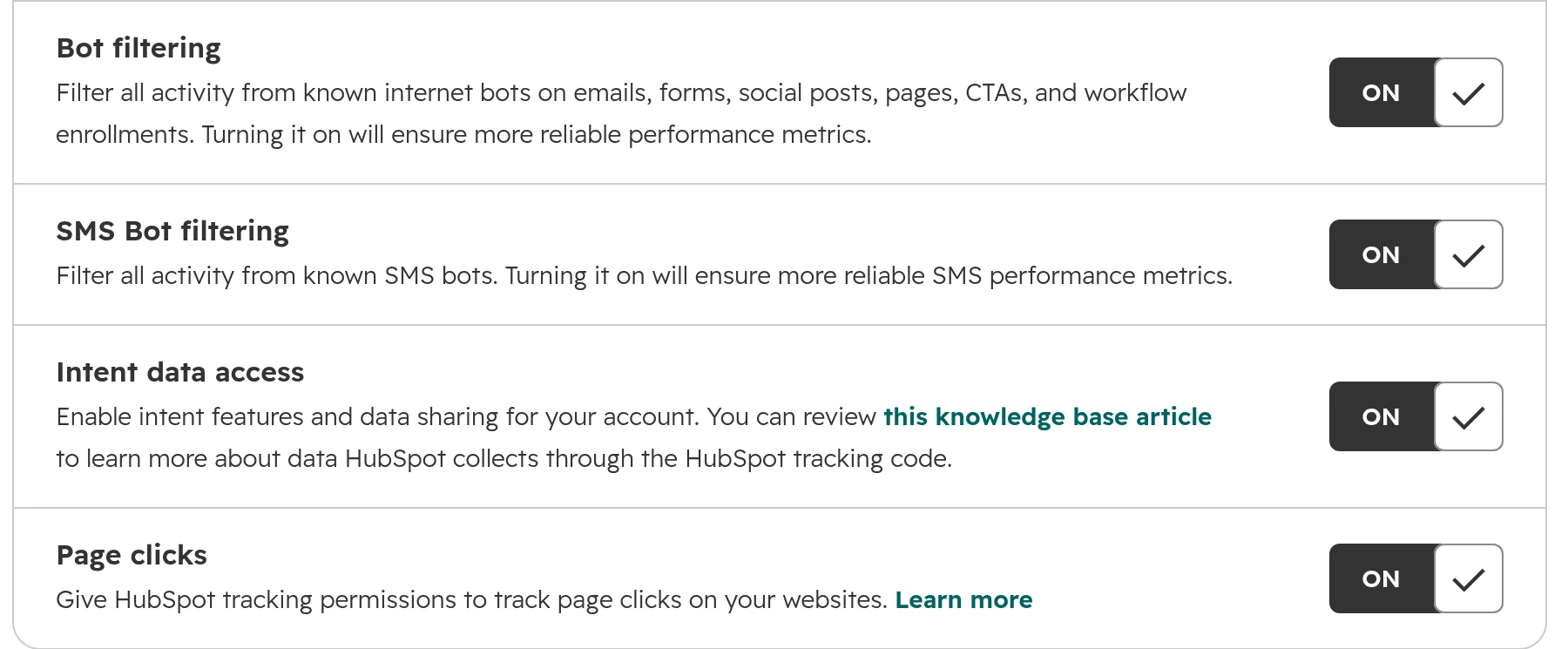
Settings > Tracking & Analytics > Tracking Code, tab “Advanced Tracking”. Switch “Intent data access” off unless you use HubSpot’s buyer intent. Everything else keeps working.“Intent data access” is on by default. Off, HubSpot stops using your tracking data to improve its products.
Step 03
Enrichment: keep it off until someone owns it
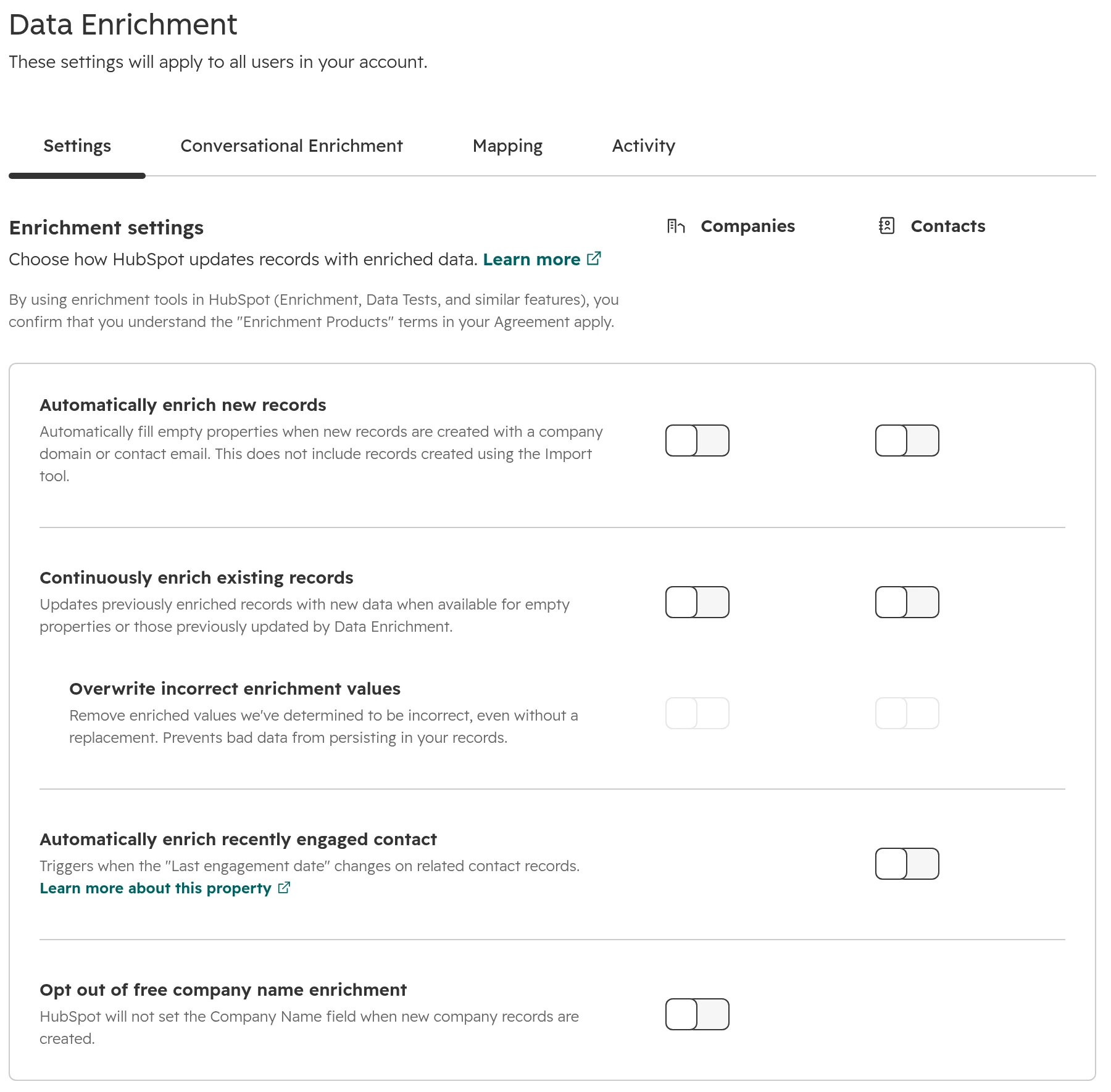
Settings > Data Management > Data Enrichment, tab “Settings”. Automatic enrichment of new records, continuous enrichment and enrichment of recently engaged contacts are separate switches for companies and contacts.Enrichment settings, all off. Mapping and overwrite rules are on the “Mapping” tab.
Our view: switch off AI model training and intent data access unless you use buyer intent. Neither is needed for HubSpot’s AI features to work. Turn on enrichment only with a person who owns the data it writes.
The background: in early July 2026 HubSpot announced it would share enrichment data across customer accounts from 4 August, opt-out by default. After customers protested, HubSpot withdrew the plan on 5 July. Its chief product officer said future data changes would be opt-in. The three switches above are what remains.
Can you move an existing HubSpot portal to the EU data centre?
Yes, if it’s a paid portal in the US East data centre. A Super Admin schedules the move under Settings > Privacy & Consent, tab “Data Hosting”, “Change”. The move is free. The portal is offline for about 24 hours, sometimes 36. There is no way back: a portal in the EU can’t move to another data centre.
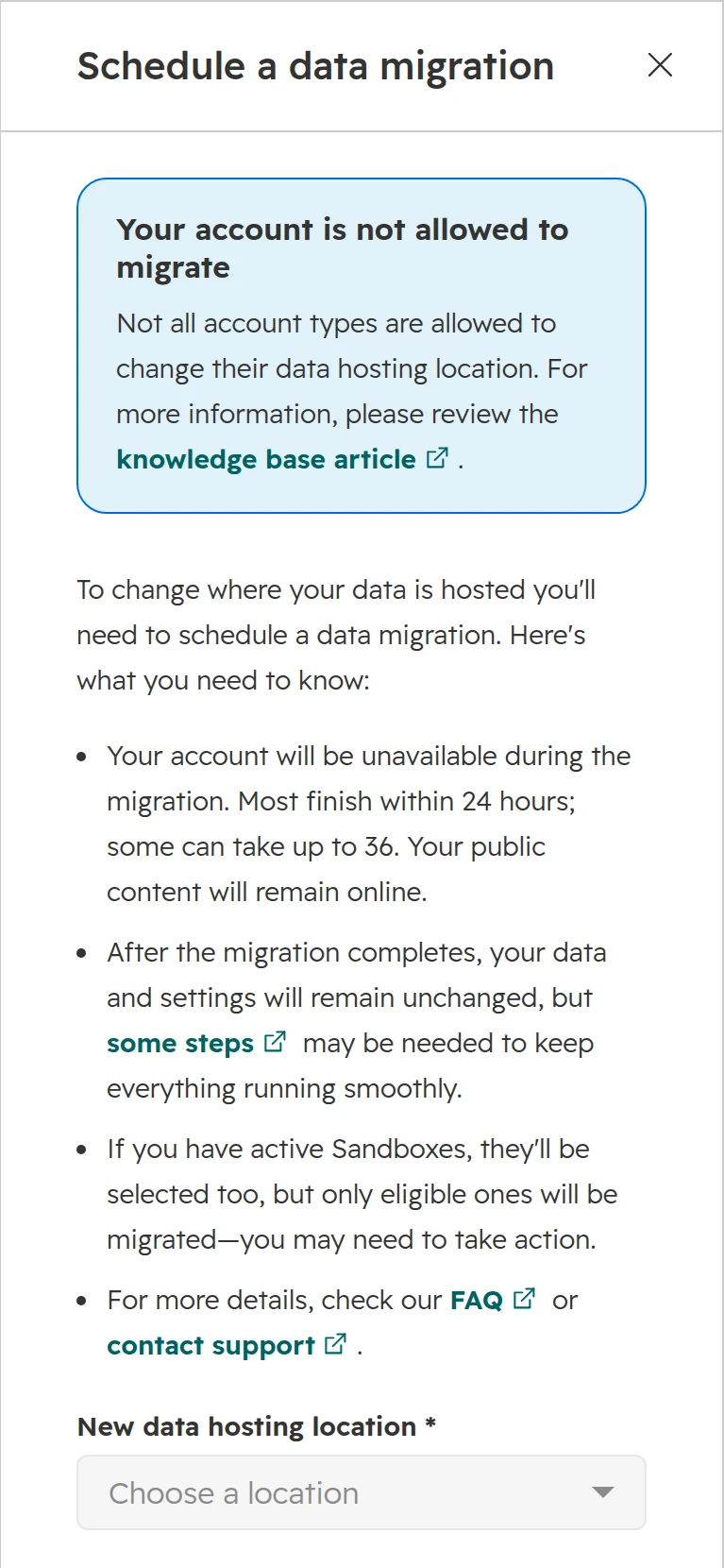
The migration panel. This portal is already in the EU, so HubSpot shows “Your account is not allowed to migrate”.
What stops a migration
Blocker
What to do
HubSpot payments or Stripe with any transaction, test transactions included
Support turns payments off. Past payment data becomes read-only, and you set payments up again after the move
HIPAA data marked in the Sensitive Data settings
Change the setting if you don’t store HIPAA data
Microsoft Teams or Zoom connected to several HubSpot portals
Move all of those portals, or disconnect the integration first
A bill date within 3 days of the migration date
Choose another date
No free dates
HubSpot limits migrations. Most dates open about a month ahead
Step 01
List everything that talks to HubSpot
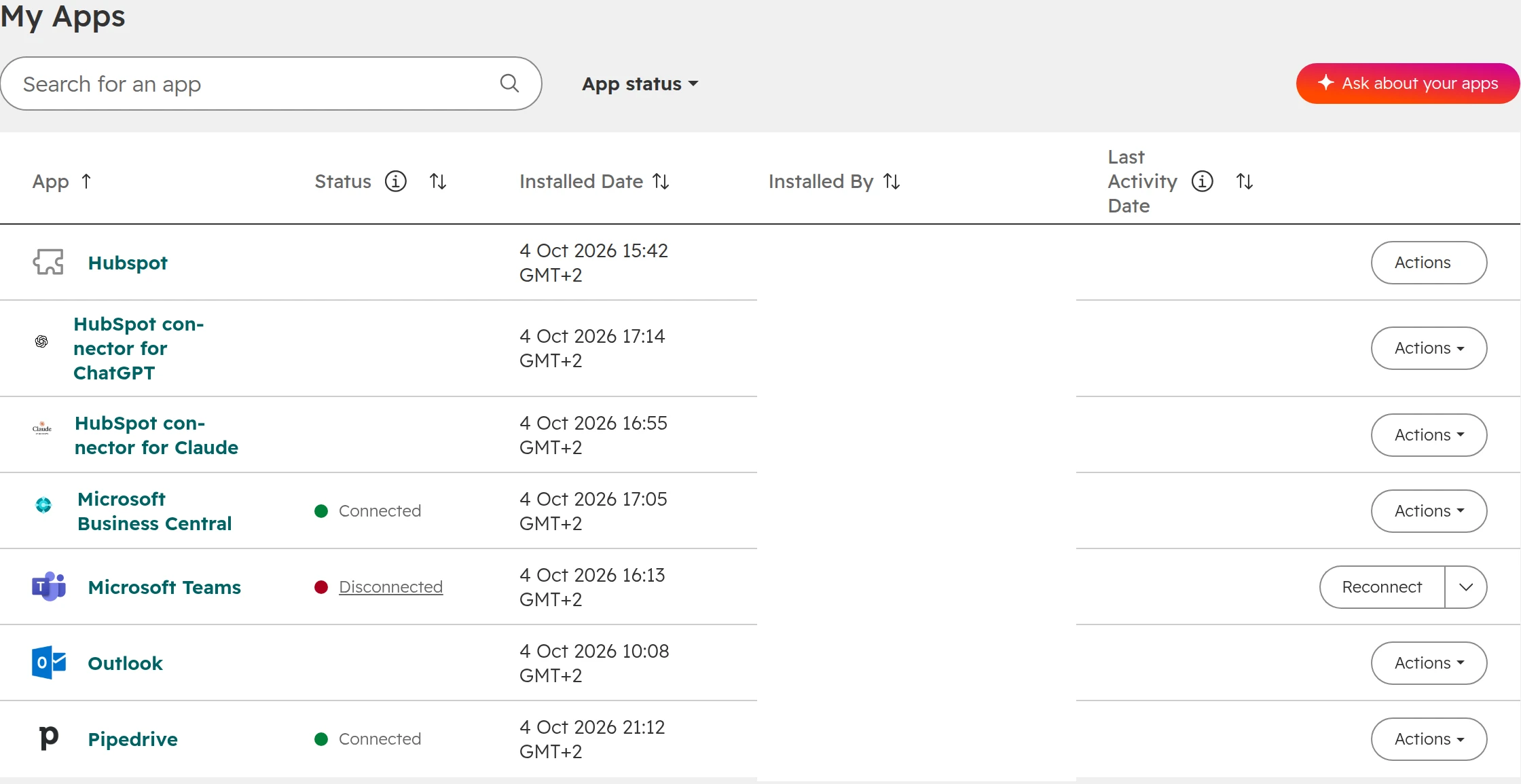
Every app, private app, webhook and automation tool, and every website with HubSpot forms, CTAs or the tracking code. During the move API calls fail with status 477, and HubSpot can’t say whether an app retries them.Connected Apps lists what is installed. Private apps, webhooks and website embeds need their own list.
Step 02
Pick a weekend
Schedule at least a week ahead, outside the 3 days around your bill date. Start on a Friday evening. Imports stop 24 hours before, and bulk marketing email can’t be scheduled for that day.
Step 03
Tell the teams what stops
Workflows, sequences and scheduled marketing emails pause. Forms keep collecting and are processed afterwards. Chat and chatbots go offline an hour before. Meeting links take requests but don’t book into calendars. Calls placed from HubSpot drop.
Step 04
Let it run
Super Admins get an email when it’s scheduled, on the Monday of that week, the day before and when it’s done. Anyone who logs in sees a notice until the portal is back.
Step 05
Update what changed address
Replace form, CTA and tracking embed codes on websites outside HubSpot, or data keeps passing through the US first. Copy the new BCC and forwarding addresses for email logging. Change the SMTP host for transactional email. Reconnect dedicated IPs, return path domains, custom SSL certificates and reverse proxies. System domains become hs-sites-eu1.com, with no redirect.
Step 06
Reinstall Snowflake and test
Uninstall and reinstall the Snowflake integration if you use it. Then submit a test form, send a test email and check that each integration synced.
The portal ID and record IDs stay the same, and apps that use OAuth refresh their access by themselves. Eligible sandboxes move with the portal. A sandbox that isn’t eligible on the day is lost, so fix or cancel it first.
Is it worth it? Move when your data protection officer, a customer or a tender requires EU hosting, and before you connect an ERP or start a large project, while there is less to rewire. Plan a weekend offline and a day of follow-up. The move doesn’t change what still leaves the EU.
HubSpot’s DPA (AVV): where it is and how you accept it
HubSpot’s Data Processing Agreement is part of its Customer Terms of Service. You accept it with your subscription, so there is nothing extra to sign. If your data protection officer wants a signed copy on file, download the PDF signed by HubSpot from legal.hubspot.com/dpa. The signed PDF includes the full Standard Contractual Clauses, the UK addendum and the sub-processor list.
Topic
What HubSpot’s terms say
Contract partner
Paid customers in Germany, Austria and Switzerland contract with HubSpot Germany GmbH. Free-only accounts contract with HubSpot, Inc. under Massachusetts law
Transfers outside the EU
EU-U.S. Data Privacy Framework and Standard Contractual Clauses. Swiss data protection law is covered
Data breach
HubSpot notifies you within 72 hours of becoming aware of it
New sub-processors
30 days’ notice if you subscribe, and a right to object
Proof of security
SOC 2 report and penetration test summaries on request, through trust.hubspot.com. HubSpot itself isn’t ISO 27001 certified; its host AWS is
End of contract
HubSpot deletes or returns your data. Export what you need first
HubSpot DPA and Customer Terms of Service, last changed 16 September 2026.
Your own part stays with you: list HubSpot in your record of processing activities, name it in your privacy policy, and document a legal basis for your contacts. In Germany the works council usually has a say once HubSpot records what salespeople do, such as calls, email opens or activity reports.
HubSpot GDPR settings to switch on in Germany, Austria and Switzerland
HubSpot turns the data privacy settings on by default for portals hosted in the EU. Check it anyway: not every EU portal has them on. Each step below is a setting a company in Germany, Austria or Switzerland normally wants.
Step 01
Turn on data privacy settings
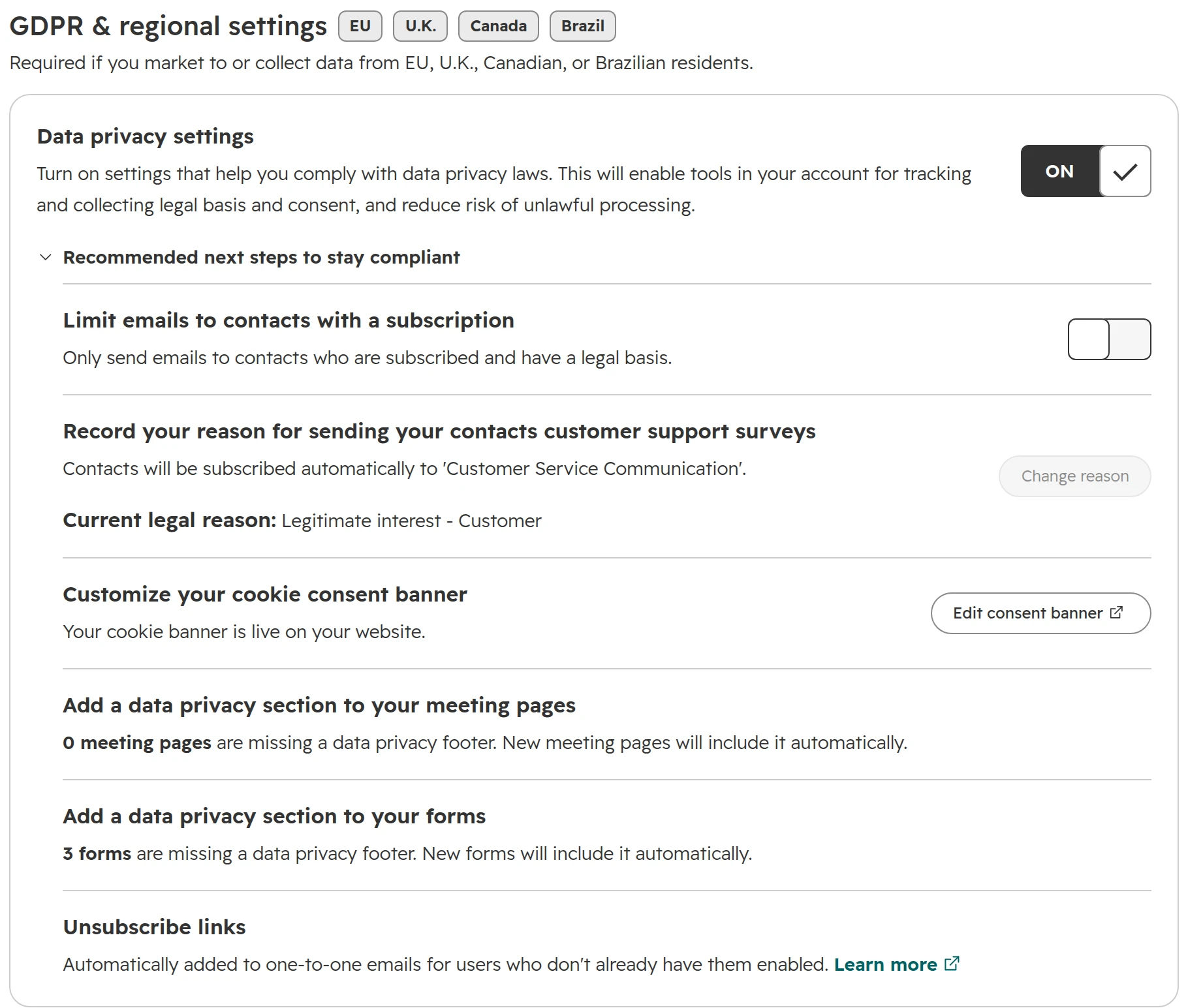
Settings > Privacy & Consent, tab “Setup”: switch “Data privacy settings” on. Turning it on needs Super Admin or the Edit account defaults permission. HubSpot then turns on the cookie banner, adds a privacy section to new forms and meeting pages, adds unsubscribe links to one-to-one and sequence emails, and stops tracking opens and clicks for contacts without a legal basis. Existing forms keep their footer until you edit them.With data privacy settings on, “Recommended next steps” shows what HubSpot changed and what is left to do.
Step 02
Limit marketing email to contacts with a legal basis
Under “Recommended next steps”, switch on “Limit emails to contacts with a subscription”. Marketing emails then only go to contacts who are subscribed and have a legal basis.
Step 03
Record a legal basis on every contact
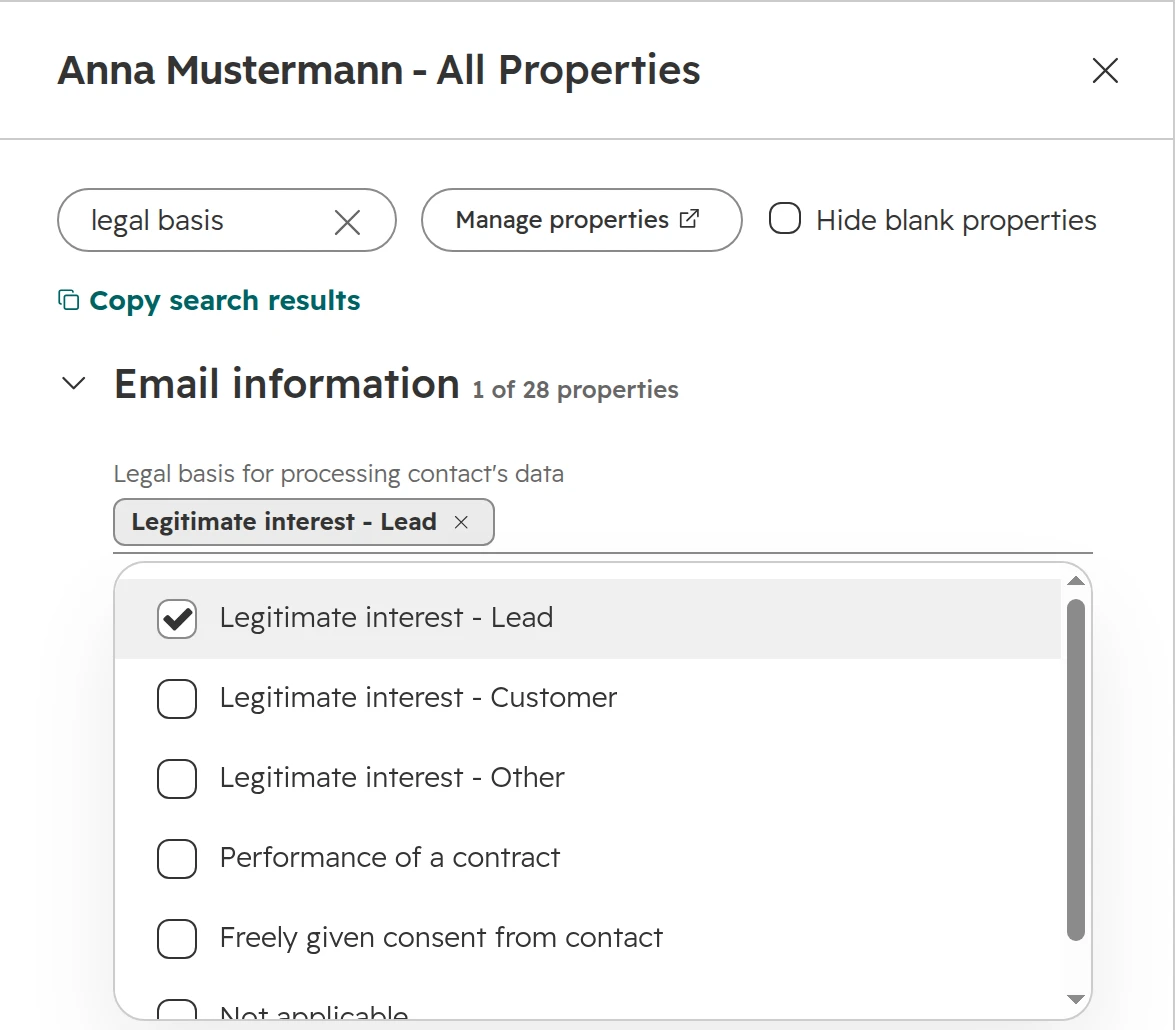
The property “Legal basis for processing contact’s data” has six values: three kinds of legitimate interest, performance of a contract, consent, and not applicable. Set it on import, in forms, in bulk or by workflow. The segment “Marketing contacts without a legal basis” shows the gaps.The legal basis on a contact. Several values can apply at once.
Step 04
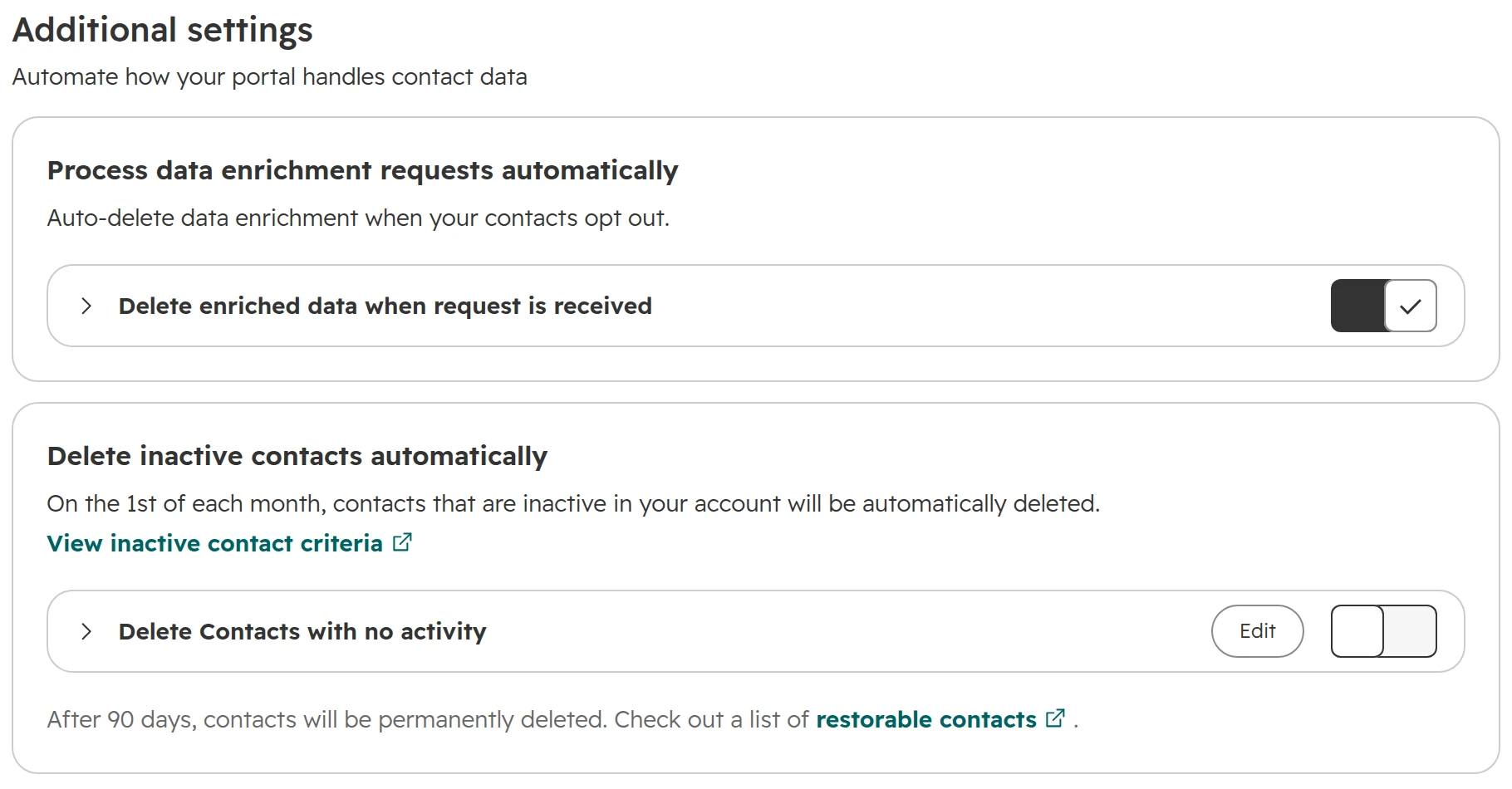
Delete inactive contacts automatically
Under “Additional settings”, switch on “Delete inactive contacts automatically”. By default a contact counts as inactive after 365 days without activity. HubSpot checks on the 1st of each month, and deleted contacts can be restored for 90 days. Check first which reports rely on old contacts.Two retention settings. Deleting enriched data on an opt-out request is on by default.
Step 05
Decide on HubSpot employee access
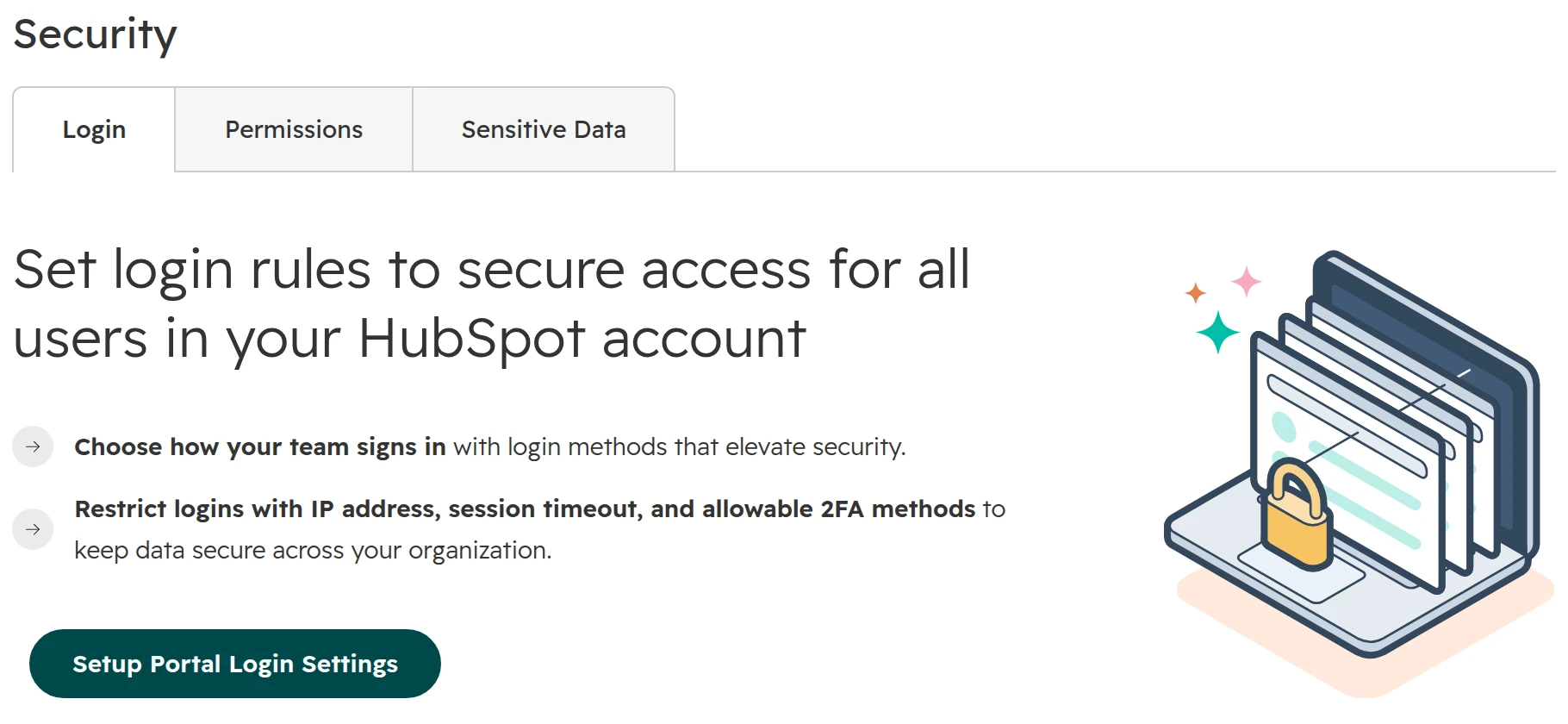
Settings > Security, tab “Login”. Set up login settings first; only then does “Allow access to HubSpot employees” appear. Off means HubSpot support can’t look into your portal. Turned back on, access lasts 24 hours.Until login settings are set up, the Security page shows only this. The employee access switch appears afterwards.
Step 06
Approve apps before anyone installs them
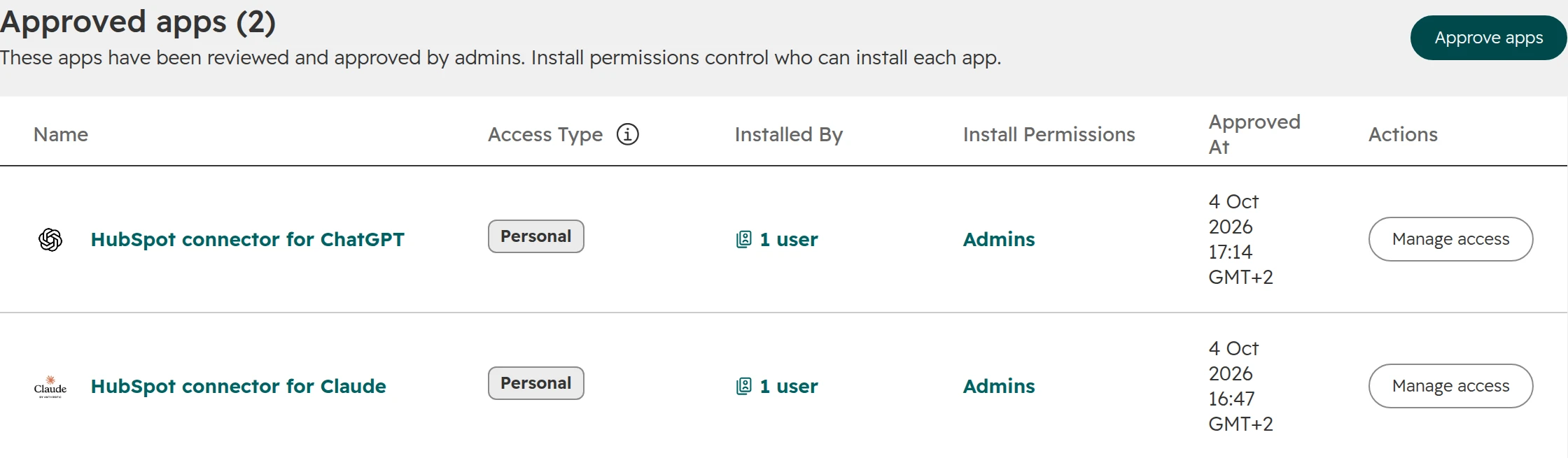
Settings > Integrations > Connected Apps, tab “Approved apps”. Super Admins approve each app, choose who may install it and which optional data it gets. App approval also covers the ChatGPT and Claude connectors.Approved apps: who may install each app, and when it was approved.
HubSpot has no setting to shorten or anonymise IP addresses in its tracking code. Control website tracking through consent instead, with HubSpot’s cookie banner or your own consent tool.
What to hand your data protection officer
This guide describes what HubSpot does, not what the law requires. Your data protection officer or lawyer decides whether HubSpot fits your obligations, and needs these eight items to do it:
Hosting. A screenshot of the Data Hosting tab, and the date of any migration.
The DPA. The signed PDF from legal.hubspot.com/dpa, with the date you downloaded it.
Sub-processors.HubSpot’s list, with the features you actually use marked: calling, WhatsApp, payments, video, AI.
Data switches. Your settings for AI data access, AI model training, intent data and enrichment.
Apps. Every connected app and AI connector, with its provider’s DPA and hosting location.
Access. Whether HubSpot employee access is on, who can switch it, and who your Super Admins are.
Contacts. Your rules for the legal basis, and the period after which inactive contacts are deleted.
HubSpot’s own papers. The Transfer Impact Assessment and SOC 2 report from trust.hubspot.com.
How we set up data protection in a HubSpot portal
The order we work in, in a new portal or one we take over:
Step 01
Hosting before anything else
We check the hosting location in the first session. A move is cheapest before integrations, forms on external sites and the ERP connection exist.
Step 02
Features mapped to sub-processors
We list the features the company will really use and mark which send data outside the EU. The list goes to the data protection officer before go-live.
Step 03
The three switches
AI model training and intent data off unless there is a reason to keep them. Enrichment only with an owner and a mapping that protects manually entered data.
Step 04
Legal basis from day one
Every import and form sets a legal basis. A segment of contacts without one is on the admin dashboard.
Step 05
Apps by approval only
Admins approve apps and AI connectors. Each one gets a line in the processing record with its provider and hosting location.
Frequently asked questions
Where is HubSpot’s EU data centre?
In Frankfurt, Germany, on Amazon Web Services. Customer data of portals hosted in the EU is stored and processed there, and backups stay inside the EU region.
What data leaves the EU when HubSpot is hosted in the EU?
HubSpot’s usage analytics, access by HubSpot support staff, calling and SMS through Twilio, WhatsApp through Meta, payments through Stripe, video through Mux, AI web search through Bright Data and Exa from 16 October 2026, and every app you connect. Most of these apply only when you use the feature.
How do I check which data centre my HubSpot portal uses?
Go to Settings > Privacy & Consent, tab “Data Hosting”. The tab shows European Union (Germany), United States (East or West), Canada or Australia. A portal hosted in the EU also opens at app-eu1.hubspot.com.
Is HubSpot GDPR compliant?
HubSpot offers a DPA, EU hosting and data privacy settings. Whether your use of HubSpot meets the GDPR depends on how you set it up, which features you use and the legal bases you rely on. Your data protection officer decides.
Can I move my HubSpot account from the US to the EU?
Yes, if it’s a paid portal in the US East data centre. A Super Admin schedules the move under Settings > Privacy & Consent > Data Hosting at least a week ahead. The move is free and takes the portal offline for 24 to 36 hours. A portal in the EU can’t move back.
Does HubSpot AI process data outside the EU?
For portals hosted in the EU, HubSpot’s AI providers process data in the European Economic Area. From 16 October 2026, AI features that search the web use providers in the USA. You choose which data AI may read under Settings > AI.
Does HubSpot train its AI on my data?
Yes, by default. The AI Model Training switch under Settings > AI, tab “Access”, is on until you turn it off. HubSpot trains its own models on your account’s data and doesn’t share that data with other customers. Opting out applies from then on, not to past training.
Do I need to sign a DPA (AVV) with HubSpot?
No. HubSpot’s DPA is part of its Customer Terms of Service and applies with your subscription. A copy signed by HubSpot can be downloaded from legal.hubspot.com/dpa.
Who is the contract partner for HubSpot in Germany, Austria and Switzerland?
Paid customers in Germany, Austria and Switzerland contract with HubSpot Germany GmbH. Accounts with only free tools contract with HubSpot, Inc. under Massachusetts law.
Is a free HubSpot account hosted in the EU?
No. Accounts with only free tools are hosted in the USA and contract with HubSpot, Inc. To move one to the EU, upgrade to a paid plan and schedule a migration.
Can HubSpot anonymise IP addresses in its tracking code?
No. HubSpot has no setting to shorten or anonymise IP addresses. Control website tracking through consent instead, with HubSpot’s cookie banner or your own consent tool.
Is HubSpot ISO 27001 certified?
HubSpot itself isn’t. Its infrastructure provider AWS holds ISO 27001 and a SOC 2 Type 2 report, and HubSpot’s own systems are audited annually for SOC 2.
Know where your customer data goes
We check hosting, apps and data settings live in your portal. You keep the findings, whether we work together or not.