Phone systems with HubSpot: HubSpot calling, 3CX, placetel, sipgate and Aircall compared
Which phone system logs every call on the right HubSpot record, what each one needs before the first call, and what to test in a trial before you sign.
Updated · 14 minutes·By Matthew Labrooy, Managing Director
HubSpot’s own calling, 3CX, placetel, sipgate and Aircall all log calls in HubSpot. The five differ in three places: how they match a phone number to a record, what you need before the first call, and where the recordings end up.
HubSpot’s own calling is enough for a sales team that calls out from HubSpot and has Sales Hub seats. A company with a main number, desk phones and staff on the road is better served by a phone system such as sipgate or placetel, with their HubSpot add-on booked. Keep 3CX if you already run it and someone can build a private HubSpot app. Aircall suits a call team with high volume and queues. Whichever you choose, store every phone number in HubSpot with its country code first: +49, +43 or +41.
HubSpot calling
From Starter, with a Sales or Service seat (a Core seat on Starter). 500, 3,000 or 12,000 minutes a month for the whole account (Starter, Professional, Enterprise)
HubSpot numbers
Germany and Austria (local and mobile), Switzerland (local). Porting in only for landline numbers
3CX
Pro edition or higher, plus a private HubSpot app you build with HubSpot’s command line tool
placetel
HubSpot app by PhoneMondo, €7.90 per user a month on top of the phone plan
sipgate
Call logging to HubSpot needs the sipgate App Premium, €19.95 per user a month on top of the plan
Aircall
From $30 per licence a month, at least three licences, on any HubSpot plan
Before you buy
Numbers stored as +49, +43 or +41, a decision on recording consent, and a trial with a missed call and a mobile call
Is HubSpot calling enough on its own?
HubSpot calling is built in from Starter. Reps call from the contact, the call logs itself with its outcome, and HubSpot can record and transcribe it. HubSpot calling runs on Twilio, which also stores the recordings.
There are two kinds of numbers, and they behave differently:
HubSpot number
Your own registered number
What it is
A number HubSpot gets for you through Twilio
Your existing mobile or office number, shown as caller ID
Calls
Outbound and inbound, in the browser or the HubSpot app
Outbound only. Callbacks ring your own phone, outside HubSpot
Missed calls, voicemail, routing
Logged in HubSpot
Not logged
Set-up
A one-time regulatory review of your business before it works
Each rep verifies their number by SMS or a call code
How many
Starter 1, Professional 3, Enterprise 5. More in packs of 5 for $25 a month
No limit
As of 5 October 2026. Sources: HubSpot’s product catalogue and its calling help pages.
Minutes are shared by the whole account, not given per user: 500 a month on Starter, 3,000 on Professional, 12,000 on Enterprise. They reset on the 1st of the month. “Call from phone” uses twice the minutes, because HubSpot places two calls. When the minutes run out, the call button stays grey until the 1st. Calls through another provider’s app use no HubSpot minutes.
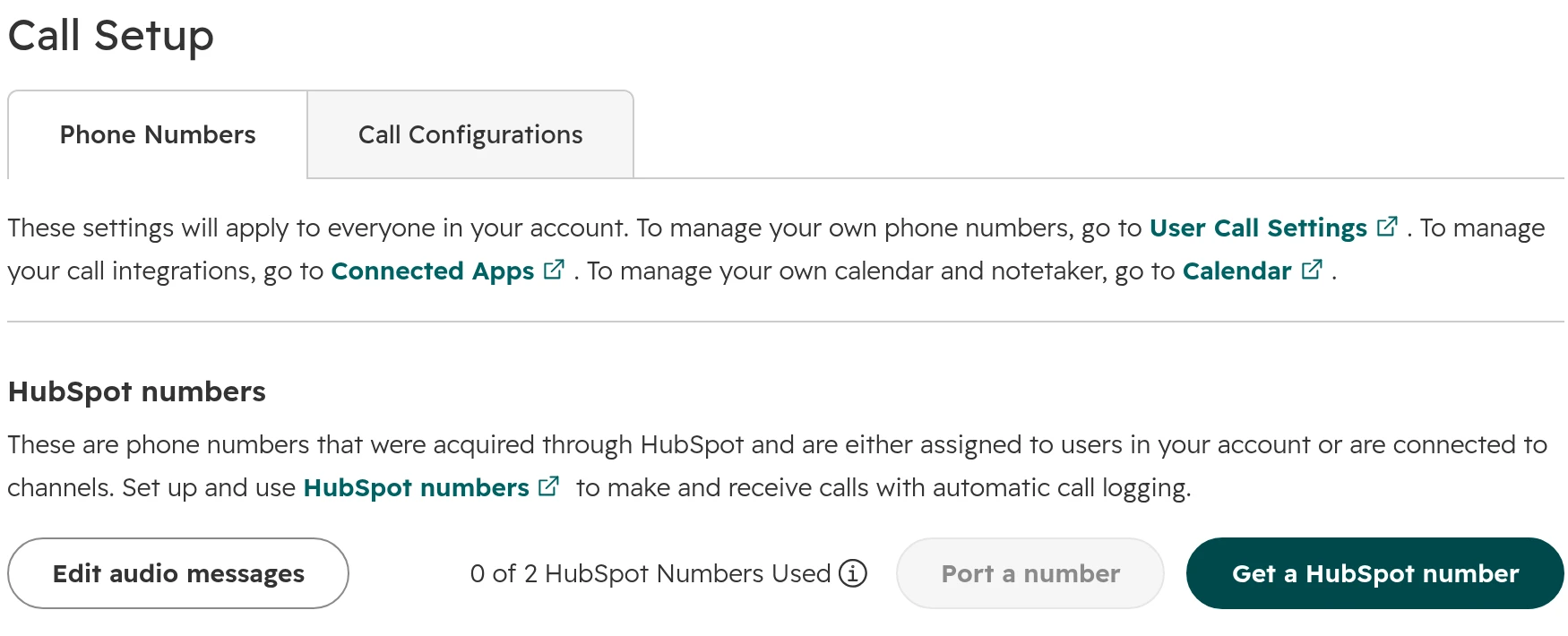
Settings > Calling > Call Setup. HubSpot numbers sit at the top; numbers you register yourself are listed below.
HubSpot calling is enough when a small team calls out from HubSpot, has Sales Hub Professional seats and wants transcripts on the record. It falls short where you need a phone system: a main number with a menu and ring groups for many people, desk phones, fax, mobile SIM cards, or calls to countries HubSpot doesn’t cover. HubSpot’s numbers can’t send text messages in Germany, Austria or Switzerland either; its SMS add-ons work with US numbers only.
Caller ID needs a test in Austria and Switzerland. According to HubSpot’s help, Austrian operators block incoming international calls that show an Austrian number. Swiss carriers block or anonymise Swiss landline numbers shown as caller ID from abroad, and since 1 July 2026 mobile numbers too. Call a phone in each country before your reps rely on the number.
HubSpot calling, 3CX, placetel, sipgate and Aircall compared
The two tables compare HubSpot calling, 3CX, placetel, sipgate and Aircall from the buyer’s side. Prices are list prices per month without VAT, as each vendor shows them on 5 October 2026.
What logs, where it lands, where the recording is
System
Which calls log
Logged to
Recordings
HubSpot calling
All calls made or taken in HubSpot
The contact, plus the company or deal you call from
Played on the record. Transcribed for users with a Sales or Service seat on Professional
3CX
External calls, only if the number matches an existing contact
The contact
Stay in 3CX. The transcription can be logged
placetel
All calls of the account. An unknown number creates a contact
The contact
Only with placetel’s paid recording option
sipgate
Calls in the sipgate App, with the App Premium
The contact, and if you choose, open deals and the company
Not sent. A note and an AI summary are
Aircall
All calls. An unknown number can create a contact
The contact, else the company, plus an open deal or ticket
A link to the recording in the call note
What you need and what it costs
System
You need
Numbers in DE, AT, CH
List price per month
HubSpot calling
Starter or higher and a Sales or Service seat (Core seat on Starter)
Yes. Port in landline numbers only
Minutes included. +1,000 minutes $50 on Professional and Enterprise
3CX
3CX Pro or higher, a server or 3CX hosting, a SIP trunk
From your carrier
Annual licence per system, priced by simultaneous calls, not per user
placetel
placetel Business (the AppStore still says PROFI) and the HubSpot app by PhoneMondo
German numbers. Address proof per area code
From €9.90 per user on 24 months, €11.90 monthly, plus €7.90 for the HubSpot app
sipgate
A sipgate business plan and the sipgate App Premium
German numbers. Commercial register extract
From €12.95 per user (at least 2), plus €19.95 for the App Premium
Aircall
3 licences or more, any HubSpot plan
Yes, once your documents are approved
From $30 per licence (Essentials) or $50 (Professional), billed yearly
Sources: each vendor’s price page and HubSpot integration docs, checked 5 October 2026. We left out Dialpad: buyers in Germany, Austria and Switzerland rarely ask for it.
Click-to-call works in all five: in HubSpot’s calling window for HubSpot and Aircall, through a browser extension for 3CX and placetel, and through a button that hands the number to the sipgate App. Each of the five has a mobile app. 3CX, placetel and Aircall log on their side, so a call from any of their phones or apps logs. sipgate logs what goes through the sipgate App, HubSpot what goes through HubSpot. A call from a personal mobile number logs nowhere. Third-party apps can’t place calls from custom object records.
Which phone system for which team?
Our view, from the projects we see. Start from how your team phones today. The feature lists come second.
Your situation
Our pick
Why
Two to ten sales reps who call out from HubSpot, on Sales Hub Professional
HubSpot calling
No extra tool, the call logs itself, transcripts on the record. Use registered numbers or one HubSpot number per rep
An office with a main number, reception, ring groups and desk phones
sipgate or placetel
A full phone system with German numbers. Book the HubSpot add-on for the people who sell
You already run 3CX and have IT support
Keep 3CX
It logs every matched call. Plan a day for the HubSpot app and cleaning up phone numbers
A call team with high volume, queues and a power dialer
Aircall
Built for teams who work inside the CRM all day. Check the price per licence against your seats
Field sales who mostly use their mobile
A system whose app logs on the server
Calls from a personal mobile number never reach HubSpot. Test a mobile call in the trial
Free HubSpot or Starter without paid seats
A provider’s app
Third-party calling apps work on every HubSpot plan; HubSpot’s own calling needs a paid seat
Why calls end up on the wrong record, or on none
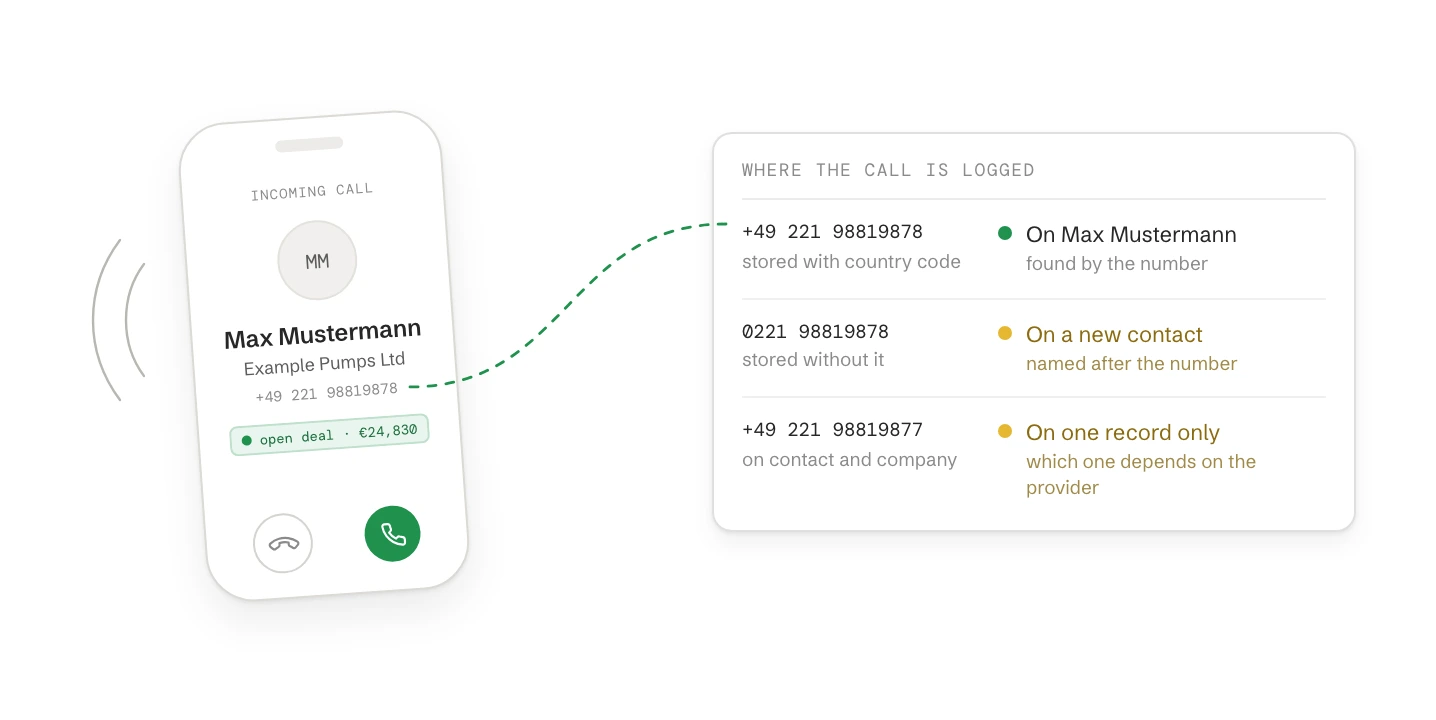
A phone system finds the contact by the caller’s number. If the number in HubSpot is written differently from the number the phone network delivers, there’s no match. Then the call isn’t logged at all, or it lands on a new, empty contact. A number written two ways is the most common reason calls “go missing”.
System
How it finds the record
When it doesn’t find one
3CX
The whole number must be identical. 3CX asks for every number in HubSpot in international format, +49 and so on
The call isn’t logged. A user can create the contact by hand in the 3CX web client
placetel
By the number
Creates a new contact. Logging calls without a match is a separate setting, off by default
sipgate
By the number. You set a default country code, so numbers without +49 are read as German
Not logged to a record. A number can only log to one record: not to a contact and its company at once
Aircall
Email first, then the contact’s phone or mobile, then the company’s phone. Numbers in international format
Creates a contact named after the number with the last name “Aircall new contact”, if you allow it. Two records with one number: the last updated wins
So before you connect anything, store every number with its country code: +49 221 98819878, not 0221 98819878. Export the phone and mobile columns, fix them in a spreadsheet and import them back with the record ID. Then decide whether unknown callers may create contacts. If they may, someone has to merge those contacts every week. Our guide on duplicates in HubSpot shows how.
placetel’s own description of its HubSpot app: every call logs on the contact, and an unknown number creates a new contact.
Also check who a call belongs to. 3CX and Aircall set the call’s owner by matching the user’s email address in both systems. If the addresses differ, calls log without an owner or with the contact owner instead of the person who called.
Call recordings in Germany, Austria and Switzerland: where they’re stored and what to set
In Germany and Switzerland, recording a call without the other person’s consent is a criminal offence, and in all three countries data protection law applies. HubSpot itself says the GDPR generally needs every party’s consent. What follows is what the software does and where you set it. Whether and how you record is for your data protection officer or lawyer to decide.
HubSpot records by default. New accounts record every call. You can exempt inbound or outbound calls by direction, number, user or region, or switch recording off. A custom consent message plays to inbound callers on HubSpot numbers; on outbound calls the rep has to ask.
Callers hang up at the announcement. Many inbound callers in Germany end the call as soon as they hear it. Decide whether you record inbound calls at all before you go live.
Recordings sit in different places. HubSpot keeps them with Twilio and plays them on the record. Aircall puts a link in the call note. 3CX keeps them in 3CX. placetel sends them only with its paid recording option. sipgate sends a note and an AI summary, not the audio.
Transcripts need the right seat. HubSpot only transcribes recordings by users with a Sales or Service seat on Professional or Enterprise.
Your own staff are recorded too. Where you have a works council, involve it before you switch recording or call analytics on.
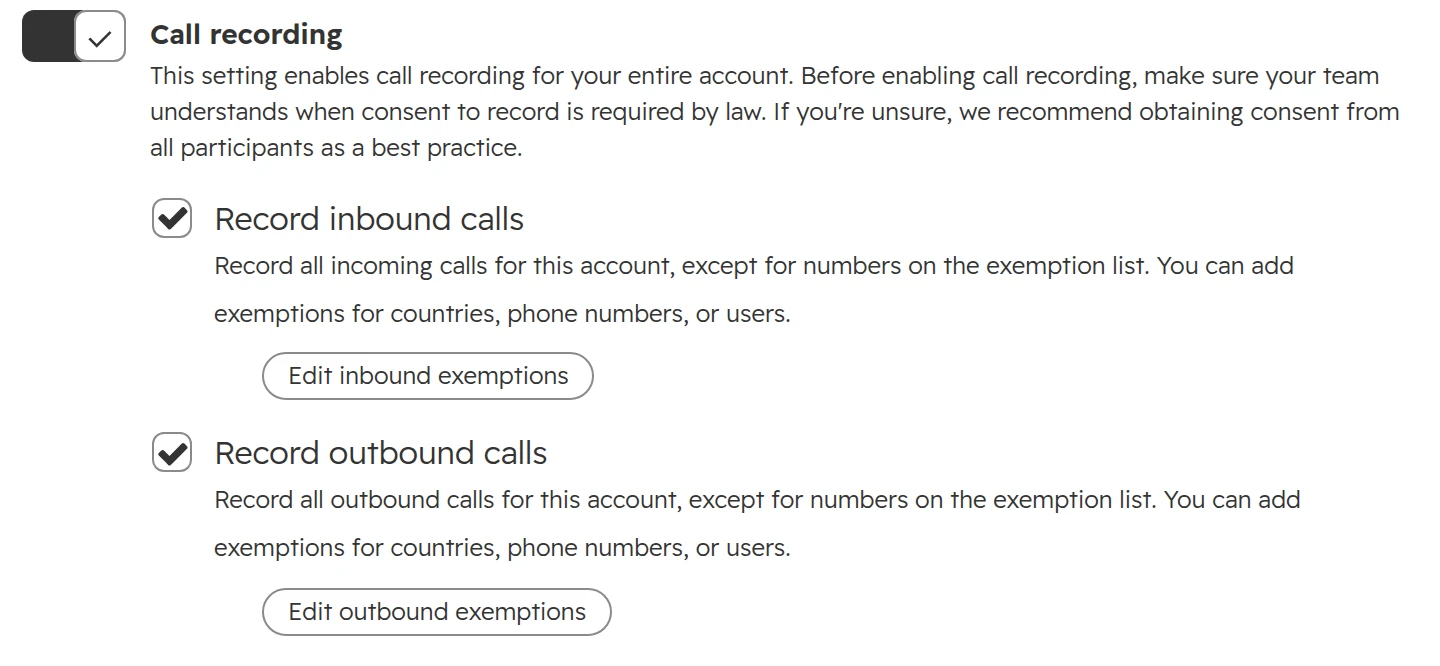
Call recording in Settings > Calling > Call Configurations. It’s on by default for the whole account; exemptions sit under each direction.
One change from 31 August 2026: meetings recorded with HubSpot’s notetaker or Zoom, Teams and Google Meet no longer create a call record as well. Call reports may show fewer calls from that date. That’s the duplicates going away, not your team calling less.
How to set up calling in HubSpot, step by step
Do the HubSpot side first, whichever phone system you use. The settings are under Settings > Calling > Call Setup.
Step 01
Clean up the phone numbers
Every contact and company number with its country code, as described above. Do this first; it decides whether the rest works.
Step 02
Decide on HubSpot’s own calling
If you use another provider, consider switching HubSpot calling off under Call Configurations, so reps don’t place some calls one way and some the other. Existing calls stay on the records.
Step 03
Set call outcomes and make them required
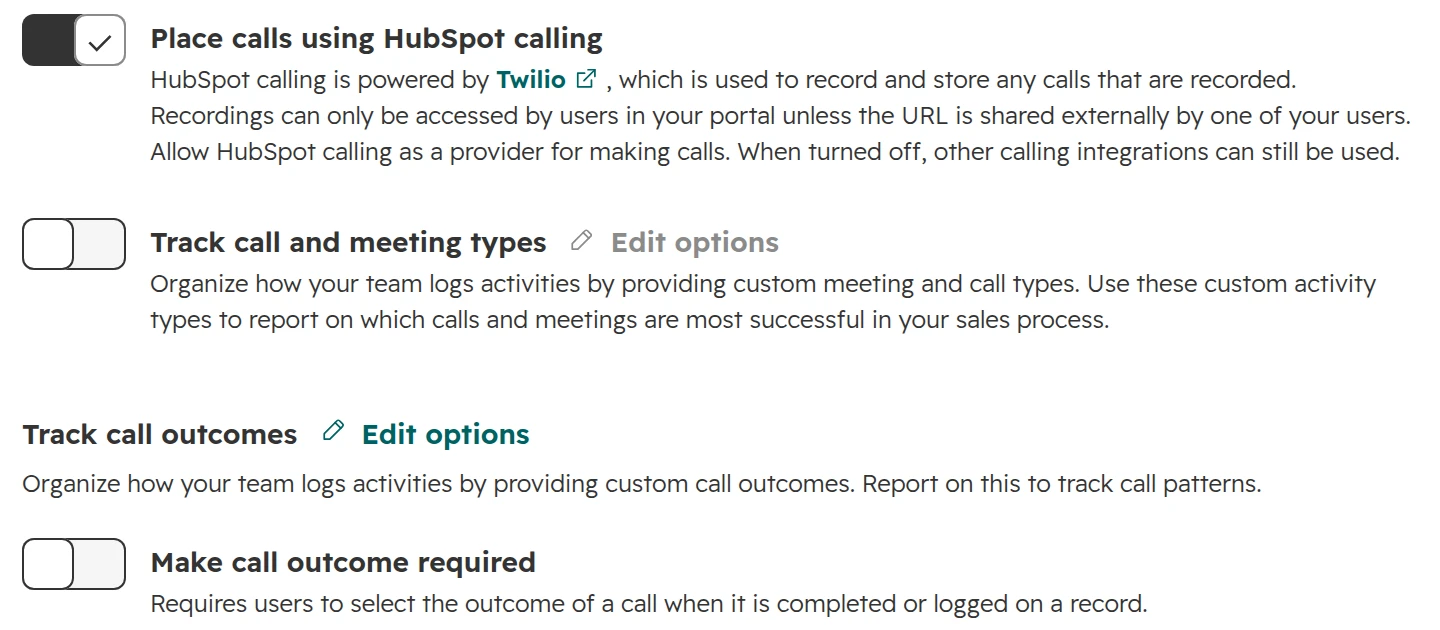
Keep the list short: connected, no answer, left voicemail, wrong number, meeting booked. Then switch on “Make call outcome required”. It applies to outbound calls from the HubSpot browser and to calls logged by hand, not to inbound, mobile or imported calls.Call outcomes and the switch that makes them required, in the same tab.
Step 04
Set recording
Decide per direction and region with your data protection officer, then set the exemptions. For inbound calls on HubSpot numbers, write your own consent message instead of the default.
Step 05
Install the provider’s app
Connect the phone system with a HubSpot Super Admin account. The next two sections show sipgate and placetel. For 3CX follow its HubSpot guide, for Aircall its help article.
Setting up the sipgate HubSpot integration
sipgate connects through the sipgate App, its softphone for desktop, browser and mobile. Logging calls to HubSpot needs the sipgate App Premium for each user who should log; the basic app only reads contacts.
Step 01
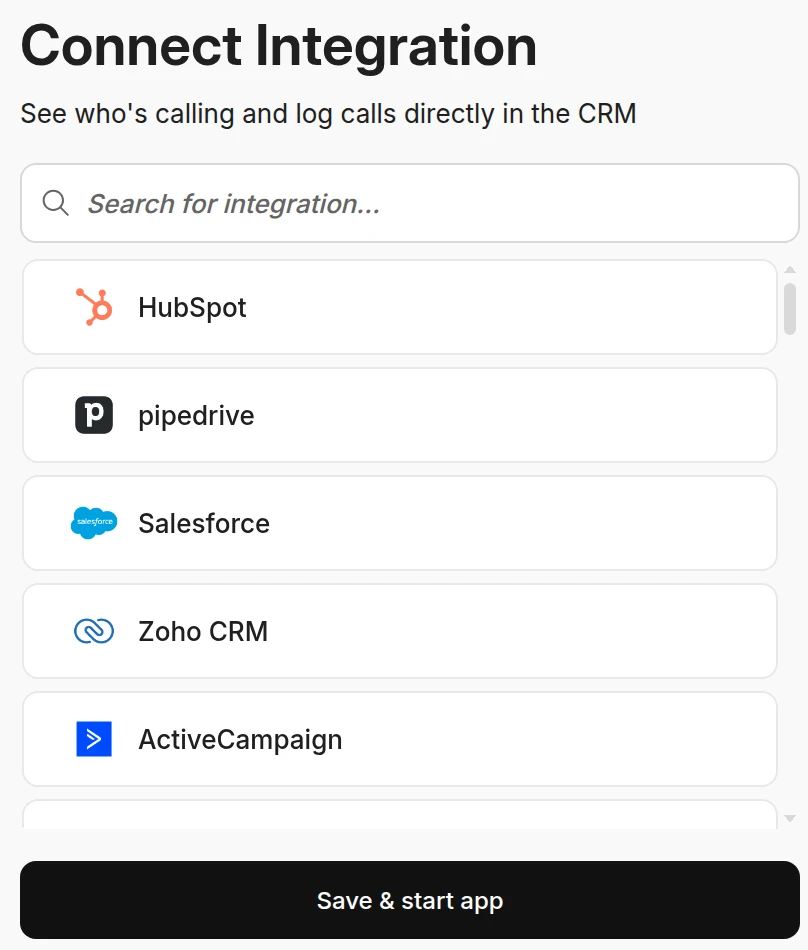
Open the integrations in the sipgate App
In the sipgate App, choose HubSpot from the integrations list.The integrations in the sipgate App. HubSpot is at the top.
Step 02
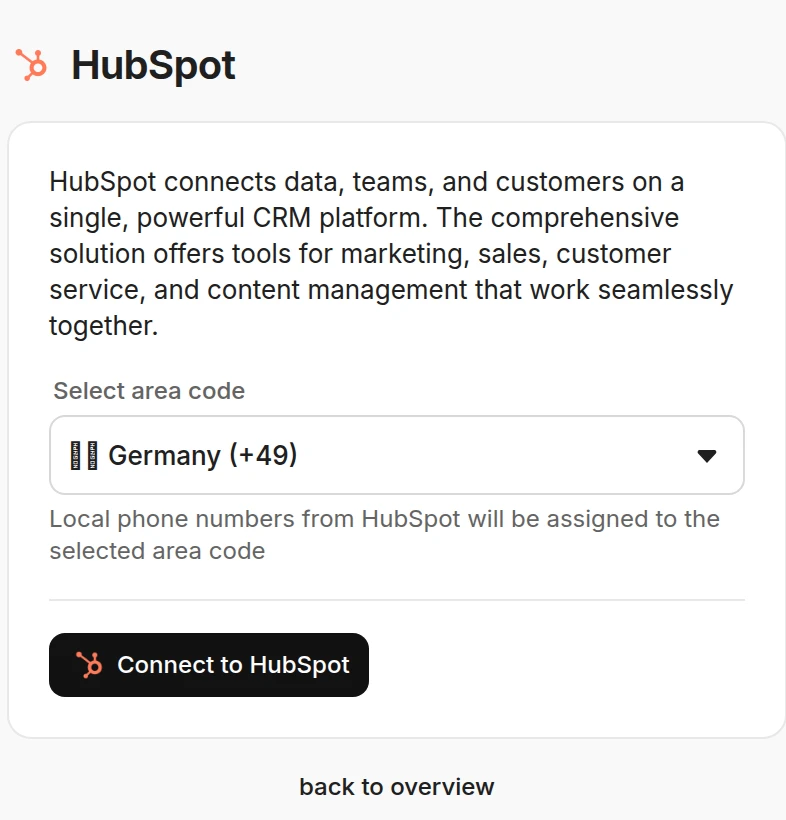
Set the default country code
Pick Germany (+49), Austria or Switzerland. Numbers stored in HubSpot without a country code are read with it. Then click “Connect to HubSpot”.The country code sipgate uses for numbers stored without one.
Step 03
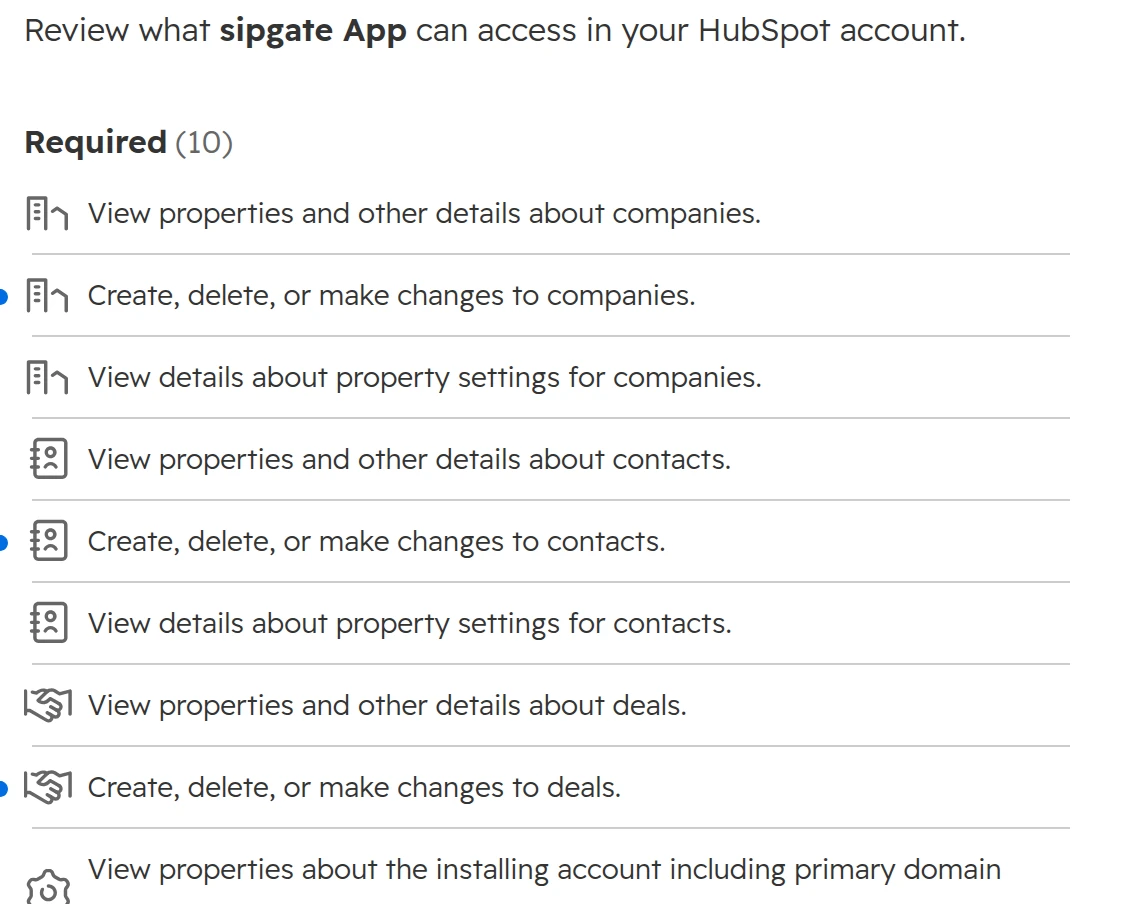
Approve the access in HubSpot
Choose the HubSpot account and approve. The app reads and writes contacts, companies and deals, and reads users.What sipgate asks for in HubSpot.
Step 04
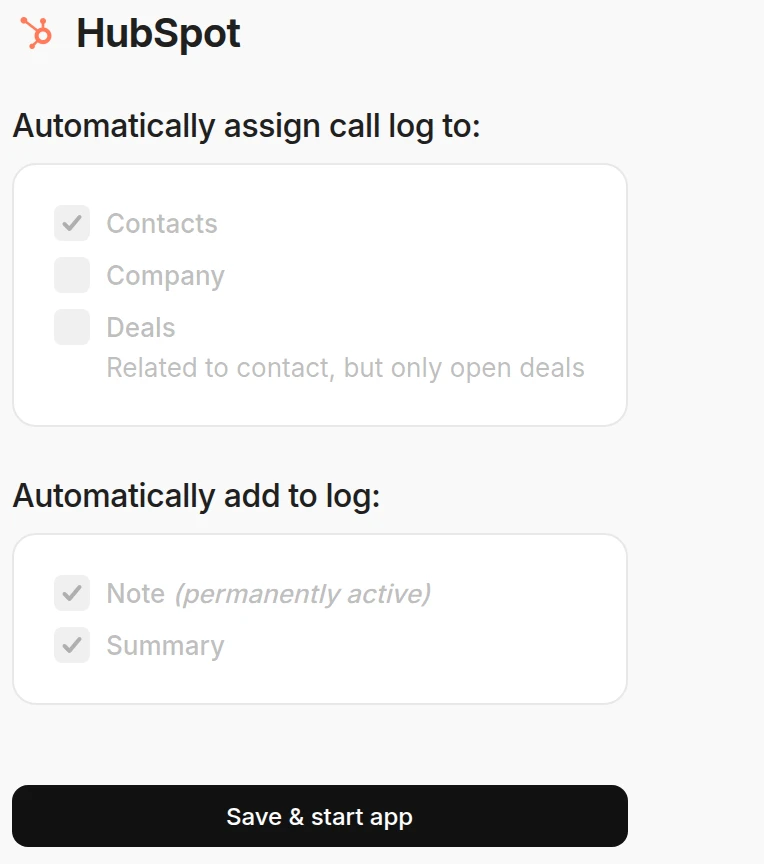
Choose where calls log
Contacts always; open deals of the contact and companies if you tick them. A note logs with every call, the AI summary optionally. One number may sit on only one record, so keep the main number on the company and direct numbers on the contacts.Where sipgate logs calls. The options are greyed out until the Premium app is booked.
Setting up the placetel HubSpot integration
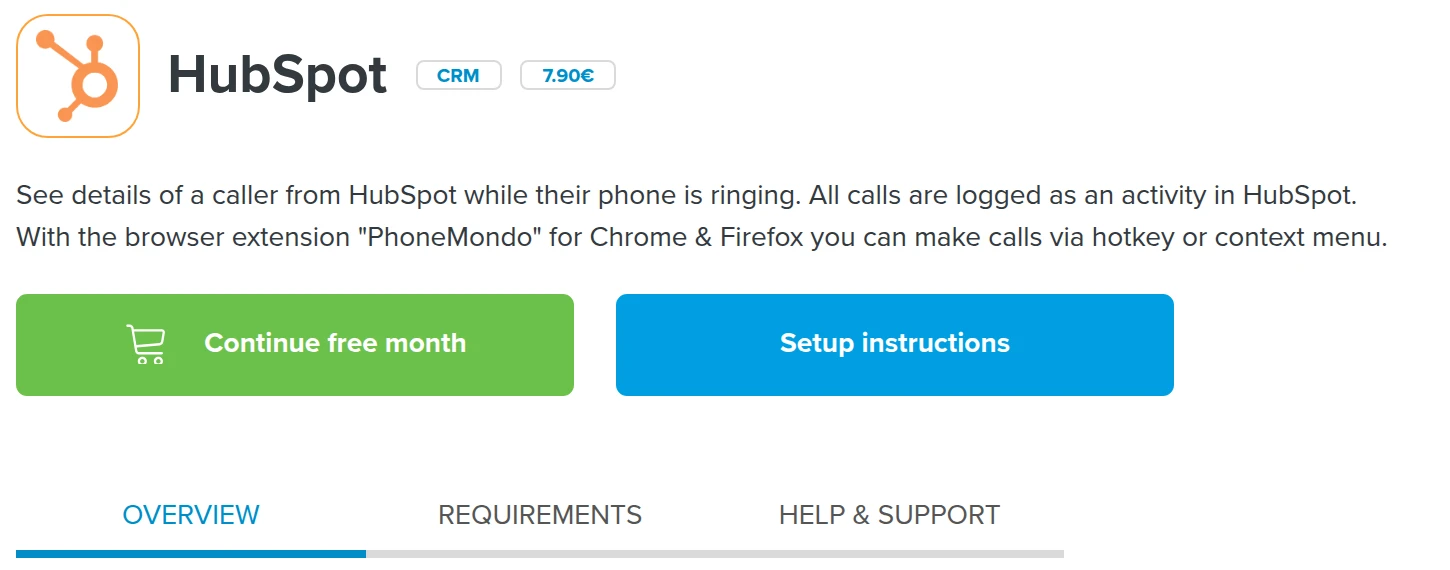
placetel’s HubSpot app is made by PhoneMondo and booked in the placetel AppStore. The first month is free. After that the app costs €7.90 per user a month until you cancel, with a month’s notice to the end of a month.
Step 01
Book the HubSpot app in the AppStore
In the placetel web portal, open AppStore > HubSpot and start the free month. Pick how many users get it; they must exist as placetel users first.The HubSpot app in the placetel AppStore. Its requirements name the PROFI package, which placetel’s price page now calls Business.
Step 02
Link the PhoneMondo account and connect HubSpot
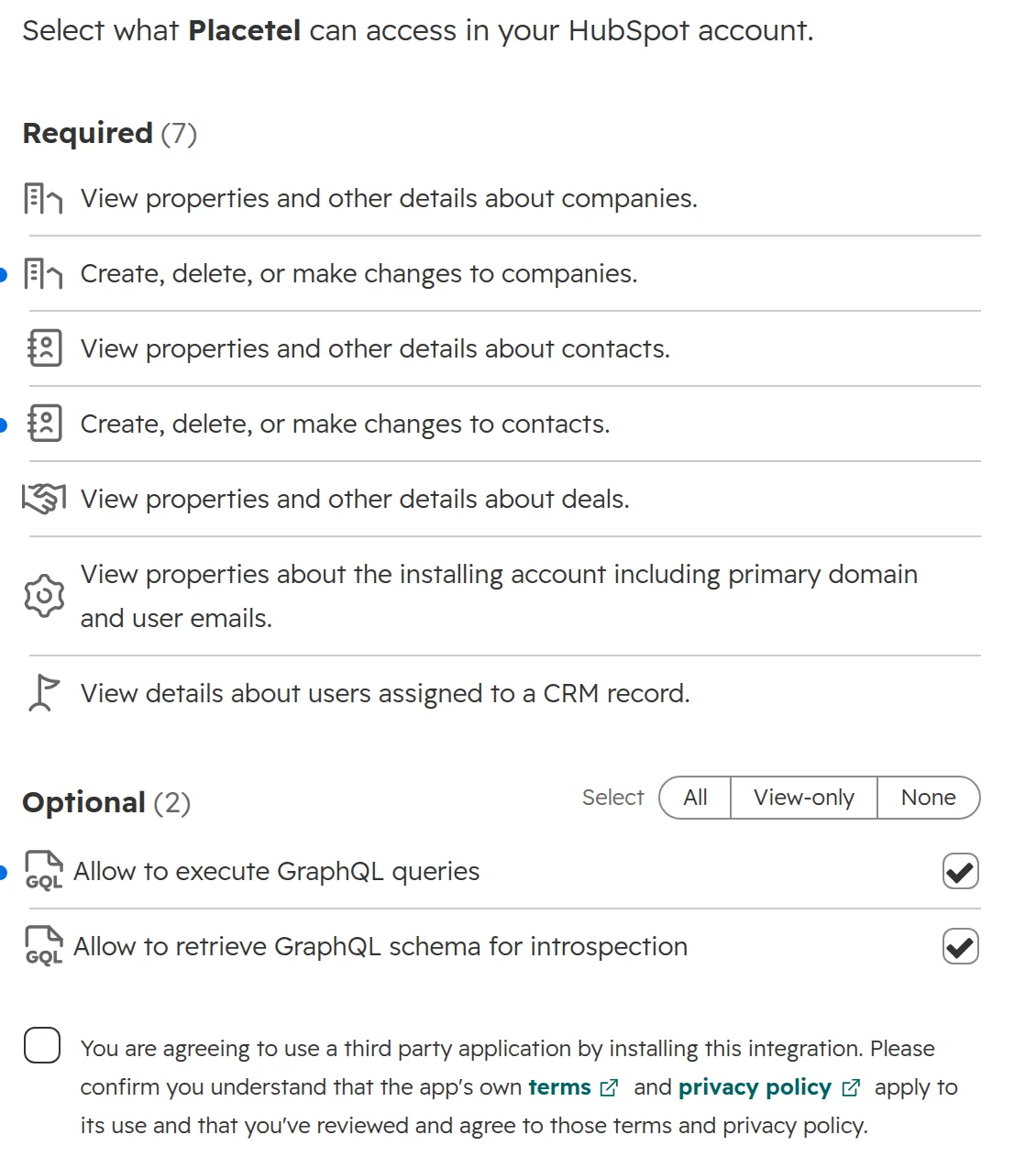
On the confirmation page, link your account to PhoneMondo. PhoneMondo opens; install its add-on for HubSpot and connect your HubSpot account. The app reads and writes contacts and companies, and reads deals.What the placetel app asks for in HubSpot.
Step 03
Check the logging settings
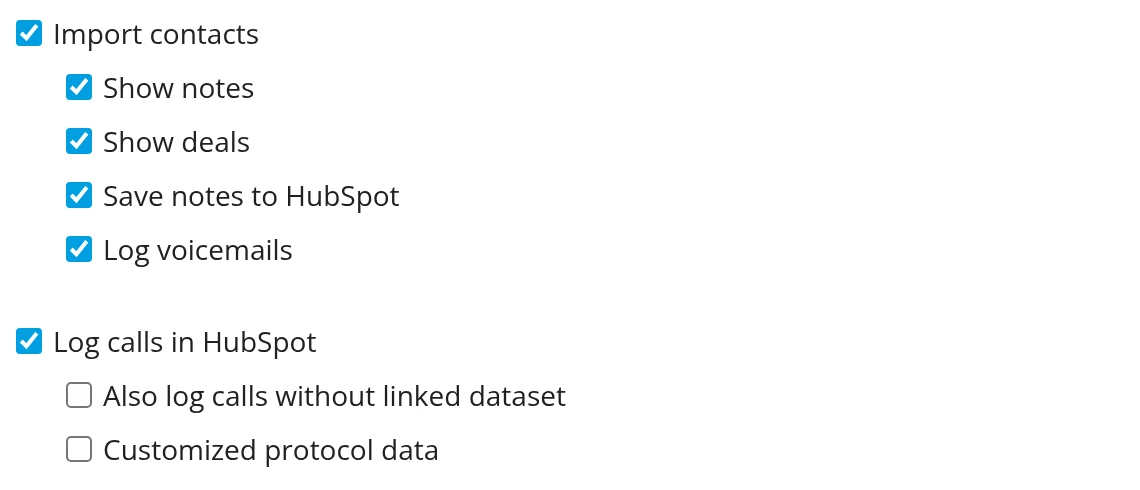
“Log calls in HubSpot” is on by default. “Also log calls without linked dataset” is off: calls from numbers that match no record are then not logged. Recordings only come across if you book placetel’s call recording option.The HubSpot settings in PhoneMondo.
Step 04
Install the browser extension
Click-to-call from HubSpot needs PhoneMondo’s extension for Chrome or Firefox on each computer.
How to check that calls really log
Integrations break quietly. A changed password, an expired token or a new number, and calls stop logging for days before anyone notices. Check three things after go-live and then every week.
Step 01
The call on the record
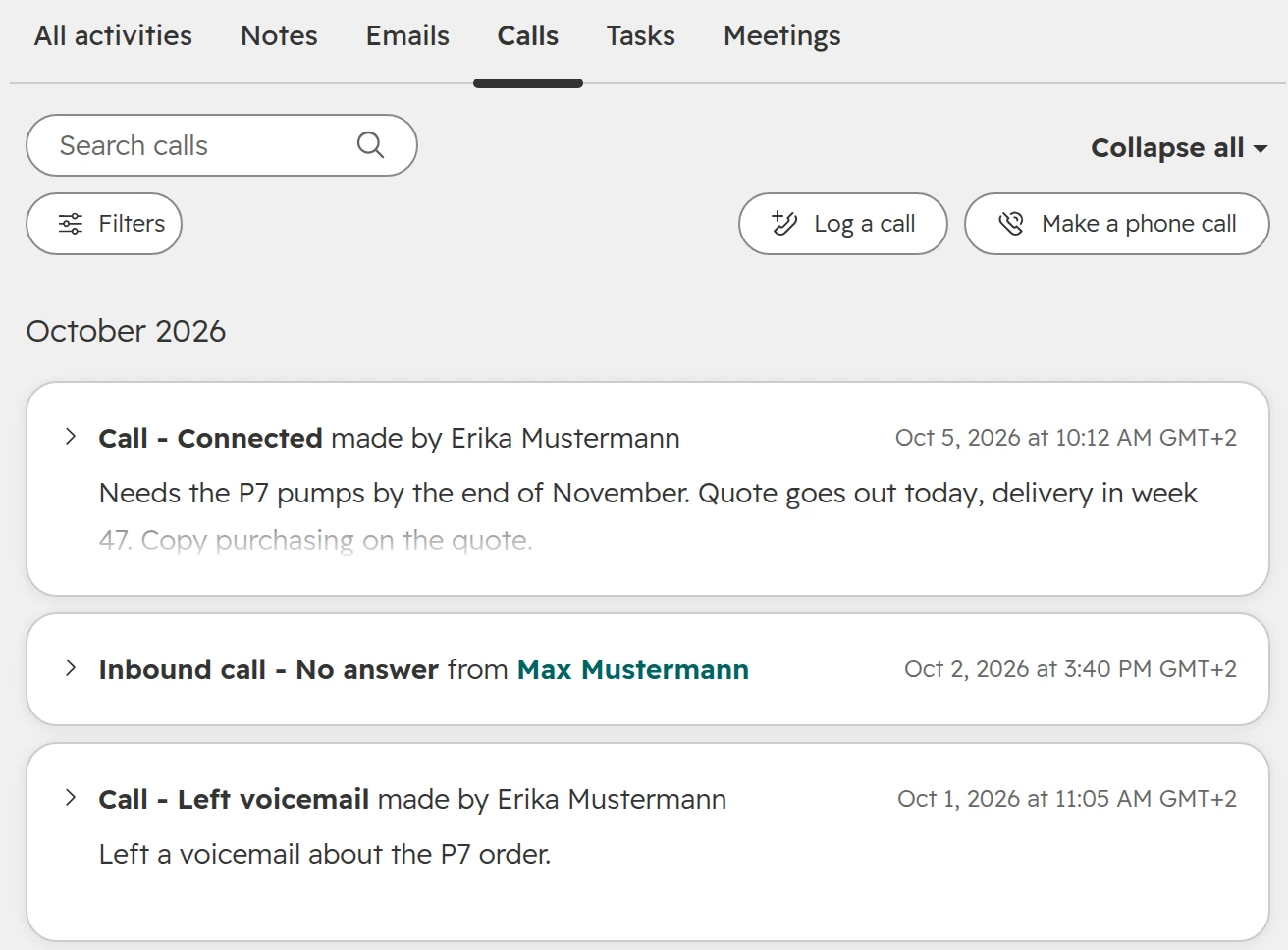
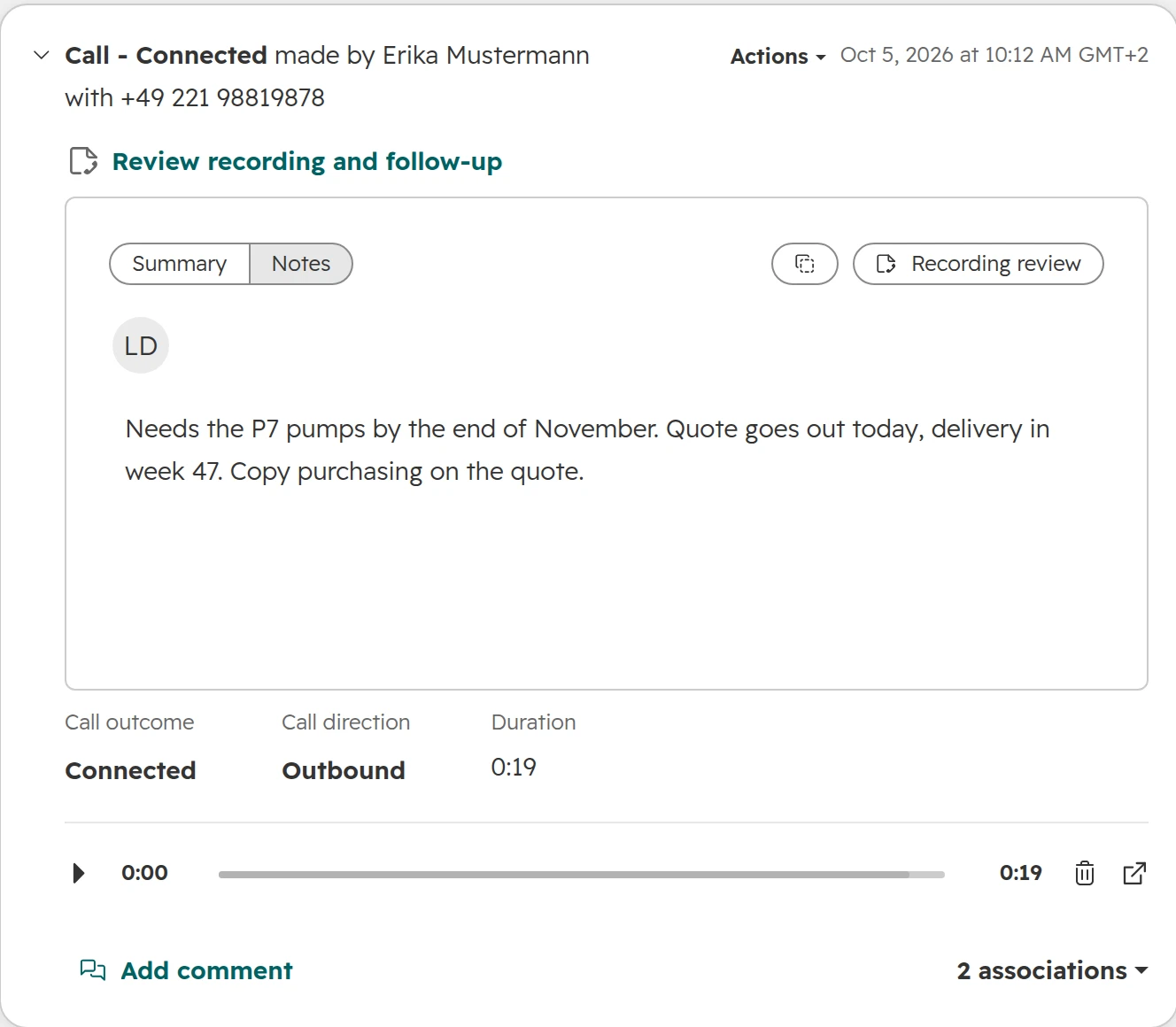
Make a test call to a known contact and open the contact. The call shows with its outcome, direction and duration, and a missed call shows as missed.Three calls on one contact: connected, missed and voicemail.
Step 02
The recording and the notes
Open the call. Check the outcome, the notes and whether the recording plays, or where the link leads.A call with notes, outcome and recording on the contact.
Step 03
The call list and one report
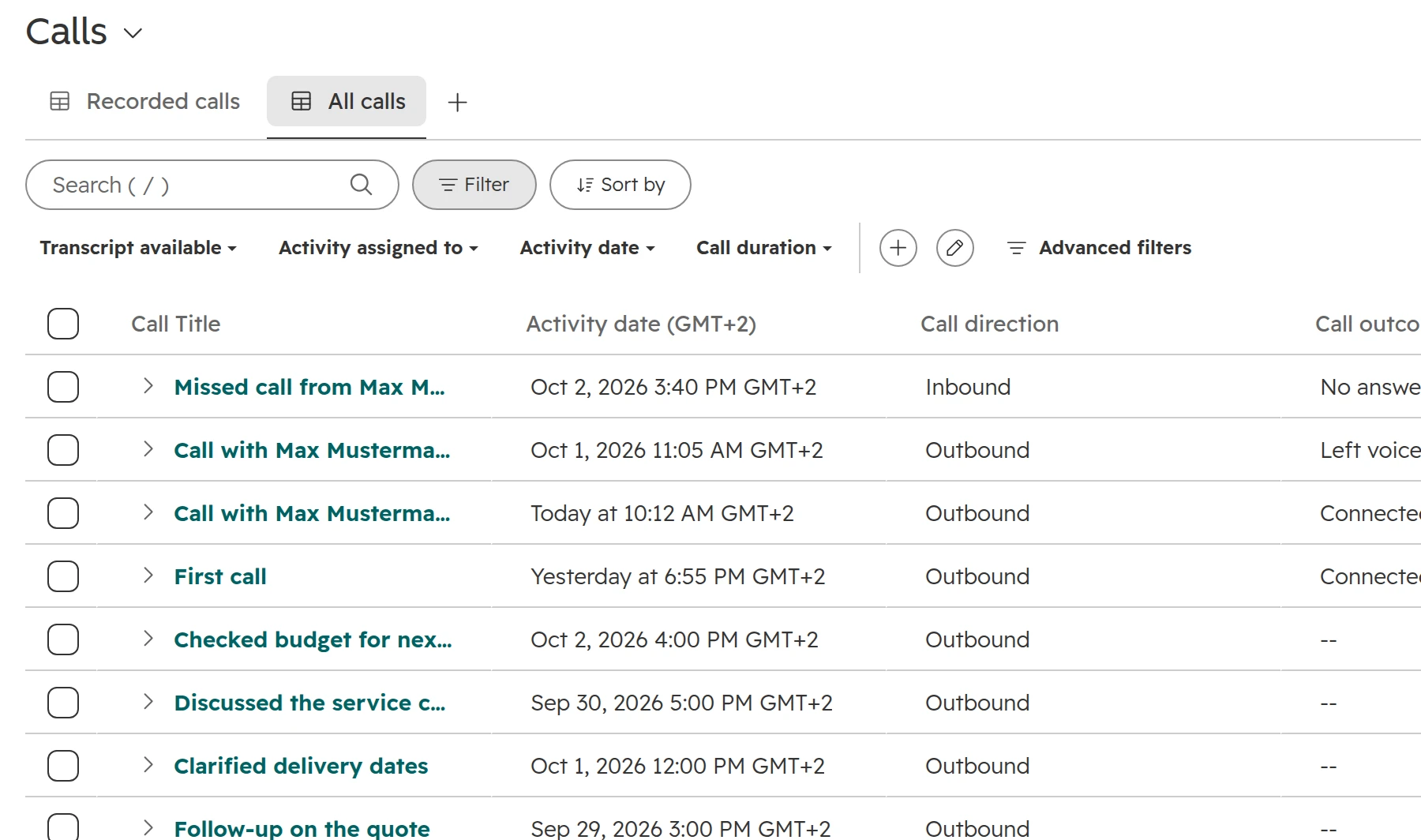
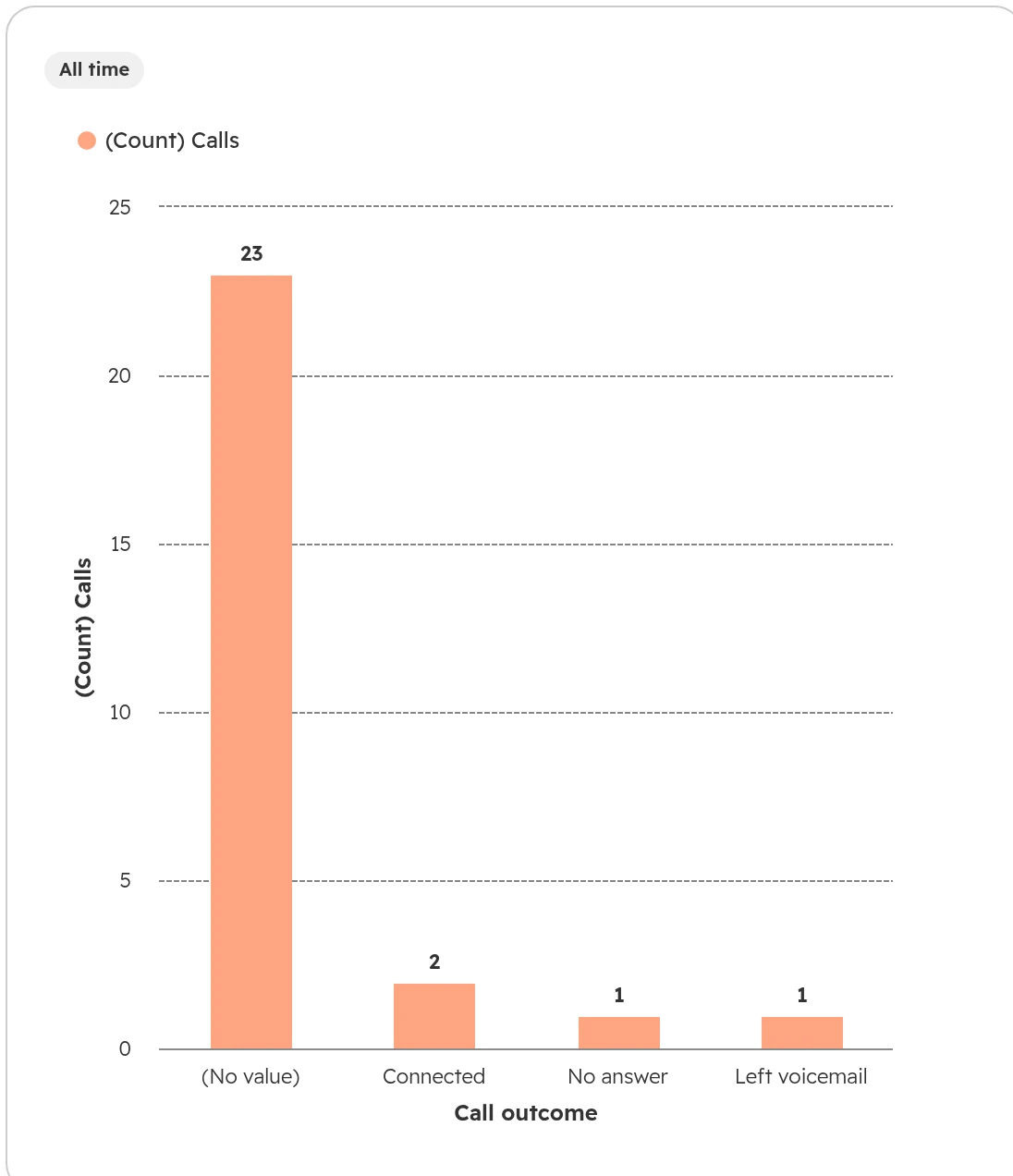
In CRM > Calls, add the call outcome column and look for calls without one. Then build one report: calls by outcome, or calls per rep per week. A rep whose count drops to zero is your alarm.The call list. Calls without an outcome show at a glance.A report on calls by outcome. Here most calls have none, so the outcome wasn’t required yet.
Plan a week for the trial. Phone numbers in Germany, Austria and Switzerland are tied to a business and a location, so every provider checks you first. placetel asks for address proof per area code before its test numbers can call. sipgate asks for a commercial register extract, and Aircall for a company document before it activates the account. HubSpot reviews your business before a HubSpot number works.
Then run these situations with two reps and real calls:
An outbound call from a contact, a company and a deal. Does it log on the record you called from?
An inbound call from a known number and from an unknown one. What happens to the unknown caller?
A missed call and a voicemail. Do they show on the contact, and in the inbox if you need them there?
A call from the mobile app, away from the desk. Does it log?
A call to a phone in Austria or Switzerland. Does your number show as caller ID?
A transfer to a colleague, and a contact whose owner changes. Who owns the call afterwards?
The outcome. Is it set, and can a workflow use it? Aircall, for one, counts an outbound call that reaches voicemail as connected.
The recording and transcript, in German. Where do they open, and who can listen?
The count. Does the provider’s call count for a day match HubSpot’s?
Support. Who answers when logging stops: the phone provider, the app’s maker or HubSpot?
Last, add up the real cost per user: the phone plan, the HubSpot add-on or premium app, and the HubSpot seats your callers need. Our guide on HubSpot seats explains which seat calls.
Mistakes we see with phone systems and HubSpot
Numbers in five formats. 0221, +49 221, +49 (0)221, 0049 221 and the same with spaces. The phone system can’t match them, and the calls disappear.
Every unknown caller becomes a contact. After a month the CRM holds hundreds of contacts named after phone numbers.
Outcomes that aren’t required. Without them, call reports show activity but not what came of it.
Nobody checks the logging. The integration stops after a password change, and a week of calls is missing from the pipeline review.
Calls from personal mobiles. They never reach HubSpot. If reps call from their own phone, give them the provider’s app.
Two ways to call. HubSpot calling stays on next to the new provider, and calls end up split between two tools.
Recording switched on without a decision. HubSpot records by default. Callers hang up at the announcement, and nobody agreed it with the data protection officer.
Calls that log themselves are what gets a sales team to trust the CRM. Our guide on HubSpot adoption covers the rest. If your team calls through Microsoft Teams Phone, the Teams guide shows how those calls log.
How we connect phone systems and HubSpot
We start with how calls flow today and where they get lost. The provider comes last.
Step 01
Map the calls
Who calls whom, from which number and device, and what has to land in HubSpot: outcomes, recordings, missed calls.
Step 02
Clean the numbers
Every number in international format, duplicates merged, one number per record.
Step 03
Choose and test
Two candidates at most, tested with the checklist above, with two of your reps.
Step 04
Set it up
Outcomes, recording rules with your data protection officer, the app for each user, and the old way of calling switched off.
Step 05
Keep it running
One report that shows calls per rep per week, and a person who looks at it.
Frequently asked questions
Does HubSpot have a built-in phone system?
HubSpot has calling built in from Starter: calls from the record, recording, transcripts, and inbound calls on HubSpot numbers. It isn’t a full phone system: no desk phones, no fax, and its numbers can’t send text messages in Germany, Austria or Switzerland.
Is HubSpot calling free?
HubSpot calling is included from Starter for users with a seat that can call: a Sales or Service seat, or a Core seat on Starter. The account gets 500, 3,000 or 12,000 minutes a month in total (Starter, Professional, Enterprise). Extra minutes cost $50 a month per 1,000 on Professional and Enterprise.
Are HubSpot calling minutes per user?
No. The minutes are pooled for the whole account and shared by everyone who calls. They reset on the 1st of each month. Calls made through another provider’s app don’t use them.
Can I keep my existing phone number with HubSpot?
Yes, in two ways. Register it as an outbound number, which only shows it as caller ID. Or port it to HubSpot: for Germany, Austria and Switzerland, HubSpot ports landline numbers, not mobile numbers. A regulatory review of your business comes first.
Does 3CX work with HubSpot?
Yes. 3CX logs calls to HubSpot contacts, looks up callers and offers click-to-call through its browser extension. It needs the Pro edition or higher, a private HubSpot app you create with HubSpot’s command line tool, and every number in HubSpot stored in international format.
Does Aircall work with HubSpot?
Yes, on any HubSpot plan. Aircall costs from $30 per licence a month (Essentials, billed yearly), with at least three licences. Numbers in HubSpot need the international format. Aircall logs the call on the contact, else on the company, and adds the recording as a link in the call note.
Which phone systems integrate with HubSpot in Germany?
Among the providers buyers ask about most: sipgate, placetel and 3CX from the German-speaking market, Aircall internationally, and HubSpot’s own calling with German numbers. sipgate needs its App Premium for call logging, placetel the HubSpot app by PhoneMondo.
Which phone system is best for HubSpot?
The best phone system for HubSpot depends on how your team phones today. HubSpot calling fits two to ten reps who call out from HubSpot on Sales Hub Professional. sipgate or placetel fit an office with a main number, ring groups and desk phones. Keep 3CX if you already run it and have IT support. Aircall fits a high-volume call team with queues and a power dialer.
Why are calls not logging in HubSpot?
Calls usually stop logging in HubSpot for one of three reasons. The number in HubSpot is stored without its country code, so the phone system finds no match. The phone system skips calls from numbers that match no record, as placetel does by default and 3CX always does. Or the connection broke after a password change or an expired token. A weekly test call to a known contact shows it.
Can we record calls with HubSpot in Germany?
HubSpot can record, and it does so by default. In Germany and Switzerland, recording a call without the other person’s consent is a criminal offence, and data protection law applies in all three countries. Set exemptions or switch recording off, and let your data protection officer or lawyer decide how you ask for consent.
Every call on the right record, without anyone typing it in
We check how calls reach your HubSpot today and what gets lost, live in your portal. You keep the quick wins, whether we work together or not.