HubSpot seats and credits explained: who needs which seat

Which seat each role needs, what seats cost, what uses credits on both of HubSpot’s pricing models, and worked examples in euros.

Updated · 15 minutesBy Matthew Labrooy, Managing Director

Free download: the seats and credits calculator (Excel)

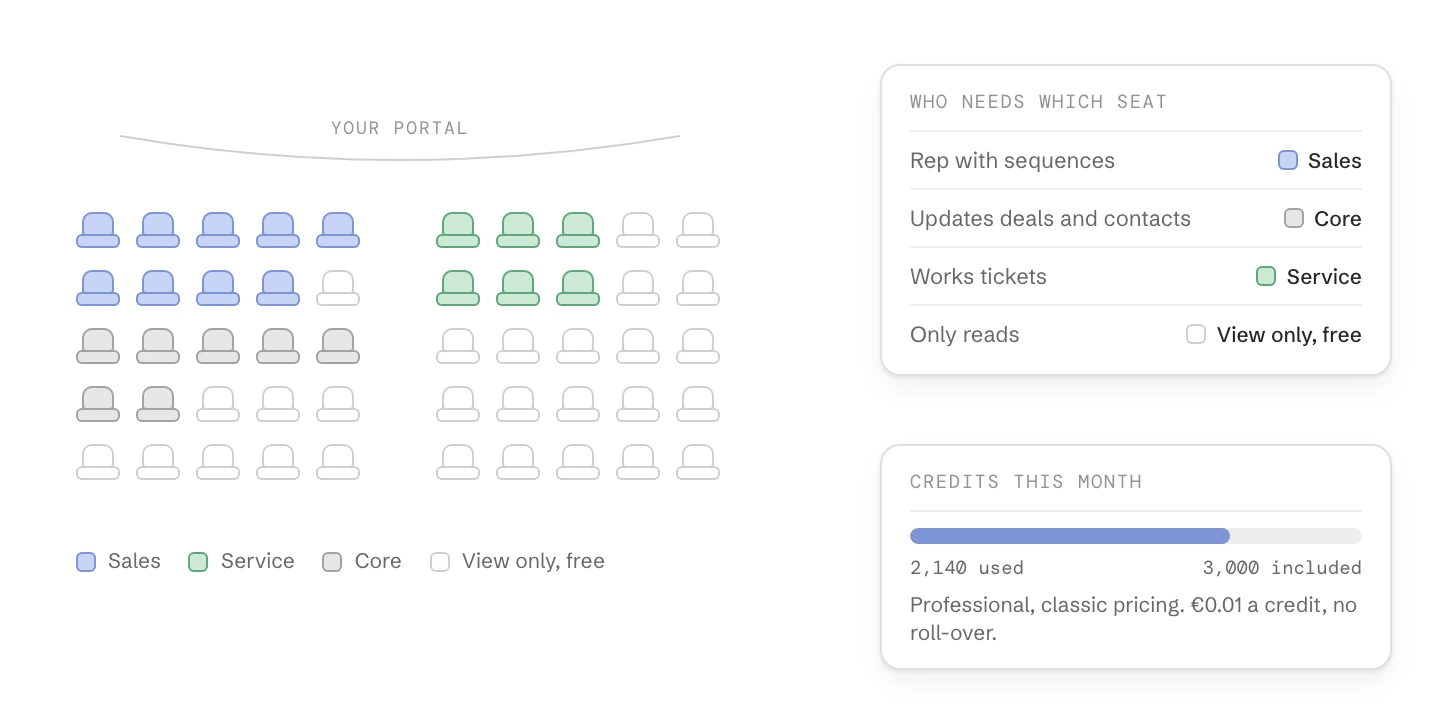
A grid of seats in one portal coloured by type, beside who needs which seat (Sales, Core, Service, free View-only) and a month's credits: 2,140 used of 3,000 included in Professional.
In short

HubSpot charges for access per seat and for work done per credit. Which seats you can buy depends on your pricing model: accounts bought in Europe since 1 October 2026 have GTM and Ops seats, all others have Core, Sales, Service and Revenue seats.

Give each person the cheapest seat that covers what they do, and use free View-only seats for people who only read. Then check what uses credits. On the new pricing the list includes marketing emails and workflow actions, so plan your email volume before you choose an edition.

Two models
New customers in Europe, the Middle East and Africa since 1 October 2026: one edition, GTM and Ops seats. Everyone else: Core, Sales, Service and Revenue seats
Free seats
View-only, Partner and Developer seats, on every paid plan
Seat prices
Core €20 to €75, Sales or Service €100 to €150, GTM €20 to €175, Ops €50 a month, list prices before VAT
Included credits
Classic: 500, 3,000 or 5,000 a month by edition. New: 5,000, 10,000 or 15,000
A credit
€0.01. Credits reset every month and don’t roll over
Uses credits
AI agents and AI workflow actions on both models. On the new pricing also every email HubSpot sends except one-to-one emails, and workflow actions
Limits
Account & Billing > HubSpot Credits: limits for the account, per feature and per action

Which HubSpot pricing model are you on?

Look at your seat types. In HubSpot go to Settings > Users & Teams, tab “Seats”. GTM and Ops seats mean the new flexible seats-and-credits pricing, Core, Sales and Service seats mean the classic seats pricing.
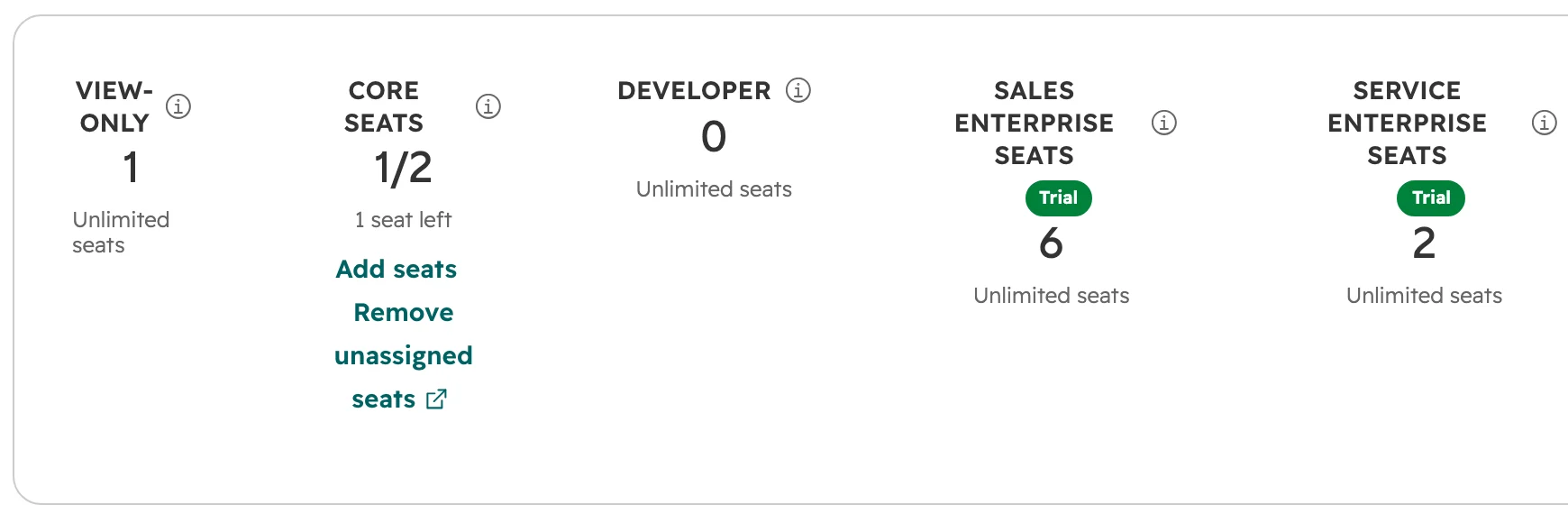
HubSpot, Settings > Users & Teams, tab Seats: View-only, Core, Developer, Sales Enterprise and Service Enterprise seats with their counts
The Seats tab on the classic pricing: one card per seat type, with how many are used and how many are left. On the new pricing it shows GTM and Ops seats.
Classic seats pricingFlexible seats-and-credits pricing
Who has itEvery account bought before 1 October 2026, and new customers outside Europe, the Middle East and AfricaNew customers in Europe, the Middle East and Africa since 1 October 2026
What you buyHubs (Marketing, Sales, Service, Content, Data, Revenue, Smart CRM), each in its own editionOne edition for the whole account: Starter, Professional or Enterprise
Paid seatsCore, Sales, Service, RevenueGTM, Ops
Free seatsView-only, Partner, DeveloperView-only, Partner, Developer
Included credits a monthStarter 500, Professional 3,000, Enterprise 5,000. With Data Hub or the Customer Platform 500, 5,000 or 10,000Starter 5,000, Professional 10,000, Enterprise 15,000
What uses creditsAI agents, AI actions in workflows, buyer intent, Data StudioThe same, plus every email HubSpot sends except one-to-one emails, workflow actions, WhatsApp messages and accepted quotes
ContactsMarketing contacts billed in tiersNo marketing contacts. A record limit per edition: 25,000, 250,000 or 15 million
As of October 2026.

Existing customers stay on their model. HubSpot launched the new pricing for new customers in Europe, the Middle East and Africa only, and hasn’t announced when or whether existing accounts move. Accounts from the earlier test in the Nordics and Benelux may show Core and Front Office seats instead of GTM and Ops seats. Accounts bought before March 2024 that never moved to seats still have paid users instead of seats.
HubSpot seat types: who needs which seat

On the classic pricing, choose the seat by what someone does in HubSpot, not by their job title. Every Sales, Service and Revenue seat includes everything a Core seat can do.

RoleSeatWhy
Sales rep who works with sequences, the sales workspace and playbooksSales seatSales Hub Professional and Enterprise tools only work with a Sales seat. Email click tracking needs one too
Salesperson or manager who updates deals and contactsCore seatEditing records, moving deals through stages and logging activities work with a Core seat
Service agent who works tickets in the help deskService seatService Hub Professional and Enterprise tools need it. Chats and team emails can only be routed to users with a Sales or Service seat
Customer success manager who also handles renewal dealsService seatThe Core access in the Service seat covers editing deals. Add a Sales seat only if they need Sales Hub tools such as sequences
Rep who builds quotes with approvals and payments in Revenue HubRevenue seatIn Revenue Hub, users with a Core seat can view quotes but not create or edit them
MarketerCore seatMarketing Hub has no seat of its own. A Core seat gives the edition you bought
Admin or RevOpsCore seatWorkflows, imports, settings and user management. A View-only user can’t be a Super Admin
Leadership who reads dashboardsView-only seat, freeViews records, dashboards and reports and can filter them. Can’t save a report or change anything
FinanceView-only seat, freeA Super Admin can give a View-only user billing admin rights
Your HubSpot partner agencyPartner seat, freeFor a Solutions Partner who works in your account. HubSpot confirms each one
Developer or IT for an integrationDeveloper seat, freeGives access to the developer platform only, and can’t be combined with another seat
Classic seats pricing, as of October 2026.
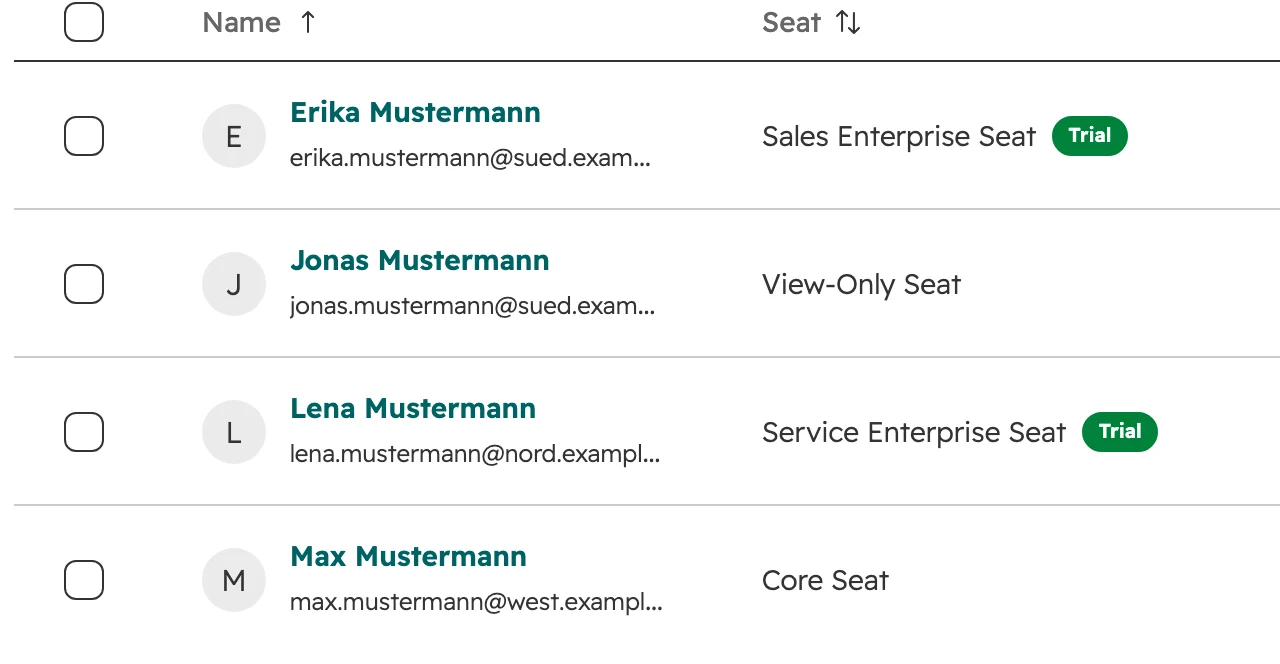
HubSpot Seats tab, user list: Erika Mustermann with a Sales Enterprise seat, Jonas Mustermann View-only, Lena Mustermann Service Enterprise, Max Mustermann Core
The Seat column shows who has which seat. Here a sales rep, a reader, a service agent and a salesperson who only updates deals.
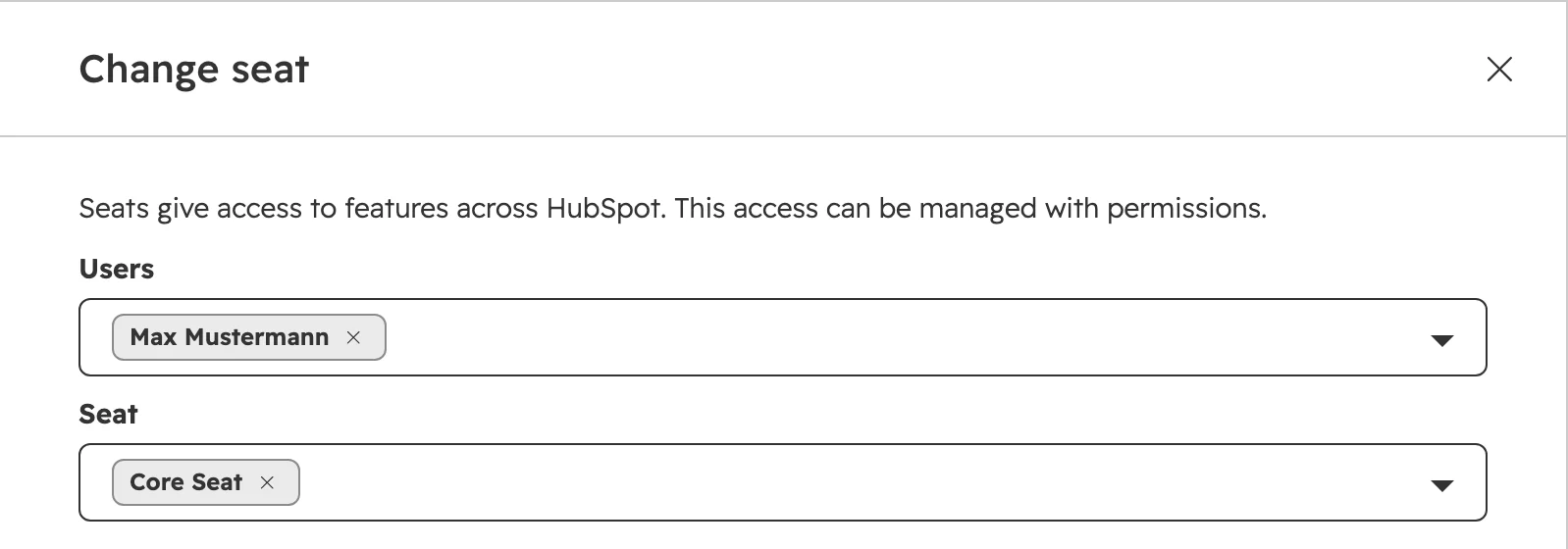
HubSpot, Change seat panel: user Max Mustermann, seat Core Seat
To change a seat, go to Settings > Users & Teams, tab “Seats”, hover over the user and click “Change seat”.

Core seats are priced at your highest edition. With Marketing Hub Starter and Sales Hub Professional, every Core seat costs the Professional price. Marketing Hub, Content Hub and Data Hub Professional and Enterprise also have a monthly base price that includes a few Core seats.

GTM seat or Ops seat on the new pricing

On the flexible seats-and-credits pricing there are only two paid seats. Everyone who works with customers gets a GTM seat. People who build and run the system behind them can get the cheaper Ops seat.

RoleSeatWhy
Sales, service and marketing staff who work with customers, including anyone who sends marketing emailsGTM seatMarketing, sales and service tools, Breeze Assistant and Smart CRM, at the edition you bought
Super AdminGTM seatHubSpot requires it. Every account needs at least one GTM seat
RevOps or admin who builds workflows, reports, imports and integrationsOps seatCustom reports, dashboards, data sync, integrations, imports and exports, workflows, AI agents, users and permissions
Manager who approves quotes and pipeline changesOps seatQuote and pipeline approvals are part of the Ops seat, with read access to some GTM tools
Anyone who only readsView-only seat, freeSees data in the account, changes nothing
Partner agency, developerPartner or Developer seat, freeAs on the classic pricing
Flexible seats-and-credits pricing, as of October 2026.

The Ops seat costs €50 a month and exists on Professional and Enterprise only. Starter has GTM seats only, up to 10 paid seats.

What HubSpot seats cost: list prices in euros

These are HubSpot’s list prices per seat and month, before VAT, from its product catalog. HubSpot’s pricing page shows annual billing and current offers, so a Professional GTM seat appears there at €90.

SeatStarterProfessionalEnterprise
Core seat, classic€20€49€75
Sales seat, classicNot sold€100€150
Service seat, classicNot sold€100€150
Revenue seat, classicNot sold€95€140
GTM seat, new€20€100€175
Ops seat, newNot sold€50€50
View-only, Partner and Developer seats, bothFreeFreeFree
HubSpot’s list prices a month, billed monthly, before VAT, as of 4 October 2026. From the Product & Services Catalog and its supplement for the new pricing.

What uses HubSpot credits

Credits pay for work HubSpot does for you, counted per action. A credit costs €0.01. Your included credits reset every month, and unused ones expire.

WhatCreditsModel
Customer agent resolves one chat or email conversation50Both
Prospecting agent suggests outreach for one lead100Both
Data agent answers one prompt for one record10Both
One AI action in a workflow10Both
Buyer intent watches one company for a month10Both
Nurture agent personalises one email (beta)10Both
Knowledge base agent writes one article (beta)200Both
Revenue agent starts payment follow-up for one invoice (beta)500Both
Content agent creates one piece of content (beta)1,000Both
One email sent by HubSpot: marketing, automated or transactional15 for the first 10,000 a month, then 5, 2 and 0.5New only
One workflow action3 for the first 10,000 a month, then 2, 0.5 and 0.1New only
One WhatsApp template message20New only
One accepted quote100New only
From HubSpot’s credit rate sheets, as of 4 October 2026. Beta rates can change, and beta features can start using credits.
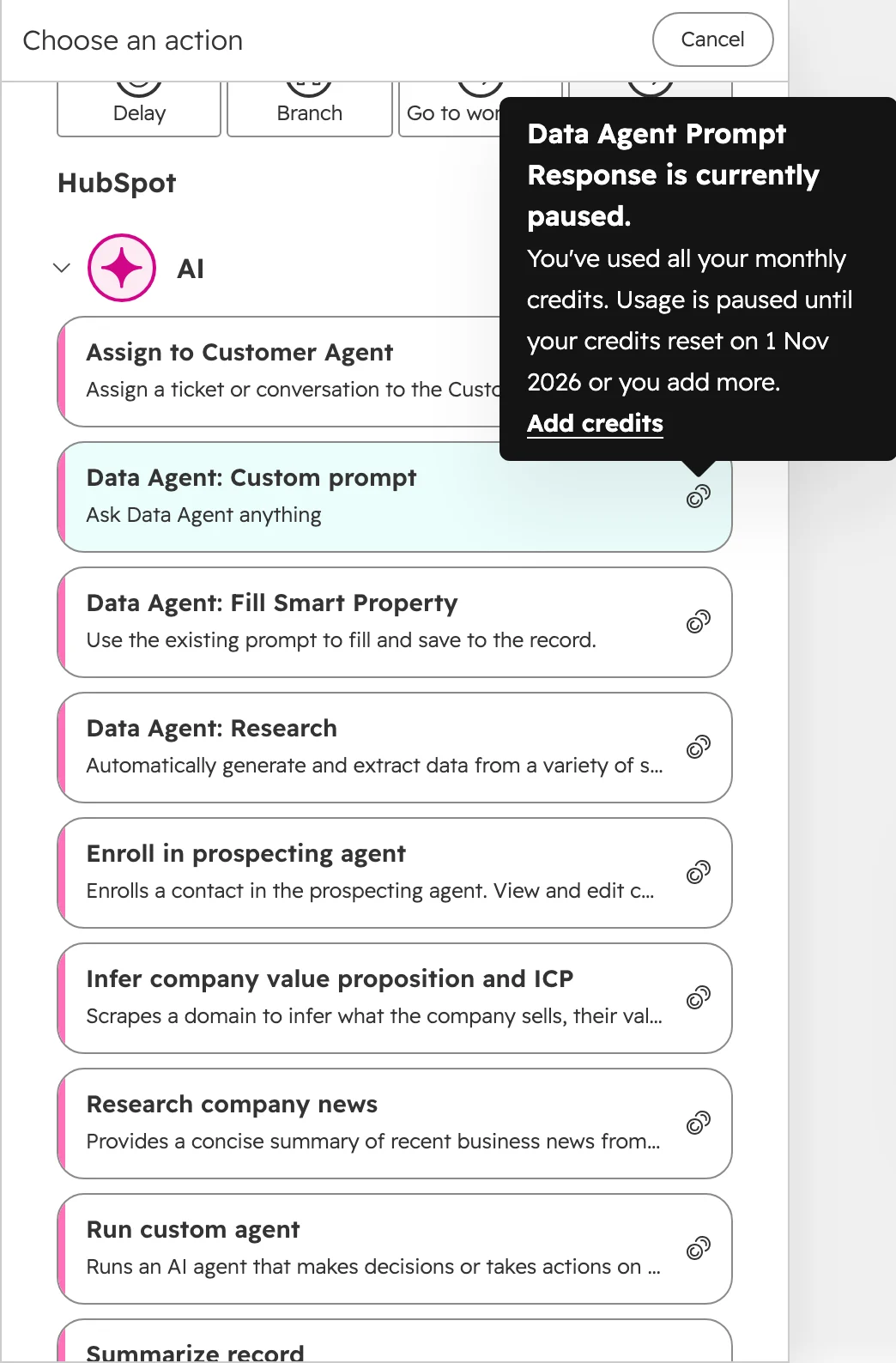
HubSpot workflow editor, AI actions: Data agent, custom agent and summary actions carry a credits icon; the tooltip says the action is paused because all monthly credits are used
In workflows, a coin icon marks the actions that use credits. When the month’s credits are used up, HubSpot pauses them until the reset date.

Some things never use credits: one-to-one emails sent from a connected inbox, the branch, delay and go-to steps in a workflow, and datasets used only in reports. On the new pricing, an email sent by a workflow counts twice, once as an email send and once as a workflow action.

On the classic pricing, only users with a paid seat or a Partner seat can use credits. View-only users and free users can’t. Included credits don’t add up across hubs: with Marketing Hub Professional and Sales Hub Enterprise you get the Enterprise amount once.

HubSpot credits: worked examples with the numbers

A credit costs €0.01 on both models. When the included credits run out and you haven’t bought any more, features that use credits stop until the next month.

  • Service team, classic pricing, Service Hub Professional. The customer agent resolves 300 chats a month, which uses 15,000 credits. 3,000 are included, so 12,000 are extra. The extra credits cost €120 a month, as pay-as-you-go or as 12 capacity packs of 1,000 credits.
  • Sales team, classic pricing, Sales Hub Professional. The prospecting agent works on 50 new leads a month, which uses 5,000 credits. 3,000 are included, so the extra 2,000 cost €20 a month.
  • Marketing and sales, new pricing, Professional. 10,000 email sends a month use 150,000 credits, or €1,500. 20,000 workflow actions add another 50,000 credits, or €500. Paying per credit, the month costs €1,900 after the 10,000 included credits. The 10,000-sends pack costs €1,000 a month and the smallest workflow actions pack €150, so €1,150 together, and the included credits stay free for AI agents.
  • Small team, new pricing, Starter. The 5,000 included credits cover 333 email sends. A monthly newsletter to 2,000 contacts uses 30,000 credits, €250 more than included. Starter can add the Base marketing pack for €150 a month, with 2,500 sends, 250 workflow actions and 2,500 credits.

Packs on the new pricing

PackSizes and list prices a monthEditions
Email sends2,000 sends for €200, 10,000 for €1,000, 100,000 for €3,000, 1,000,000 for €6,000Professional, Enterprise
Workflow actions500,000 actions for €150, 500,000,000 for €900Professional, Enterprise
Agents2,500 credits for €25, 40,000 for €400, 150,000 for €1,500All
MarketingBase: 2,500 sends, 250 workflow actions and 2,500 credits for €150. Growth: 10,000 sends, 500,000 actions and 40,000 credits for €1,300. Scaled: 100,000 sends, 500,000,000 actions and 150,000 credits for €5,000Base on Starter, Growth on Professional, Scaled on Enterprise
Credits1,000 credits for €10, for the rest of the termAll, both models
HubSpot’s list prices before VAT, from its Product & Services Catalog Supplement, as of 4 October 2026. Sends and actions above a pack use credits.

How to see and limit HubSpot credit use

Set the limits before you turn on an agent. You need to be a Super Admin or have billing permissions.

  1. Step 01

    Open the credits page

    Click your account name in the top right, then Account & Billing, tab “HubSpot Credits”. On the classic pricing it sits under “Usage & Limits”. The page shows your monthly credits, what you have used, the use per feature and the history.
  2. Step 02

    Set a maximum for the account

    Under “Maximum monthly credits”, click Edit. When you buy extra credits, HubSpot sets this limit 50% above your monthly credits. Lower it to what you planned to spend.
  3. Step 03

    Set limits per feature

    Under “Feature credit limits”, click View, choose a feature such as the customer agent and add a limit. A feature limit stops the feature at that number but doesn’t reserve credits for it. For buyer intent you can also limit each action.
  4. Step 04

    Pause what you don’t use

    In “Manage usage by feature”, click a feature to see its settings and pause it. Check this list every month, because features leave beta and start using credits, usually with 30 days’ notice.
  5. Step 05

    Choose pay-as-you-go on the classic pricing

    If you bought extra credits before 16 September 2026, the default is auto-upgrade. Then one busy month adds a capacity pack for the rest of your contract, and you can only reduce it at renewal. Switch under “Overage setting” > Edit > Pay-as-you-go. Purchases since 16 September 2026 and the new pricing use pay-as-you-go.
  6. Step 06

    Send the alerts to the budget owner

    HubSpot warns at 75, 85 and 90 percent and at the limit, by email and banner, to Super Admins and billing contacts. Make the person who owns the budget a billing contact.

Mistakes that cost seats and credits

These are the mistakes we see most often when we audit an account’s seats and credits.

  • A Sales seat for everyone in sales. People who only update deals and contacts need a Core seat. Keep Sales seats for the people who use sequences, the sales workspace and playbooks.
  • A paid seat to read dashboards. A View-only seat is free and shows records, dashboards and reports. Someone who saves or edits reports needs a paid seat.
  • Moving a salesperson to View-only. View-only users can’t log or track emails. HubSpot turns their email logging off, and their emails stop reaching the CRM.
  • Removing the user and expecting the bill to drop. An unassigned seat is still billed. Remove it under Settings > Users & Teams, tab “Seats”, “Remove unassigned seats”. The change applies from your next billing period or term, never below the number in your contract.
  • Sharing one login to save a seat. Every change then shows under one name, so nobody can tell who changed a deal or sent an email. Give the person their own seat, or a free View-only seat if they only read.
  • Paying a seat for your agency or IT. A Solutions Partner gets a free Partner seat, and a developer building an integration gets a free Developer seat.
  • Trying AI features without a limit. An agent that runs on every new contact or every chat uses credits on each one. Set a feature limit first, then turn it on.
  • Old workflows on the new pricing. Every workflow action now uses credits, including the ones nobody looks at. A workflow that re-enrols records on every change can use more than all your campaigns. Turn off what nobody needs before you go live.

How we plan seats and credits

The cheapest set of seats starts from what people do in HubSpot every week.

  1. Step 01

    List what each person does

    Write down actions: edits deals, sends sequences, works tickets, builds workflows, reads reports, approves quotes.
  2. Step 02

    Match each person to the cheapest seat

    For each person, the cheapest seat that covers every action they need. View-only for everyone who only reads.
  3. Step 03

    Count the monthly volume

    Email sends, workflow actions and agent runs, taken from the last three months. This matters most before buying on the new pricing.
  4. Step 04

    Set the limits

    Account and feature limits, pay-as-you-go instead of auto-upgrade, and alerts to the budget owner, before any agent goes live.
  5. Step 05

    Check after the first month

    Seats nobody used, credits per feature and features that left beta, then adjust before the next billing period.

Frequently asked questions

Do I need a paid seat to see reports in HubSpot?

No. A View-only seat is free on every paid plan and can view records, dashboards and reports and filter them. Saving or editing a report needs a paid seat.

What’s the difference between a Core seat and a Sales seat?

A Core seat gives the CRM and the tools of the hubs you bought. A Sales seat adds the Sales Hub Professional or Enterprise tools, such as sequences, the sales workspace, playbooks and email click tracking, and includes everything in a Core seat.

How much does a HubSpot Sales seat cost?

€100 a month on Sales Hub Professional and €150 on Enterprise, at HubSpot’s list prices before VAT as of 4 October 2026. A Core seat costs €20, €49 or €75 a month by edition.

What’s the difference between a GTM seat and an Ops seat?

A GTM seat is for people who work with customers and gives the marketing, sales and service tools of your edition. An Ops seat is for people who run the system: reports, dashboards, workflows, imports, integrations, users and approvals. The Ops seat costs €50 a month and exists on Professional and Enterprise only.

How many paid seats can HubSpot Starter have on the new pricing?

Up to 10, and all of them are GTM seats. The Ops seat exists only on Professional and Enterprise.

Is a HubSpot Partner seat free?

Yes, for a HubSpot Solutions Partner who works in your account. HubSpot confirms, denies or removes each Partner seat.

How much does a HubSpot credit cost?

€0.01 per credit with pay-as-you-go, billed in steps of 10 credits. As a capacity pack, 1,000 extra credits a month cost €10 for the rest of your contract term.

How many HubSpot credits are included?

On the classic pricing, Starter includes 500 credits a month, Professional 3,000 and Enterprise 5,000, or 500, 5,000 and 10,000 with Data Hub or the Customer Platform. On the new flexible pricing, Starter includes 5,000, Professional 10,000 and Enterprise 15,000. Included credits don’t add up across hubs, so the highest edition counts.

Do marketing emails use HubSpot credits?

Only on the new flexible seats-and-credits pricing. There every email HubSpot sends uses credits, except one-to-one emails from a connected inbox: 15 credits each for the first 10,000 a month. A newsletter to 10,000 contacts uses 150,000 credits, or €1,500. On the classic pricing, emails don’t use credits.

Do unused HubSpot credits roll over?

No. Credits reset at the start of every usage period, and unused credits expire.

What happens when my HubSpot credits run out?

If you only have the included credits, features that use credits pause until the next reset date. If you have bought extra credits, use beyond your limit is billed as pay-as-you-go, or on older classic purchases it triggers an auto-upgrade.

Can existing customers switch to the new seats-and-credits pricing?

Not for now. HubSpot launched it on 1 October 2026 for new customers in Europe, the Middle East and Africa, and existing accounts stay on their model. HubSpot hasn’t announced a date for moving them.

Pay for the seats and credits your team actually uses

We check who has which seat, what uses credits and where the limits sit, live in your portal. You keep the quick wins, whether we work together or not.