HubSpot SAP Business One integration: what to sync, and which route fits
HubSpot has no app for SAP Business One. What should flow between the two, where they clash, what changed in 2026, and how to set up HubSpot for any route.
Updated · 15 minutes·By Matthew Labrooy, Managing Director
HubSpot has no SAP Business One app of its own. You connect HubSpot and SAP Business One through a partner app from the HubSpot Marketplace, an integration platform, or your own connection on Business One’s Service Layer, its REST interface.
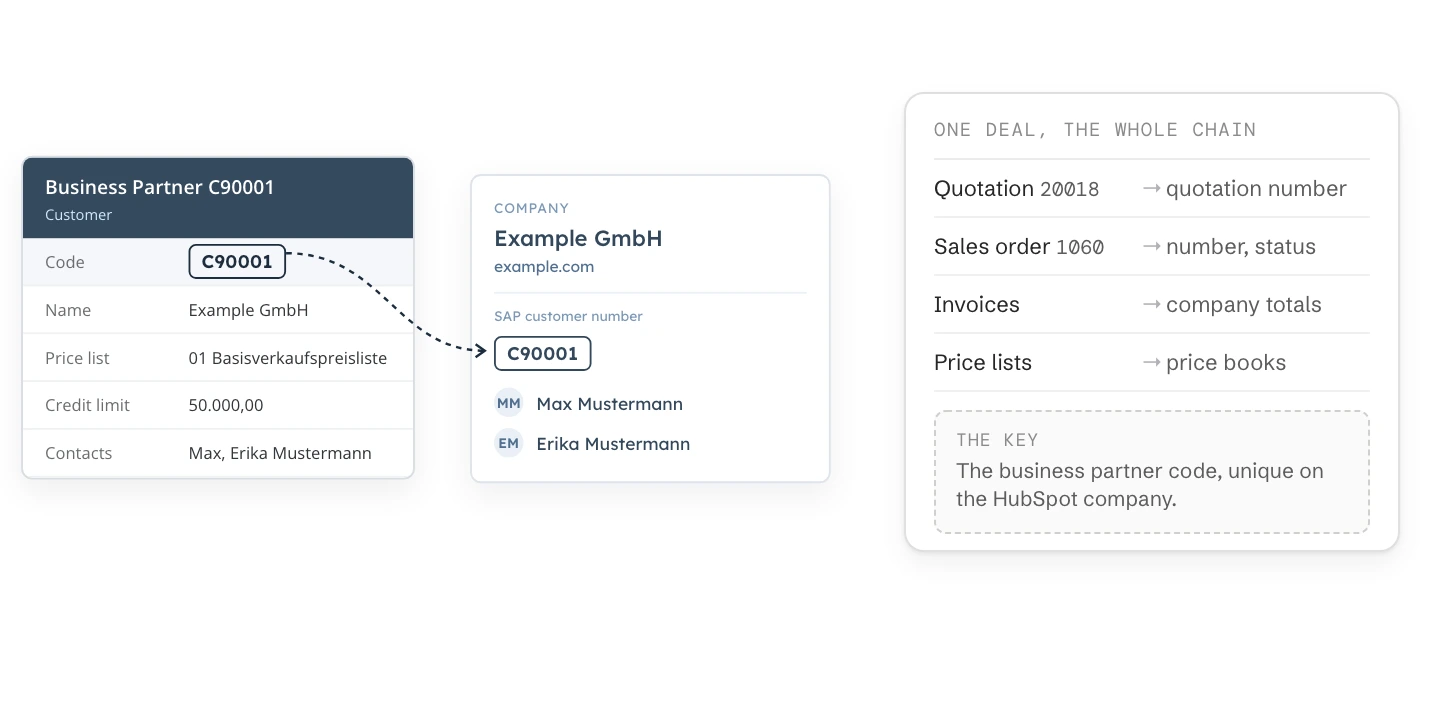
Every route does the same work. One business partner in Business One becomes one HubSpot company with its contacts, matched on the business partner code. Sales then sees quotations, orders, open items and the credit limit on the company and the deal. Since Feature Package 2602 in 2026, Business One reports changes as they happen. Since June 2026, HubSpot has price books for Business One’s price lists.
HubSpot app
None built by HubSpot. Partner apps include “SAP B1 SYNC” by Commercient and “ERP Bridge” by DMA
Interface
Service Layer (REST/OData) on SAP HANA and Microsoft SQL Server, reached in the cloud or over your network
Key
The business partner code (CardCode) as a unique property on the HubSpot company
New in 2026
Webhooks in Business One from FP 2602. Price books in HubSpot Revenue Hub Enterprise
Your partner
Every route needs your Business One partner: access, a user, a licence check, the version
Does HubSpot have an SAP Business One integration?
No. HubSpot builds its own data sync apps for NetSuite and Business Central, but not for SAP Business One. HubSpot’s SAP page points to partner apps in its marketplace and to integration platforms.
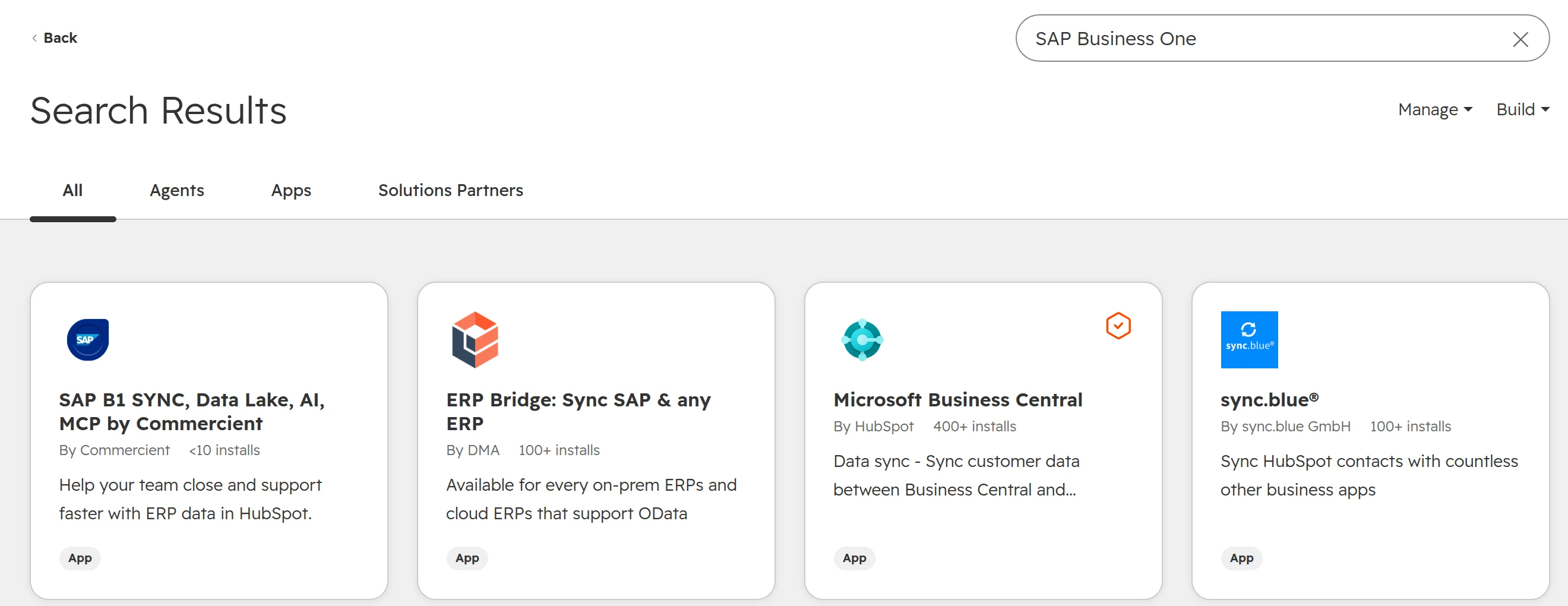
Search the marketplace for “SAP Business One” and you find two kinds of result: apps that connect to Business One, and HubSpot partners who build connections. Their vendors make and support these apps.
The search in October 2026. HubSpot’s own app in the results is for Business Central, not SAP.
Every route below reaches Business One through the Service Layer, Business One’s REST interface, or directly through its database. For the general questions behind any ERP connection, such as which system owns which field, read the ERP guide. This guide covers what is particular to Business One.
SAP Business One CRM: is it enough, or do you need HubSpot?
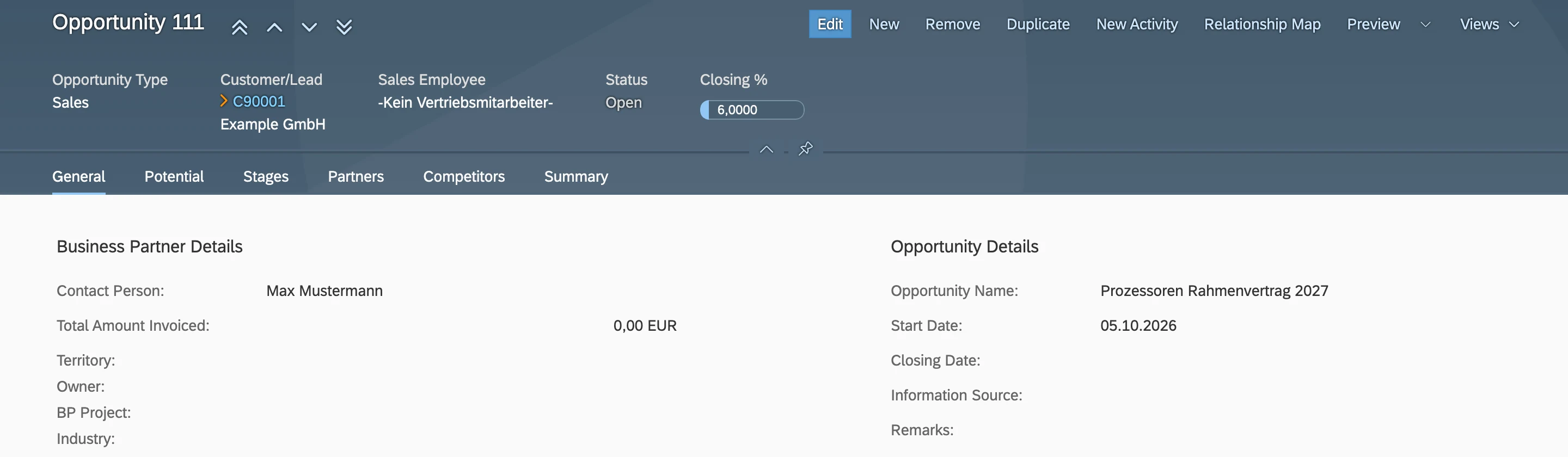
SAP Business One comes with its own CRM module: business partners, contact persons, activities, sales opportunities with stages and a forecast, and campaigns. For some teams that is enough.
An opportunity in Business One’s Web Client. Stages, closing percentage and potential amount, on the business partner.
Business One’s CRM is enough when
HubSpot is worth adding when
A few sellers who work in the ERP all day anyway
Many sellers, field sales or partners who should never open the ERP
Leads come from existing customers and the phone
Leads come from the website, forms, events and ads
Emails are sent from Outlook one by one
Marketing emails, sequences and tracking are part of selling
Reporting means order intake and revenue
Reporting means pipeline, conversion and where deals come from
A rule of thumb. Where the right column describes your team, HubSpot is worth a look.
What to sync between SAP Business One and HubSpot
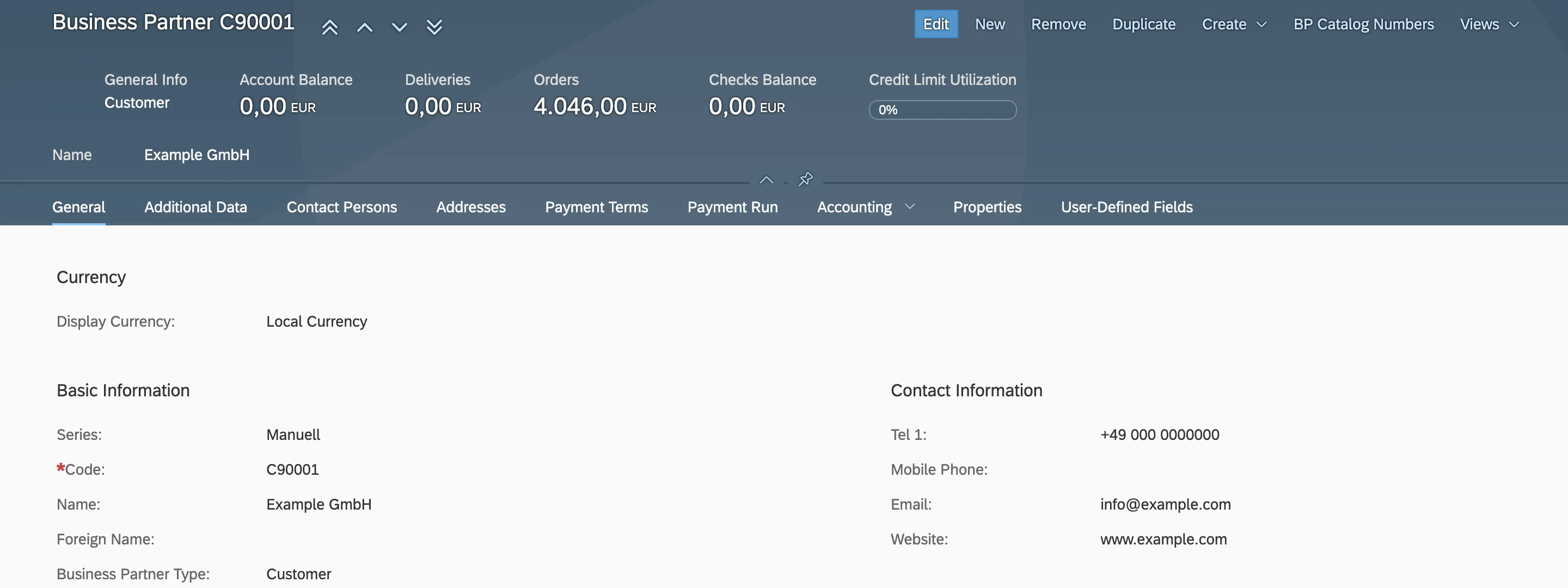
Start from the business partner. In Business One, one business partner record holds the company, its contact persons, addresses, payment terms, credit limit and account balance. In HubSpot, the same information lives on a company and its contacts.
Business partner C90001. The code is the key every connection should match on.
SAP Business One
HubSpot
Direction
Business partner, type Customer (code, name, VAT number)
Company, with the code in a unique property
Business One to HubSpot
Business partner, type Lead
Company with lifecycle stage Lead, or nothing yet
Usually HubSpot to Business One
Contact persons
Contacts, associated with the company
Both, with one owner per field
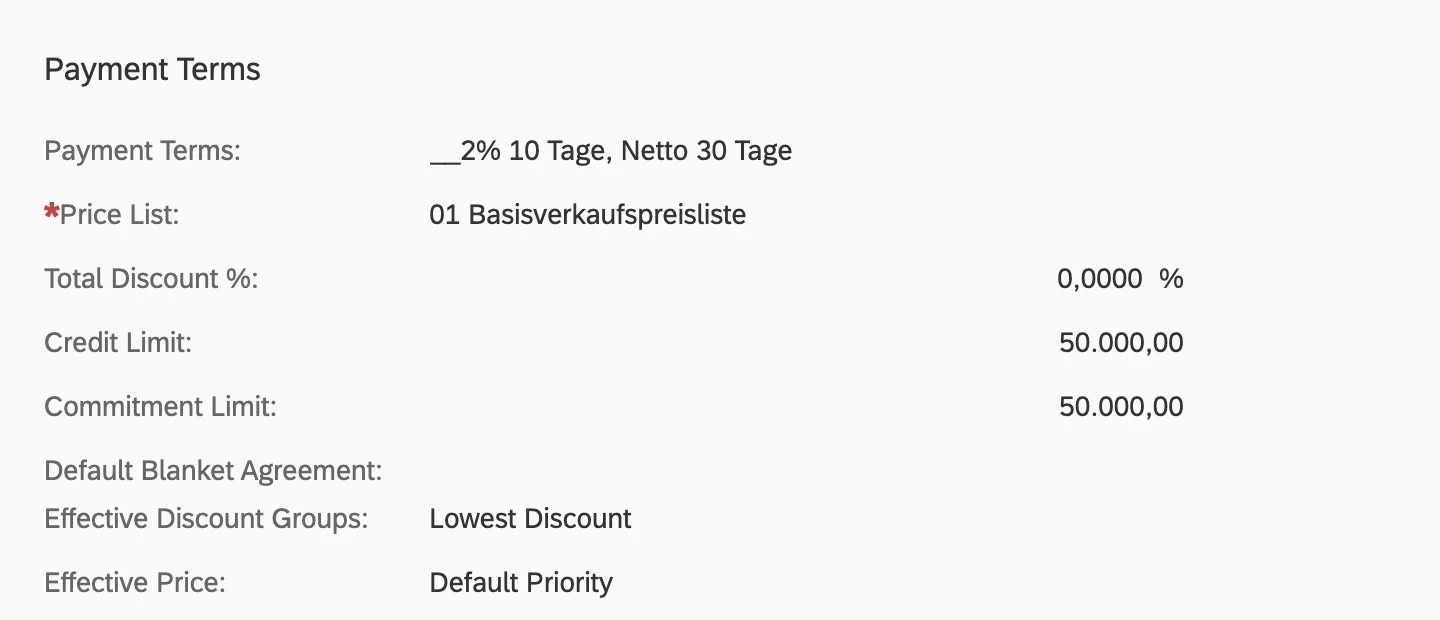
Payment terms, price list, credit limit, account balance, open orders
Properties on the company, read-only for sales
Business One to HubSpot
Items (item code, name, price)
Products, with the item code as SKU
Business One to HubSpot
Price lists
Price books, one per price list and currency
Business One to HubSpot
Sales quotation, sales order, delivery, invoice
Numbers and status on the HubSpot deal
Business One to HubSpot
Won deal
Sales order in Business One
HubSpot to Business One
SAP Business One to HubSpot: the usual object map. Your partner and your sales team decide the details field by field.
Contact persons sit inside the business partner. Their ID is the person’s name, unique only within that business partner.
Payment terms, price list and credit limit: the fields sales asks for most, kept in Business One.
Sync totals before documents. Open orders, account balance and the date of the last invoice on the company answer most sales questions. Single invoices as HubSpot records only pay off when someone has a question that needs them.
Where SAP Business One and HubSpot don’t fit: eight points to settle first
These eight points come up in almost every Business One connection. Settle each one with your partner before anything syncs.
The business partner is a company and its people at once. HubSpot splits them into a company and contacts. A connection must create both, and associate them, or contacts end up without a company.
Contact persons have no unique key. Their ID in Business One is the name, unique only within one business partner, and the email address is optional. Contacts without an email can’t be matched in HubSpot.
Leads live in both systems. Business One has business partners of type Lead, HubSpot has leads and the lifecycle stage. Decide where a prospect is created and when it becomes a customer in Business One, usually with the first order.
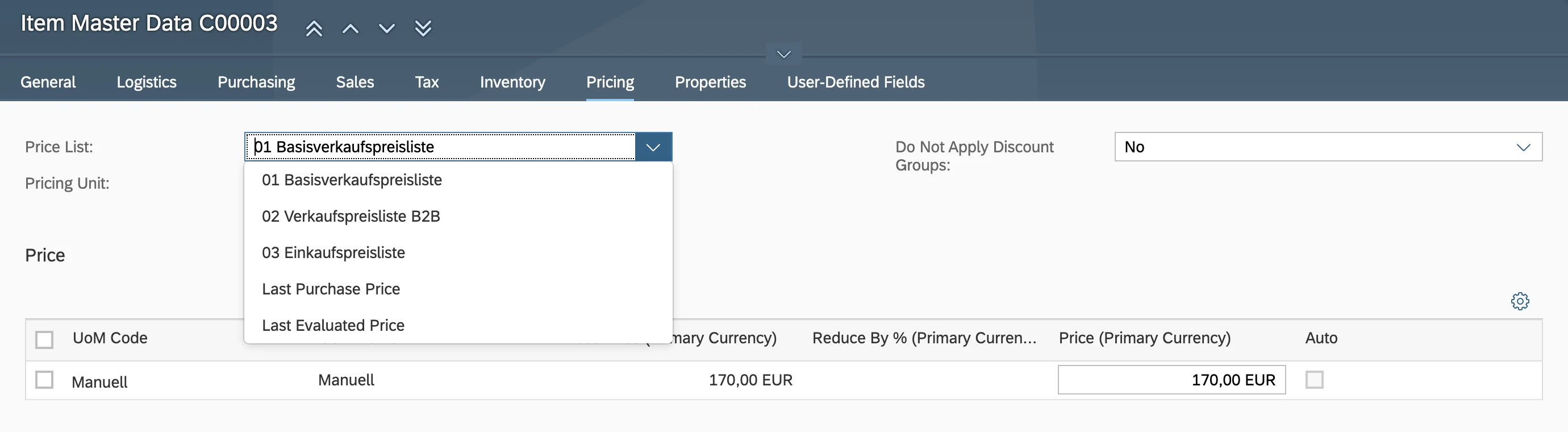
One item, many prices. An item has a price on every price list, and business partners can have special prices. A HubSpot product has one price per currency. Price books close part of that gap, not all of it.
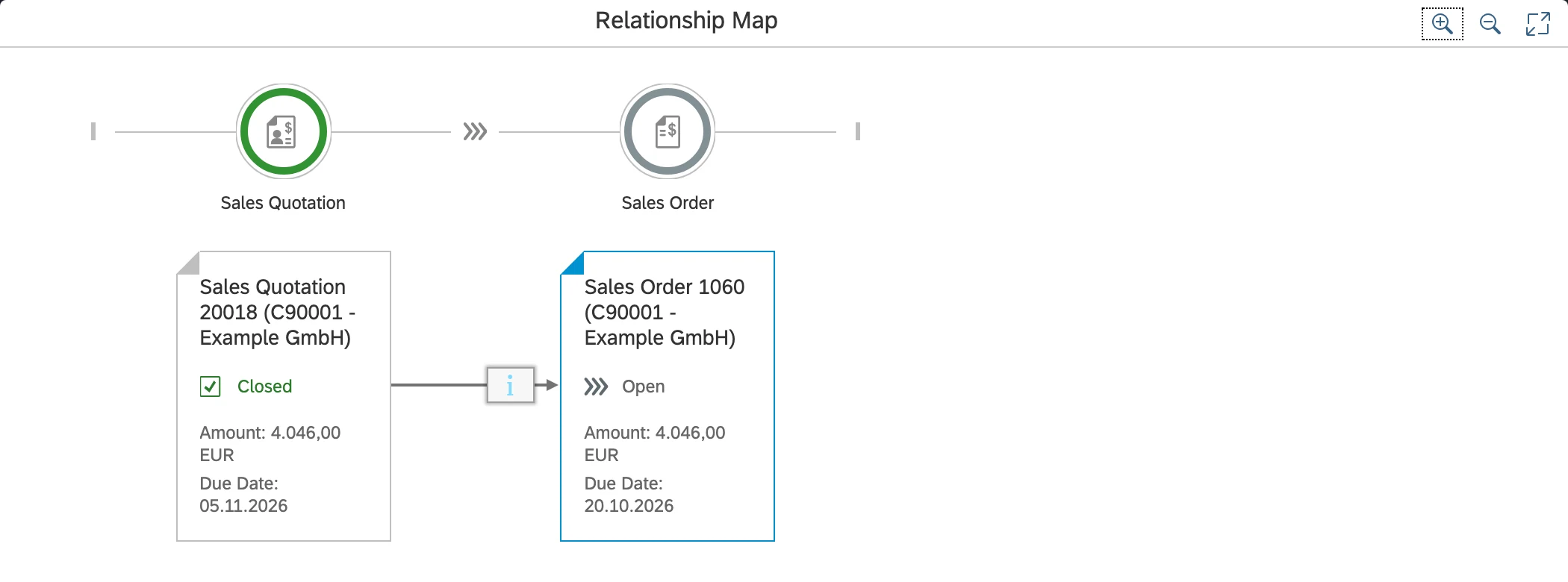
A quotation becomes an order becomes an invoice. Business One keeps each document as its own record, linked in a chain. In HubSpot that chain belongs on one deal.
Stock changes often. Before Feature Package 2602 there was no event for a stock change, so connections polled Business One on a schedule. With thousands of items, batch updates of 100 records at a time get slow.
Several company databases. Groups often run one Business One company per country. Few connectors bring several into one HubSpot account, so check this first.
Business One on your own servers. The Service Layer must be reachable from the connector, through the partner’s cloud, a VPN or an agent on site.
A customer and a lead, both business partners. HubSpot needs to know which of the two it is.
One item, one price per price list. A HubSpot product only knows one price per currency.
The document chain in Business One. In HubSpot, the quotation and the order are two stages of the same deal.
What changed in 2026: webhooks in Business One, price books in HubSpot
Two changes in 2026 make Business One connections simpler than most vendor pages still describe.
Business One reports changes itself
Since SAP Business One 10.0 Feature Package 2602, the Service Layer supports webhooks. Business One sends a notification to an HTTPS address when a business partner, item or document is created, updated or deleted. The change can come from the desktop client, the Web Client or any interface. Feature Package 2608 adds your own fields to the notification.
Webhooks are off by default for each company database. Your partner installs the Webhook Messenger service and switches them on.
The receiving address must use HTTPS.
A company database allows 16 subscriptions by default. Your partner can raise the limit.
Business One logs each notification and retries failed ones.
With webhooks, changes reach HubSpot within seconds instead of on the next scheduled run, and nobody has to poll thousands of items to find the few that changed. You need Business One 10.0 FP 2602 or later.
HubSpot has price books
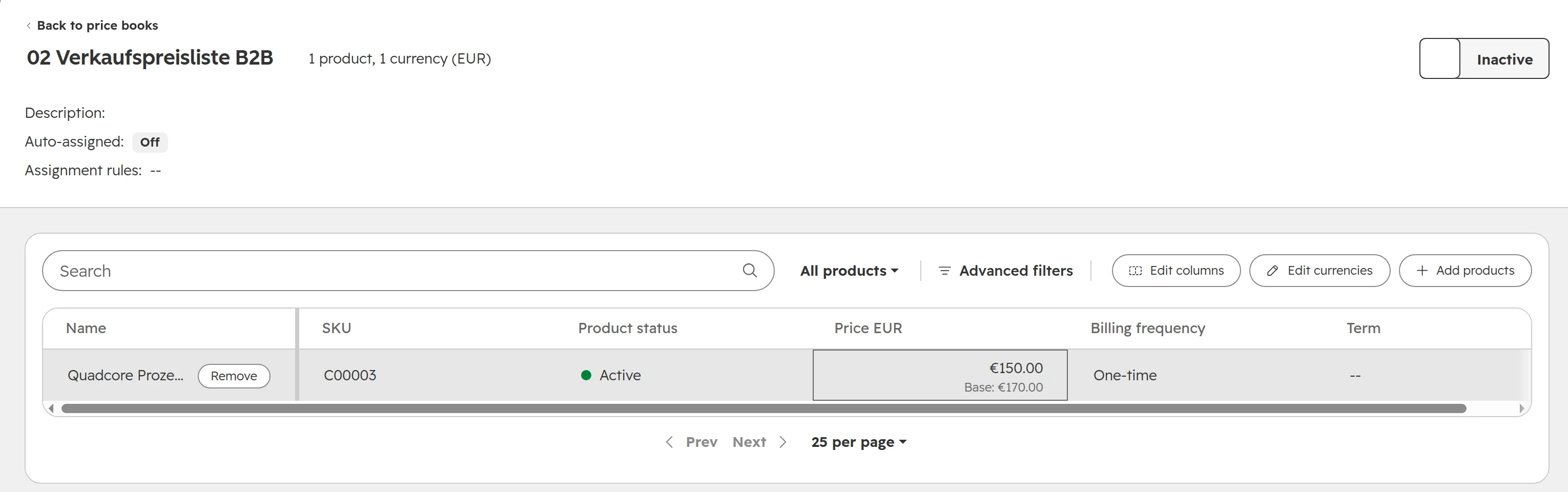
Since June 2026, HubSpot has price books: named lists of products with their own prices, one currency each. Price books map well to Business One’s price lists. A deal is assigned a price book, and quotes on that deal use its prices.
A price book named after the Business One price list. The item code is the product’s SKU.
Price books need Revenue Hub Enterprise.
Each price book holds one currency. Business One price lists in EUR and CHF become two price books.
A price book is assigned when a deal is created, by rules on deal properties, or by hand. Changing the company later doesn’t reassign it.
Workflows can’t use price books. The workflow action “Add line item to deal” uses the product library price, not the price book.
Through the API, products can only be added to a price book or repriced while the price book is inactive. A nightly price update from Business One has to switch the price book off and on again.
Special prices for single business partners don’t fit price books. Show them to sales on the company, or let Business One price the order.
The routes: partner app, integration platform or your own connection
Choose the route by what sales needs from Business One, how often it changes, and who will look after the connection once it runs.
Route
Fits when
Watch for
“SAP B1 SYNC” by Commercient (HubSpot Marketplace)
You want history and two-way sync of customers, orders, invoices and items from a vendor that also runs your Business One data
Fewer than 10 installs and no reviews on HubSpot’s marketplace. Listed from USD 398 a month, plus required onboarding priced per project
“ERP Bridge” by DMA (HubSpot Marketplace)
Business One and other ERPs that offer OData; you want to map objects yourself or have them do it
Estimated cost to get started USD 3,400. Sync every five minutes on most plans, real time only on the top plan
An integration platform such as MARINI, or Make and n8n
Several systems around HubSpot, or a team or partner who looks after the flows
Who monitors errors. Where data is processed. Whether the platform reaches Business One on your servers
Your own connection on the Service Layer
You need the business partner code as key, your own rules, webhooks and error alerts
Someone has to own the code. Plan for Business One upgrades and HubSpot API versions
As of October 2026, from the vendors’ marketplace listings and SAP’s documentation.
Every route involves your Business One partner. The partner gives the connection a user, opens the network path and often charges for the time.
How to set up the HubSpot side
Prepare HubSpot before any route writes to it. These five steps are the same for every route.
Step 01
Make the customer number the key
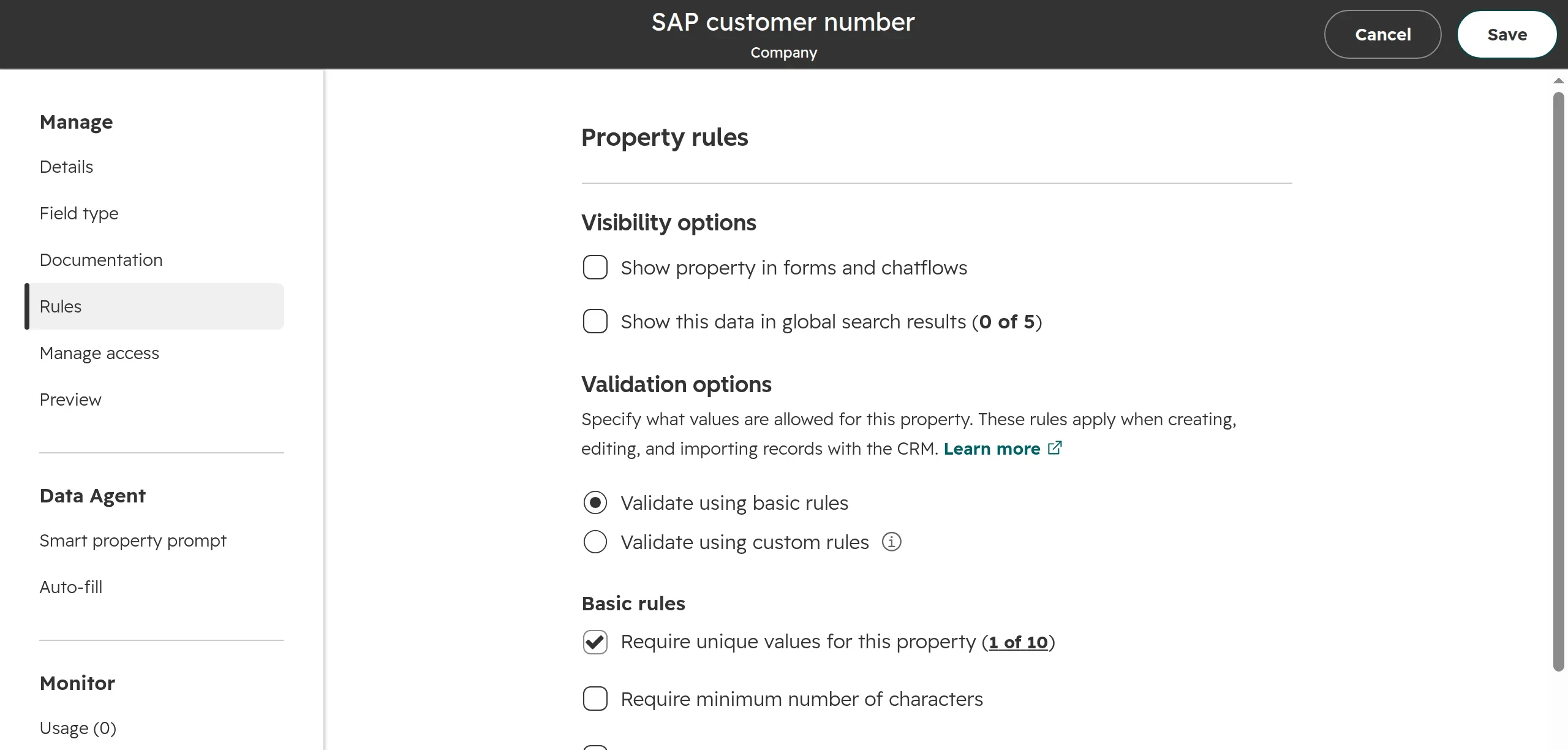
Go to Settings > Properties, choose Company properties and create a single-line text property “SAP customer number” in its own group. Under Rules, turn on Require unique values. Decide this when you create the property; switching it on later fails as soon as two companies share a value.Up to ten unique properties per object. Products can’t have one, so use the SKU for the item code.
Step 02
Show the SAP data on the company
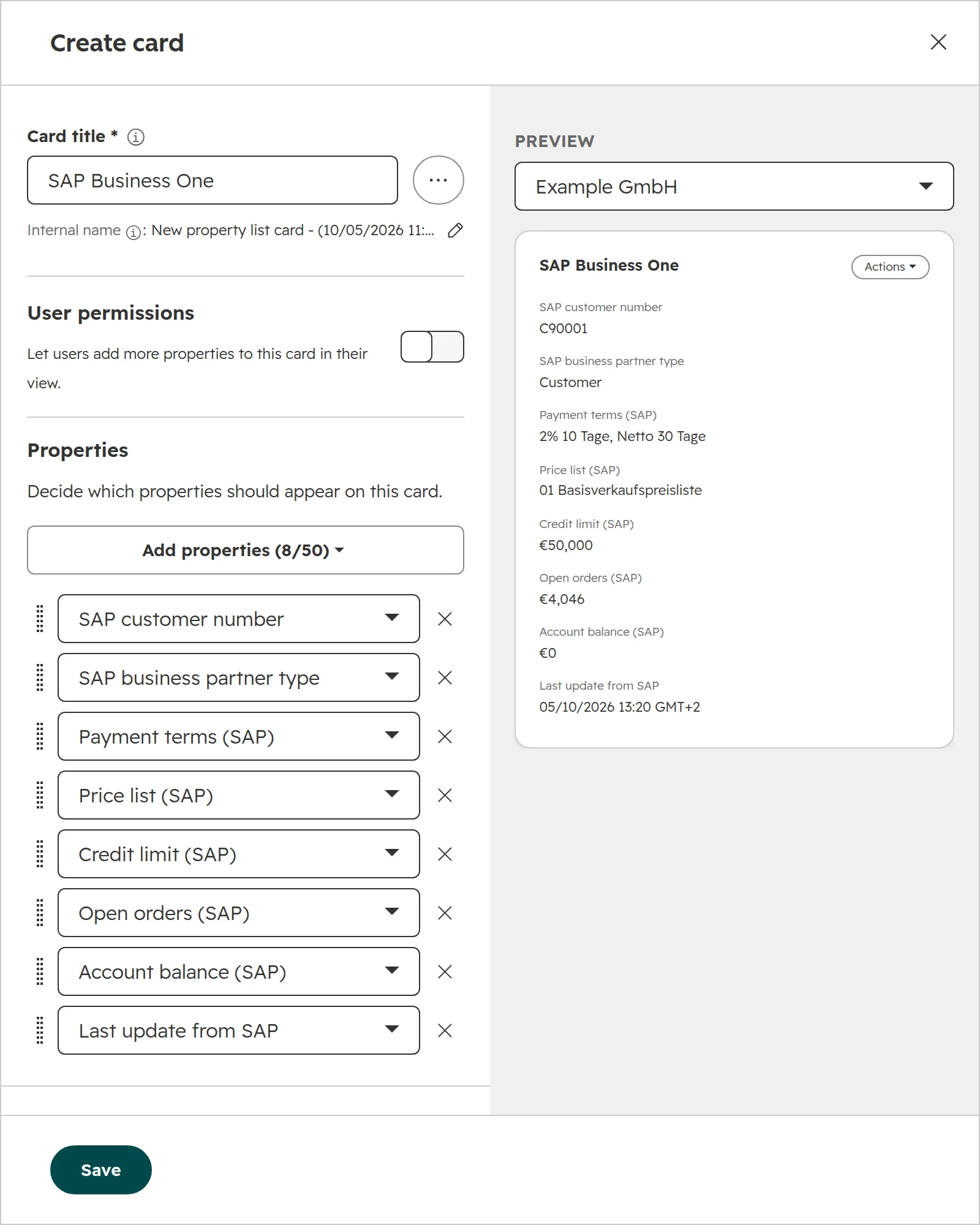
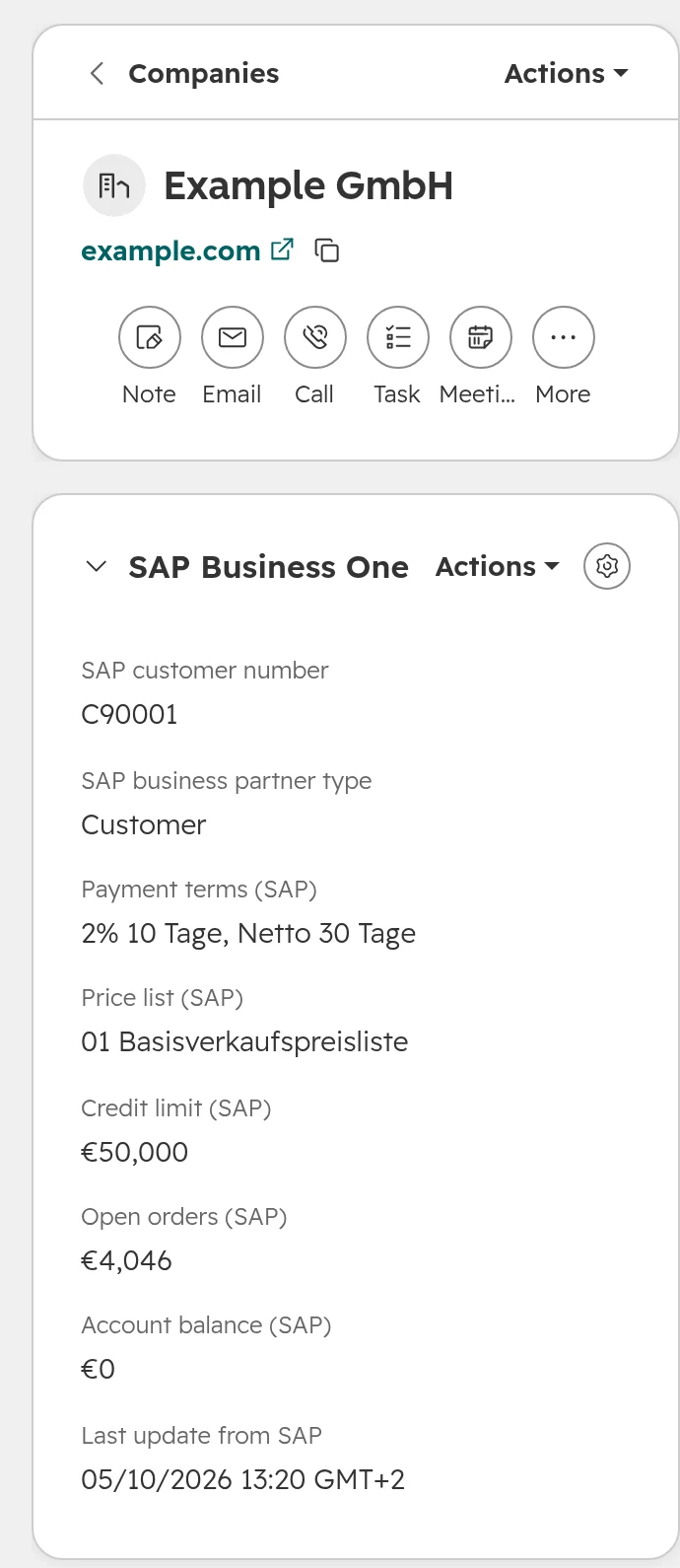
Create the other properties from the table above, then open a company and click Customize. Add a property card “SAP Business One” to the left sidebar with these properties. Leave “Let users add more properties” off, so the card stays the same for everyone.The card and its preview. A property list card holds up to 50 properties.What sales sees: Business One’s values on the company, with the time of the last update.
Step 03
Put the document numbers on the deal
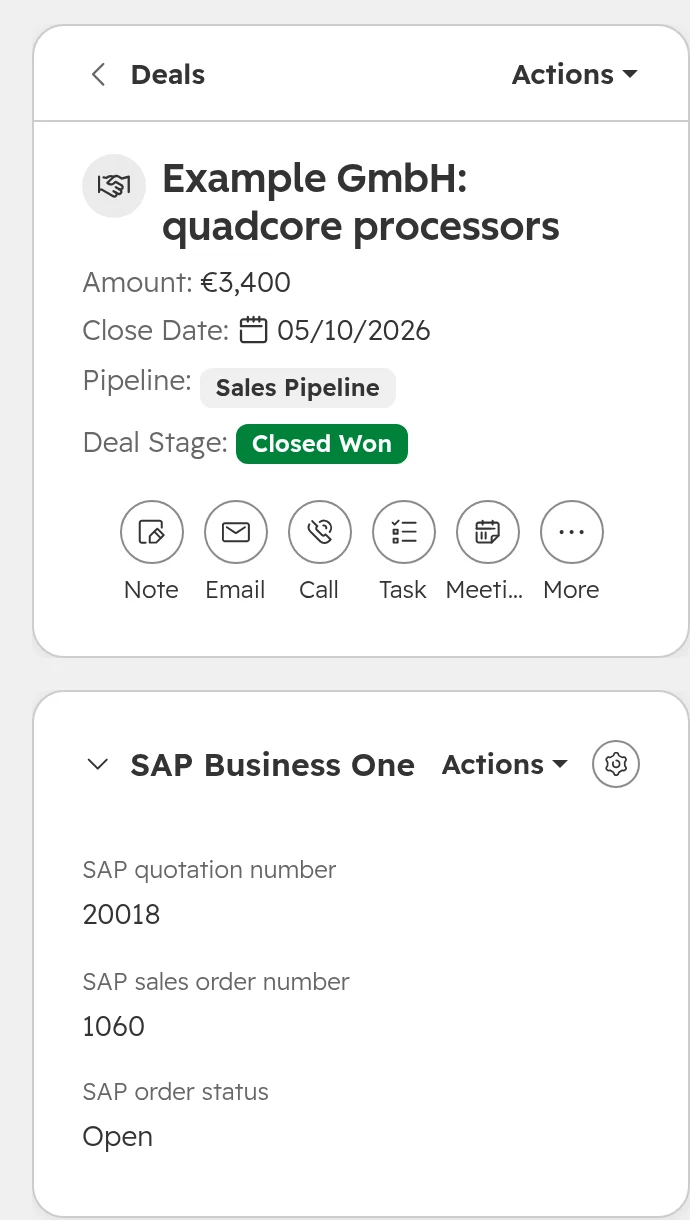
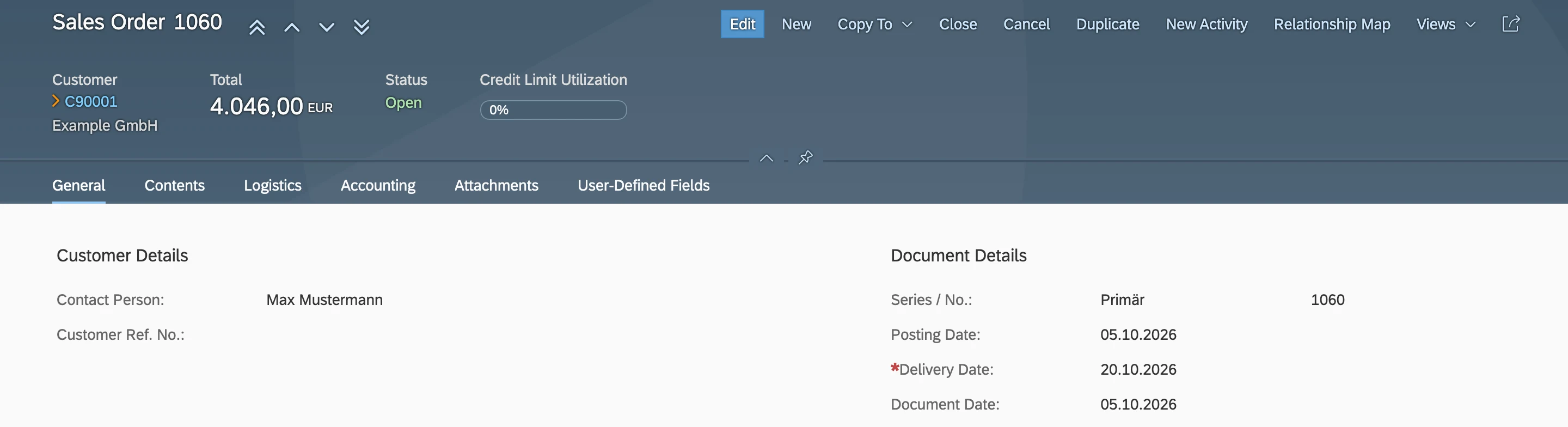
Add deal properties for the quotation number, the sales order number and the order status, and a second card on the deal record. The deal stays one record for the whole sale; the connection fills in the numbers as Business One creates the documents.The deal carries quotation 20018 and sales order 1060, the same documents as in Business One’s relationship map.
Step 04
Match products on the item code
Import or sync items as HubSpot products with the item code as SKU. Then create one price book per Business One price list and currency if you have Revenue Hub Enterprise, and assignment rules that pick the right one for each deal.
Step 05
Hand won deals over with a checkbox
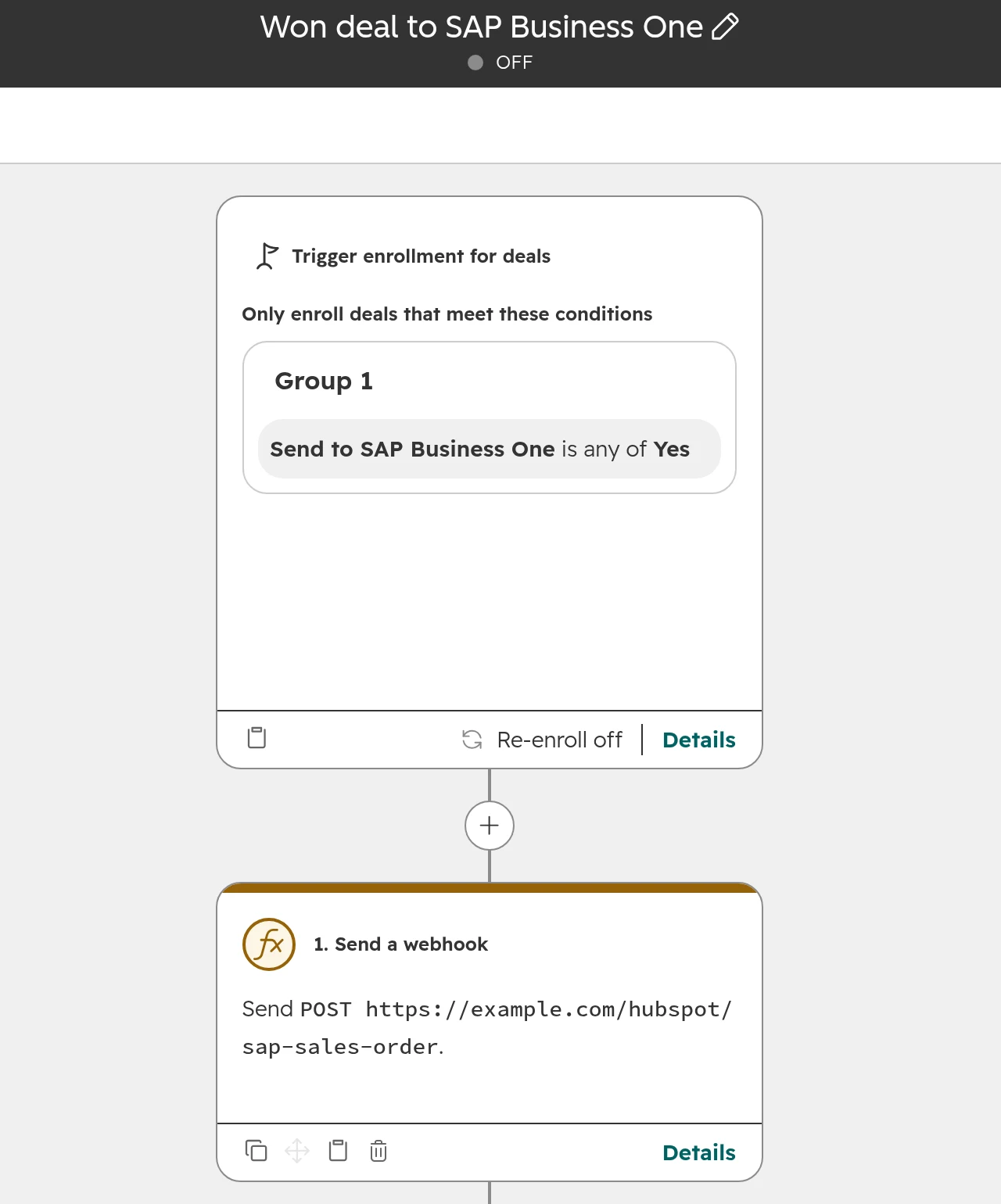
Create a deal property “Send to SAP Business One” and a deal workflow that starts when it is ticked. Its action hands the deal to the connection, for example with Send a webhook (Data Hub Professional or Enterprise). A checkbox lets sales decide when the order is ready; a stage change alone fires on every won deal, including test and mistaken ones.The trigger is the checkbox, not the deal stage. Re-enrolment off, so a deal is sent once.
What your SAP Business One partner has to do
Bring this list to your partner before you pick a route. Each point costs time on their side.
Access. The Service Layer reachable for the connection: in the partner’s cloud, through a VPN, or with an agent on your servers.
A user for the connection. Its own Business One user with only the rights it needs. Ask whether that user needs a licence of its own in your contract.
The version. Which Business One version runs today, and whether an update to FP 2602 or later for webhooks is due anyway.
Webhooks. The Webhook Messenger service installed and webhooks switched on for your company database.
A field for the HubSpot ID. A user-defined field on the business partner and on documents that holds the HubSpot record ID, so both sides can find each other.
A test company. A copy of your company database, so tests never touch the live one.
A sales order in Business One. A HubSpot ID in a user-defined field links it back to the deal.
What about SAP S/4HANA?
For SAP S/4HANA and SAP ECC, HubSpot names custom APIs, OData and integration platforms. The Business One apps above don’t cover them. The questions stay the same: which system owns which field, what the key is, and how documents land on the deal. S/4HANA connections usually run through SAP Integration Suite or another integration platform, and need SAP’s own experts on the project.
SAP Business One in Germany, Austria and Switzerland
Partner-run systems. Business One is sold and hosted by SAP partners. Many run on the partner’s servers, some still on site. Every connection starts with the partner, not with SAP.
Localisation. The German, Austrian and Swiss versions differ in tax, document and accounting settings. Field names in Business One also appear in German, as in the screenshots above, so agree the field list in one language with your partner.
Accounting stays separate. In Germany, bookkeeping often goes on to DATEV through the tax adviser. HubSpot takes open items and balances from Business One itself.
Several currencies. Swiss companies often sell in CHF and EUR. HubSpot needs each currency set up in the account, and one price book per currency.
Data protection. A connector or platform that moves customer data is a processor. Check where it processes data and sign a data processing agreement. Your data protection officer decides what is needed.
How we connect HubSpot and SAP Business One
We start with what sales should see from Business One, then pick the route together with your Business One partner.
Step 01
Agree the list with sales
Which Business One values sales needs on the company and the deal, and which decisions they change. Usually fewer than the first list.
Step 02
Fix the key and the owners
The business partner code as the key, one owner per field, and where leads and contact persons are created.
Step 03
Pick the route with your partner
Partner app, integration platform or own connection, depending on access, version, webhooks and who looks after it.
Step 04
Test on copies
A Business One test company and a HubSpot test account, with bulk changes and a renamed field, then the first sync with error alerts from day one.
Frequently asked questions
Does HubSpot have an SAP Business One integration?
Not one built by HubSpot. HubSpot connects to SAP Business One through partner apps in its marketplace, such as “SAP B1 SYNC” by Commercient and “ERP Bridge” by DMA, through integration platforms, or through your own connection on Business One’s Service Layer.
Is SAP Business One’s CRM enough, or do I need HubSpot?
SAP Business One’s CRM is enough if your sales team is small and works in the ERP anyway. Business One’s CRM has opportunities with stages, activities and campaigns. HubSpot is worth adding when leads come from the website, marketing email matters, or many sellers shouldn’t work in the ERP.
Which data should sync between SAP Business One and HubSpot?
Business partners become HubSpot companies with their contacts. Items become products with the item code as SKU, and price lists become price books. Quotation and order numbers land on the HubSpot deal, and a won deal goes back to Business One as a sales order. Start with Business One to HubSpot, and add the way back once that runs without errors.
How does HubSpot match SAP Business One customers?
On the business partner code. Store it in a HubSpot company property that requires unique values, and let every route match on it. Names and email addresses change; the code doesn’t.
Can HubSpot show SAP Business One price lists?
Partly. HubSpot products have one price per currency. Since June 2026, price books in Revenue Hub Enterprise hold different prices per list and currency. Special prices for single business partners stay in Business One.
Does SAP Business One support webhooks?
Yes, since SAP Business One 10.0 Feature Package 2602. The Service Layer sends notifications for created, updated and deleted records to an HTTPS address. Your partner has to install the Webhook Messenger service and switch webhooks on.
Does the integration work with SAP Business One on our own servers?
Yes, if the connection can reach the Service Layer: through your partner’s cloud, a VPN or an agent on site. Check this before choosing a route, because not every connector supports it.
What does a HubSpot SAP Business One integration cost?
Marketplace apps are priced per month or year plus onboarding. Commercient’s “SAP B1 SYNC” is listed from USD 398 a month. DMA’s “ERP Bridge” gives an estimated USD 3,400 to get started. HubSpot’s marketplace showed both prices in October 2026. Add your Business One partner’s time for access, users and testing.
What does our SAP Business One partner have to do?
Your Business One partner makes the Service Layer reachable and sets up a user for the connection. The partner confirms the version, since webhooks need FP 2602 or later, and switches webhooks on. The partner also adds a field for the HubSpot ID and provides a test company.
Does HubSpot connect to SAP S/4HANA?
Not through the SAP Business One apps. For SAP S/4HANA and SAP ECC, HubSpot names custom APIs, OData and integration platforms. S/4HANA connections usually run through SAP Integration Suite or another integration platform.
Customer numbers, credit limits and orders on the deal, from SAP Business One
We look at what your sales team needs from Business One, agree the route with your SAP partner, and tell you whether HubSpot is worth adding.