Pipedrive is the better choice for a sales team that needs a clean pipeline, email sync and simple automation, and nothing for marketing or service. Pipedrive is quicker to set up and costs less: €39 a seat a month on Growth, against €90 on HubSpot Professional, both billed annually.
HubSpot is the better choice once marketing and sales have to work from the same customer record: lead source, nurture emails, scoring, handover and reports from first touch to won deal, or a help desk. Plan for Professional, its onboarding fee and someone who owns the set-up.
Pipedrive
A sales CRM. Lite €14, Growth €39, Premium €59, Ultimate €79 per seat a month, billed annually. No free plan
HubSpot
Marketing, sales and service on one record. New customers in Europe: Starter €20, Professional €90, Enterprise €175 per seat a month, billed annually. Free for up to 2 users
Automation
Pipedrive from Growth, 50 automations. HubSpot workflows and sequences from Professional
Marketing
Pipedrive: a newsletter add-on. HubSpot: email, forms, scoring and attribution built in, with credits for every marketing email
Three years
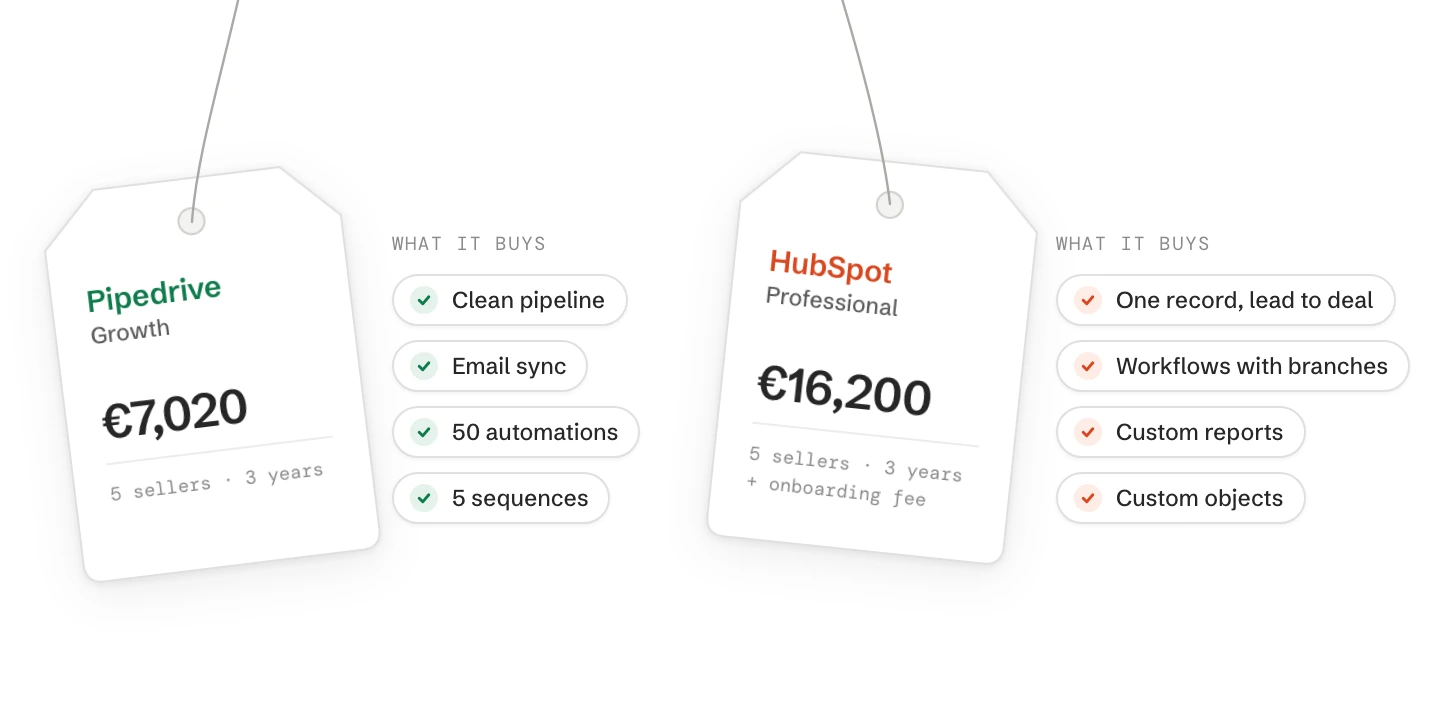
Five sellers with automation: Pipedrive €7,020, HubSpot €16,200 plus onboarding. List prices before VAT, as of October 2026
HubSpot or Pipedrive: which fits your team?
Pick by where your leads come from and what you must report in a year. Sales-only teams do well on Pipedrive. Once marketing and sales share one customer record, HubSpot fits.
Your situation
Choose
Why
2 to 10 sellers, leads from referrals, trade fairs or outbound, no marketing team
Pipedrive Growth
Clean pipeline, email sync, 50 automations and 5 sequences, quick to learn
Marketing brings most leads through the website, campaigns or events
HubSpot Professional
Lead source, nurture emails, scoring and handover sit on the same record as the deal
The sales head must report from first touch to revenue
HubSpot Professional
Custom reports join contacts, companies, deals and marketing data
Service answers customers by email or chat
HubSpot
Tickets on the same record as the deal. Pipedrive has no help desk
You track things that aren’t deals or people: machines, sites, contracts
HubSpot Professional
Custom objects. Pipedrive has custom fields only
A pipeline only, no automation, tight budget
Pipedrive Lite or HubSpot Starter
Both cover the basics. Try each with 20 of your real deals
Plans as of October 2026.
If you’re unsure, write down what the sales head and marketing must see in twelve months. A team that is sales-only today but starts inbound marketing within a year saves itself a second migration by starting on HubSpot.
What’s the real difference between HubSpot and Pipedrive?
Pipedrive is a sales tool built around the pipeline. HubSpot is one database for marketing, sales and service, with a sales tool on top of it.
The difference shows in daily work. In Pipedrive a rep sees deals, activities and emails, and little else. In HubSpot the same contact also shows the form they filled in, the emails marketing sent and any open ticket. Whether the extra context matters depends on who else works with your customers.
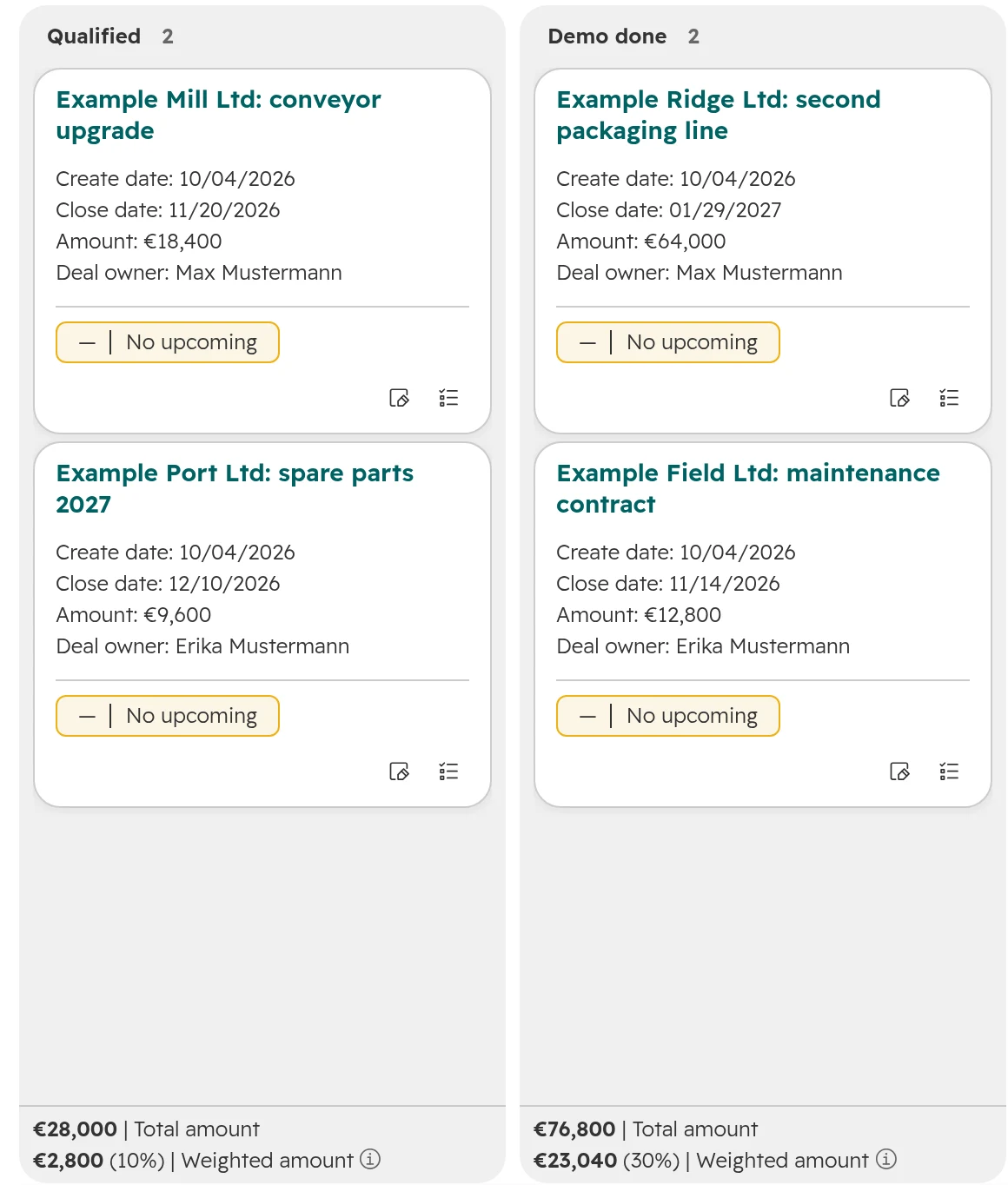
HubSpot’s deal board, first two stages. Each stage shows its total and its weighted amount.
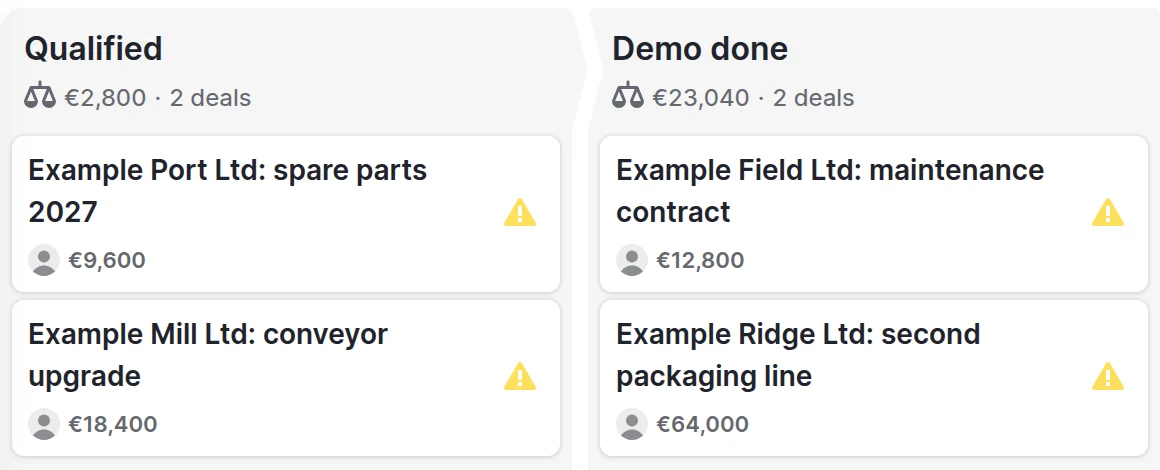
Pipedrive’s board with the same deals. The warning sign marks a deal with no next activity planned.
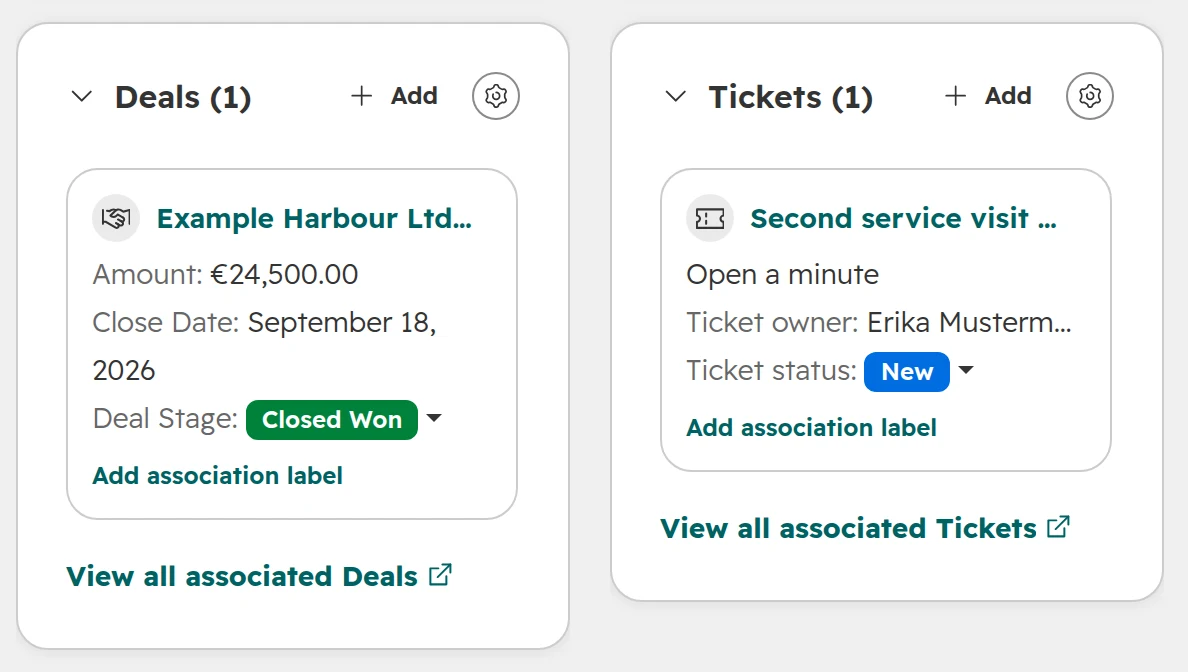
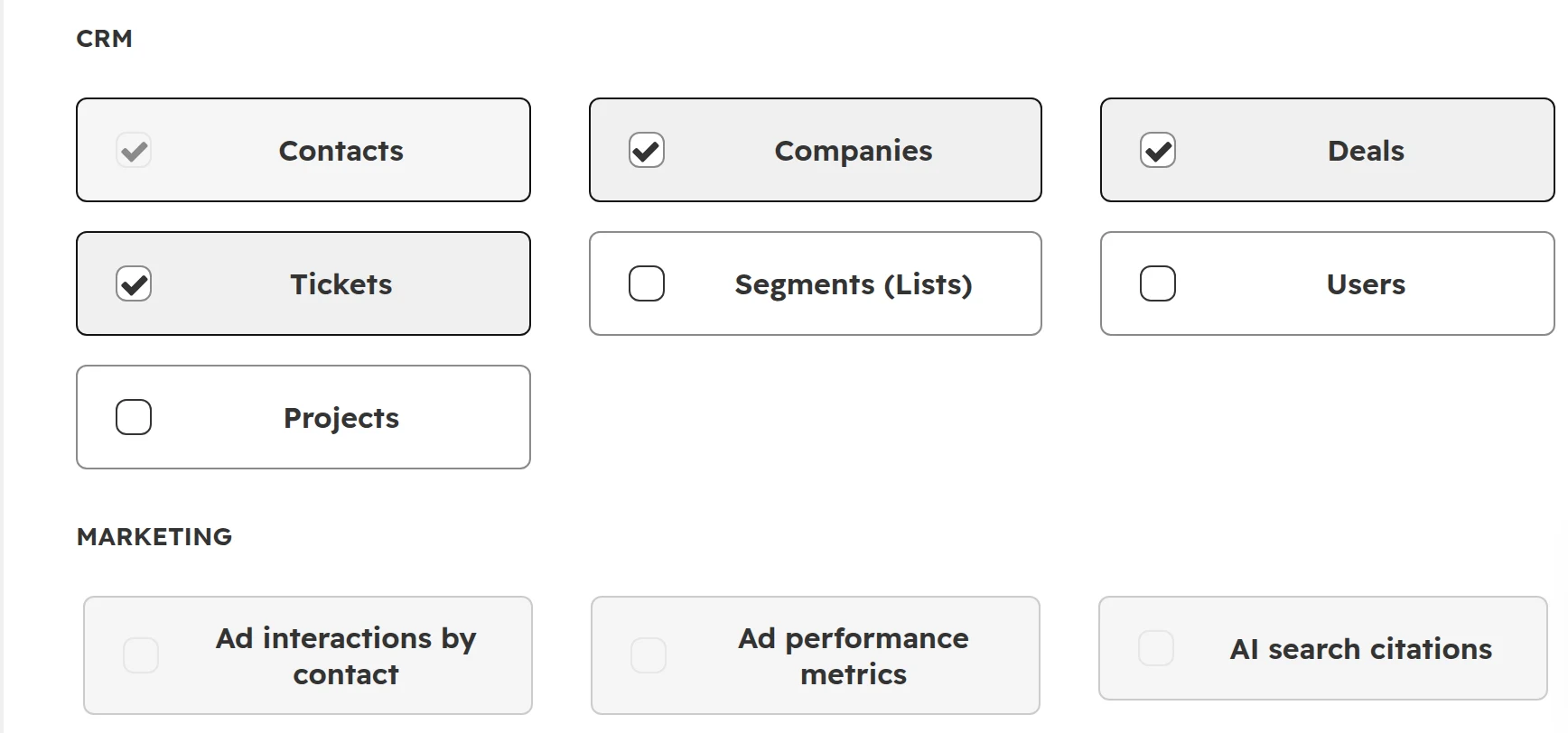
Two cards from the right column of one contact in HubSpot: the deal sales won and the ticket service is working on. Marketing’s campaigns sit in the same column.
Pipedrive and HubSpot limits by plan
Feature
Pipedrive
HubSpot
Pipelines
On every plan
Free: 1. Starter: 15. Professional and Enterprise: 350
Automation
From Growth: 50 automations per company. Premium: 150
Starter: simple automation. Professional: workflows with branches, 2,000 per account
Sequences
Growth: 5. Premium: 25. Ultimate: 50
Professional: 5,000
Marketing email
Campaigns add-on, priced by subscribers
Built in. On the new pricing every send uses credits
Reports
Growth: 50 reports per user, forecast view
Starter: standard reports. Professional: custom reports, forecasts, attribution
Help desk
None
Tickets in every edition, help desk from Professional
Custom objects
No, custom fields only
From Professional
Test account (sandbox)
Ultimate
Enterprise
Data limit
Leads and deals: 5,000 per seat on Growth
Records: 25,000 on Starter, 250,000 on Professional
Pipedrive plans Lite, Growth, Premium, Ultimate. HubSpot editions for new customers in Europe. As of October 2026.
HubSpot and Pipedrive pricing: what each costs over three years
For five sellers who need automation, Pipedrive Growth costs €7,020 over three years and HubSpot Professional €16,200, plus HubSpot’s onboarding fee. Both figures use list prices with annual billing, before VAT.
Seat costs over 36 months
Team
Pipedrive
HubSpot
5 users, pipeline only
Lite: €2,520
Starter: €3,600
5 users, with automation and sequences
Growth: €7,020
Professional: €16,200, plus onboarding
12 users (10 sales, 2 marketing), newsletter to 5,000 contacts a month
Premium: €25,488, plus the Campaigns add-on
Professional: €38,880, plus €19,800 to €23,400 for email sends, plus onboarding
List prices per seat a month: Pipedrive €14, €39, €59, €79; HubSpot Starter €20, Professional €90. Annual billing, before VAT, as of 4 October 2026. Sources: pipedrive.com/de/pricing, hubspot.de/pricing and HubSpot’s pricing supplement.
HubSpot’s email line is new. Since 1 October 2026, new HubSpot customers in Europe pay for marketing email with credits: 15 credits, €0.15, per email for the first 10,000 a month. Professional includes 10,000 credits a month. A newsletter to 5,000 contacts uses 75,000. The sends above the included credits cost €550 to €650 a month, depending on whether you buy a pack of sends. Existing HubSpot customers keep their old pricing.
What the numbers leave out
HubSpot onboarding. Professional and Enterprise must buy a one-off onboarding package. HubSpot doesn’t publish its price on the pricing page, so ask for it in writing. Pipedrive offers free implementation help on plans over USD 400 a year.
Pipedrive add-ons. LeadBooster (forms, chat), Web Visitors, Smart Docs and Campaigns cost extra on the plans that don’t include them.
The tools next to Pipedrive. A newsletter tool, a help desk or a website form tool, and the sync between them.
Monthly billing. Pipedrive costs up to 42% more billed monthly: Lite €24, Growth €49, Premium €79, Ultimate €99.
Set-up, migration and training. Usually the biggest item in year one, on both.
Two rules that change the bill
Pipedrive puts every seat on the same plan. If one person needs a Premium feature, everyone moves to Premium. Seats are billed whether they’re assigned or not.
HubSpot has cheaper seats for people who don’t sell. View-only seats are free. An Ops seat for the person who builds reports and workflows costs €50 instead of €90. Which seat each person needs is in our guide to HubSpot seats and credits.
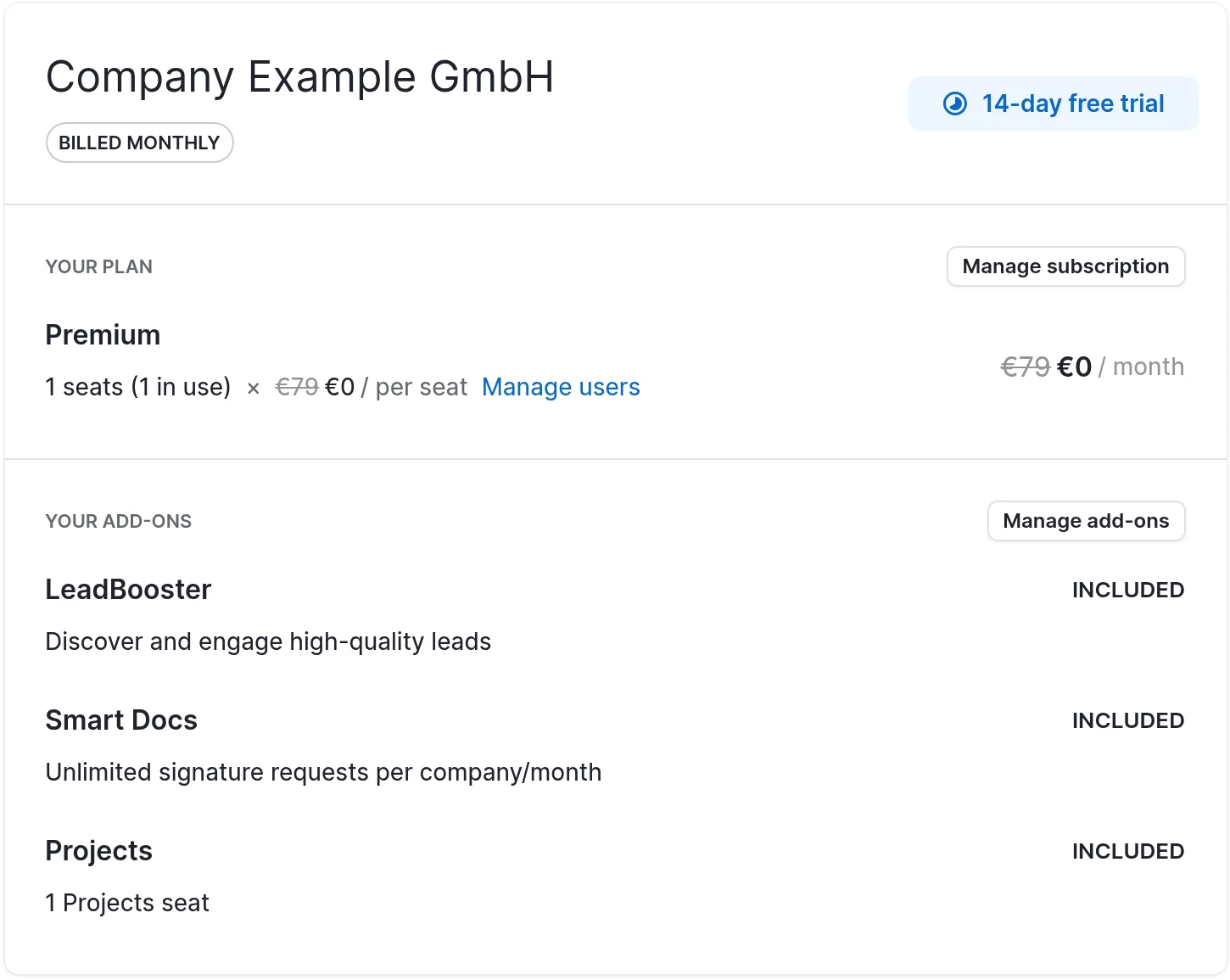
Pipedrive’s billing page during the trial: Premium at €79 per seat a month on monthly billing. LeadBooster, Smart Docs and Projects are included in Premium.
Automation and reporting: where the gap is biggest
Pipedrive gives you automation on its second plan. HubSpot keeps workflows and sequences for Professional, and that step from Starter is the most common reason small teams look at Pipedrive.
Pipedrive Growth: 50 automations per company, each with up to 10 actions, 3 delays and 3 if/else conditions. Premium allows 150 automations and 10 conditions.
Pipedrive starts automations on events only. A deal changes stage, a person is added. You can’t pick ten deals and start an automation for them. The workaround is a field you set by bulk edit that the automation listens to.
HubSpot Starter: simple automation, such as a task when a deal reaches a stage or a follow-up email after a marketing email. No branches, no workflows across objects.
HubSpot Professional:workflows on contacts, companies, deals, tickets and custom objects, with branches and delays. You can also enrol records by hand. On the new pricing each workflow action uses credits: 3 credits for each of the first 10,000 actions a month.
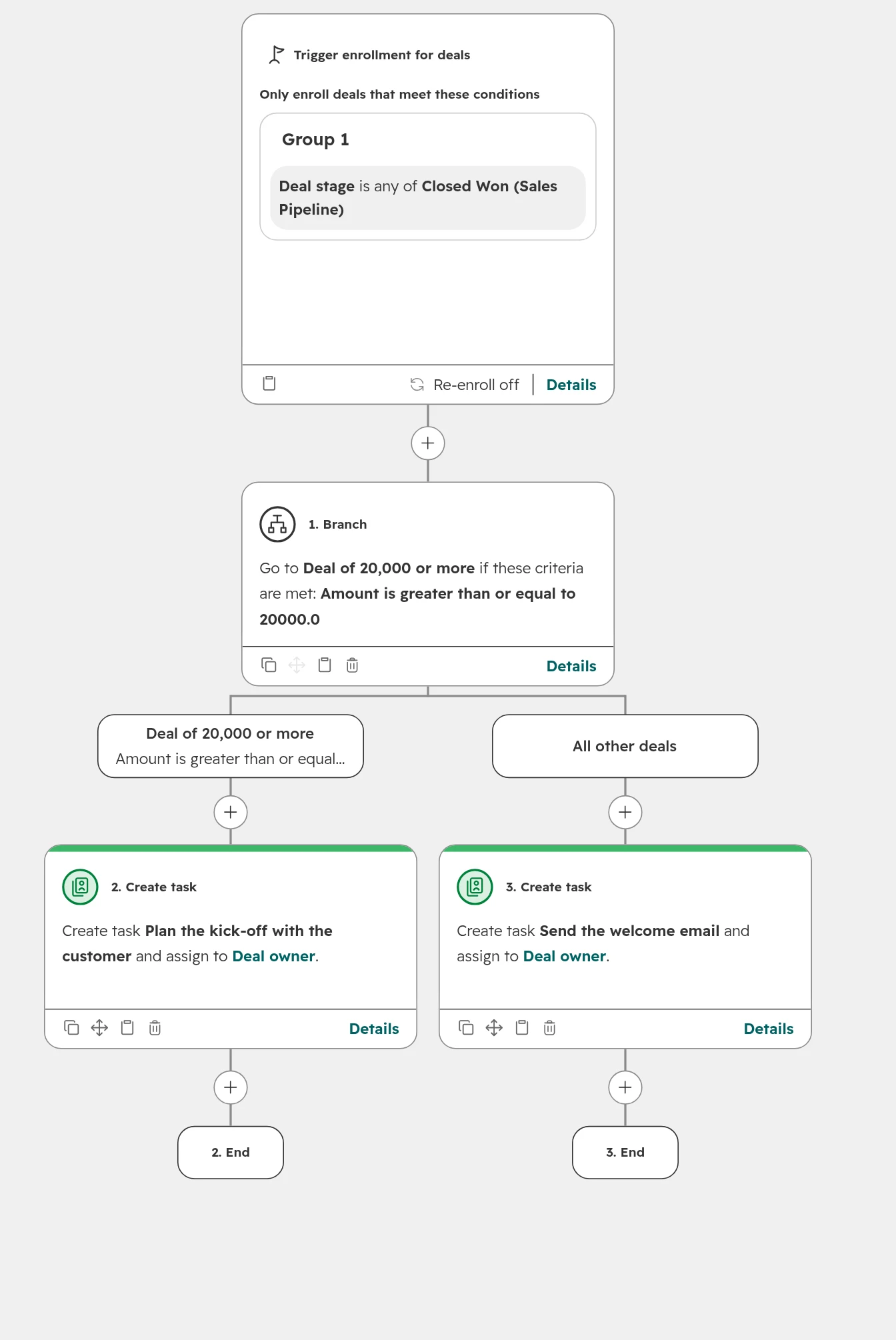
A HubSpot workflow with a branch: a won deal of 20,000 or more gets a kick-off task, every other won deal a welcome email task, each for the deal owner. Branches like this need Professional.
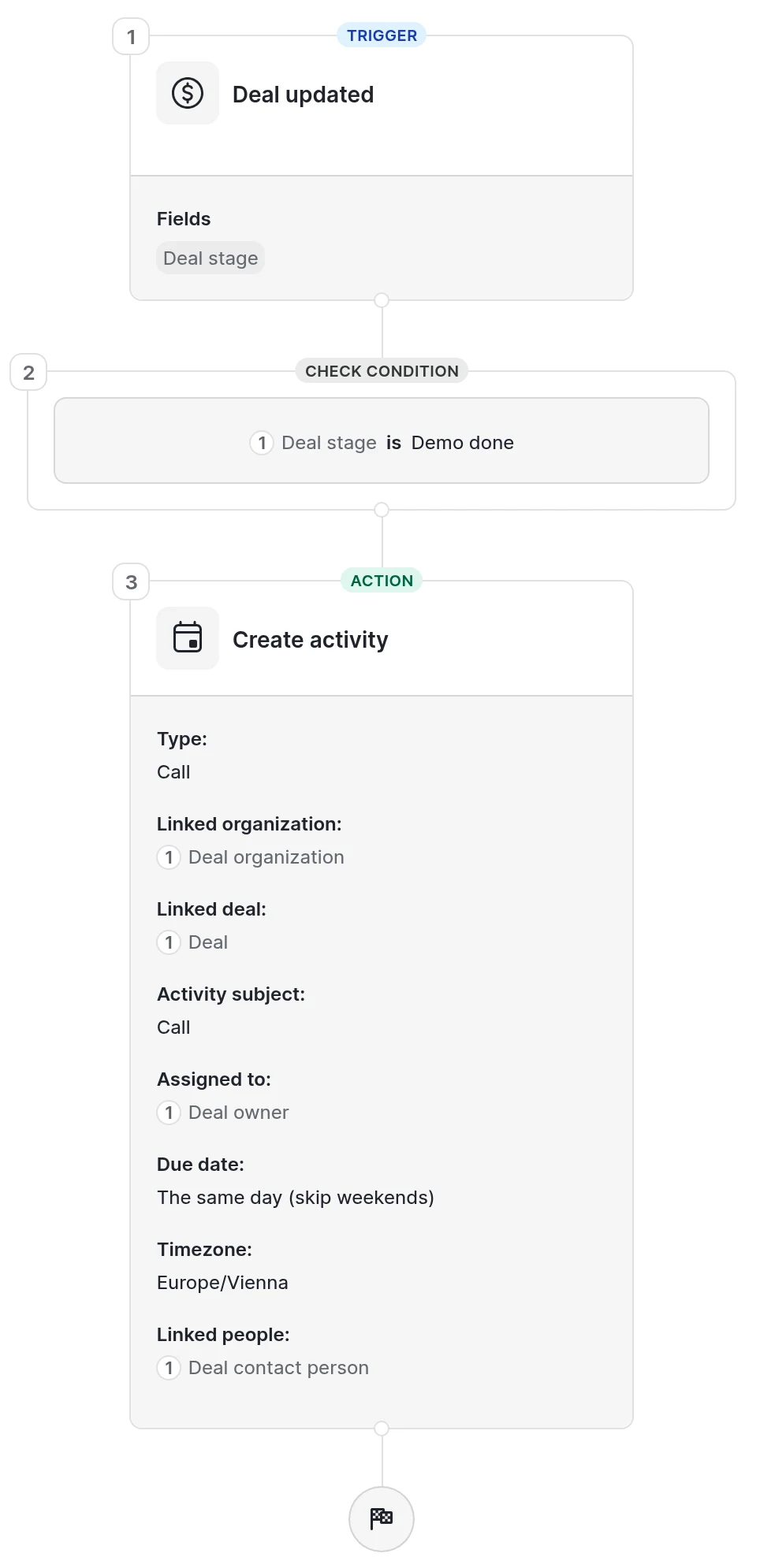
A Pipedrive automation: when a deal reaches Demo done, Pipedrive creates a call for the deal owner. One trigger, conditions, then actions.
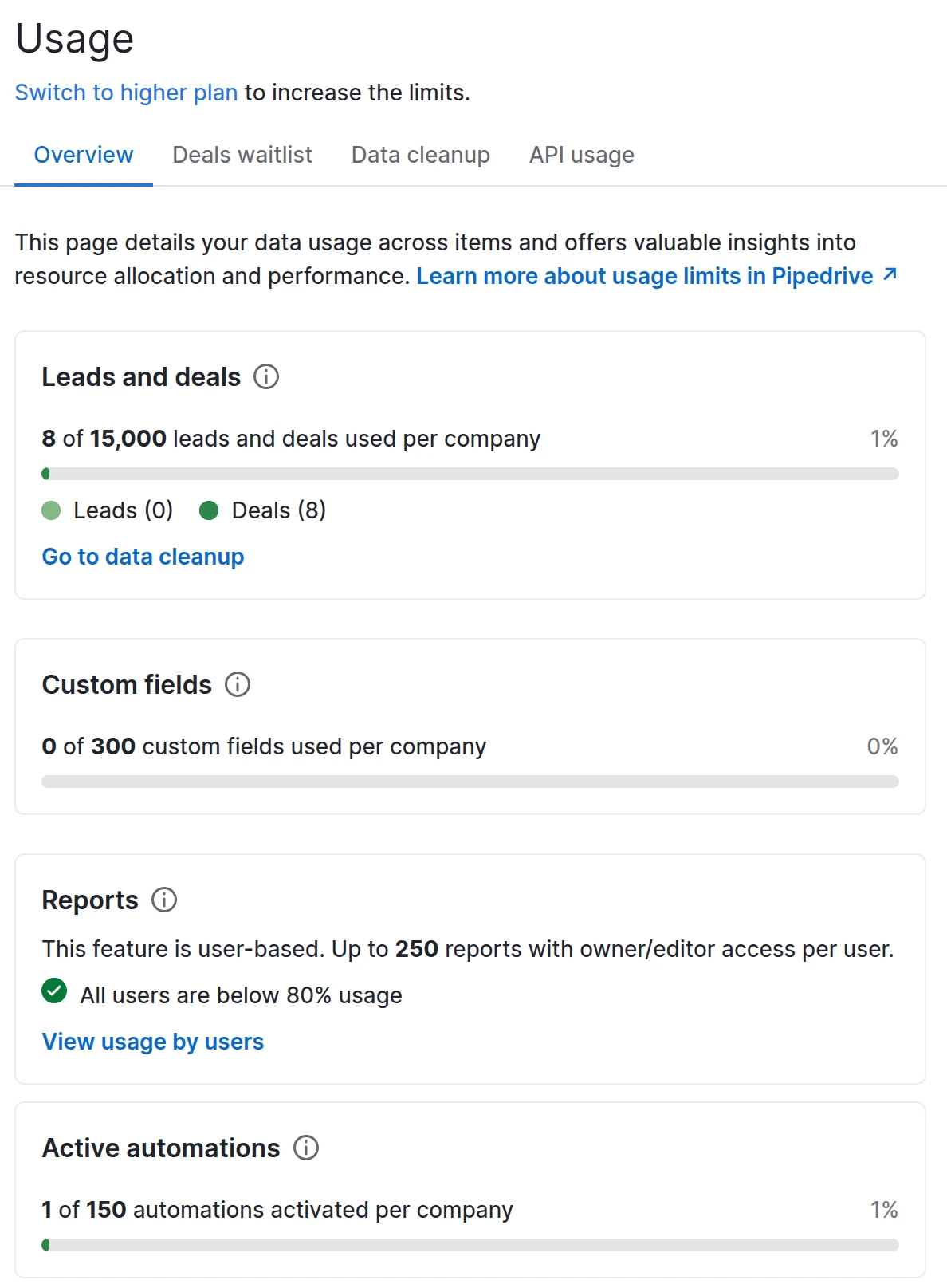
Pipedrive shows its plan limits under Settings > Usage. These are Premium’s limits with one seat: 15,000 leads and deals, 300 custom fields, 250 reports per user, 150 automations.
Reporting
Pipedrive’s reports are quick to build for sales numbers: deals, activities, forecast and targets per rep. Growth allows 50 reports per user.
HubSpot’s custom reports join contacts, companies, deals and marketing data. Those reports answer the questions a sales head asks across teams: which source brings the deals that close, how long each stage takes, which campaign paid off. Custom reports need Professional. Which ten numbers to put on the sales head’s dashboard is in our guide to HubSpot dashboards for sales leaders.
HubSpot’s custom report builder: one report can join contacts, companies, deals and tickets, and add marketing data such as ad interactions or campaigns.
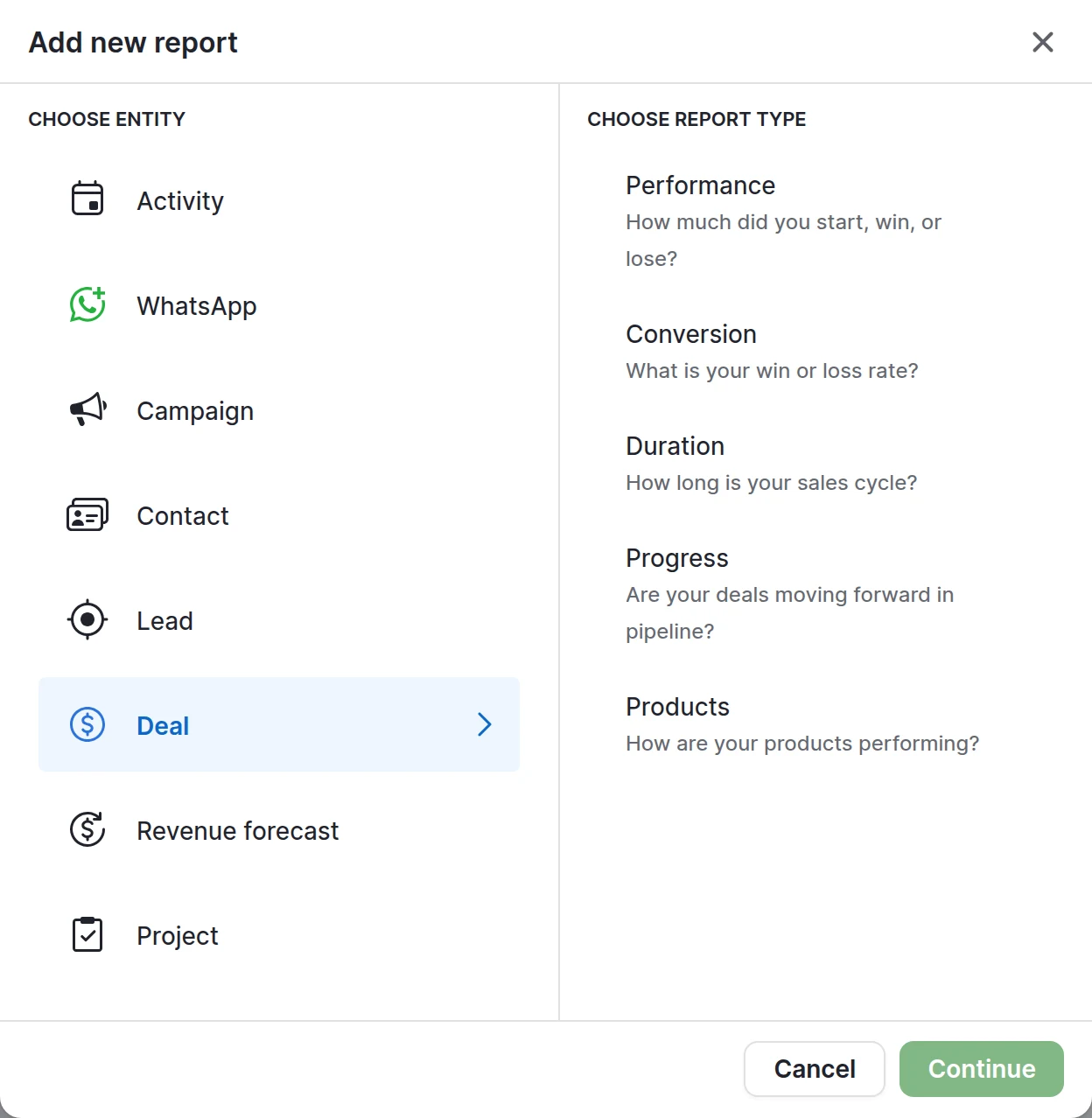
Pipedrive’s report builder: one entity per report, such as Deal or Activity, then a report type.
Integrations and data protection in Germany, Austria and Switzerland
Neither CRM wins on data protection alone. HubSpot and Pipedrive both host European customers in the EU and offer a data processing agreement. The differences are in the apps and the set-up.
Where the data is. HubSpot runs an EU data centre in Frankfurt for new accounts. Pipedrive hosts new EU sign-ups in its EU region (Frankfurt or Dublin) and tells you the exact location on request. Check the region when you sign up: moving an account later is a project.
Accounting tools. HubSpot and Pipedrive both have apps for sevdesk and Lexware Office. HubSpot also has one for DATEV Unternehmen Online. Before you rely on one, check whether it syncs both ways or only creates invoices.
ERP. For SAP Business One, Business Central, weclapp or proALPHA, the app list matters less than the build: which system owns customers, prices, orders and open items. How to decide that is in our guide to connecting HubSpot to your ERP.
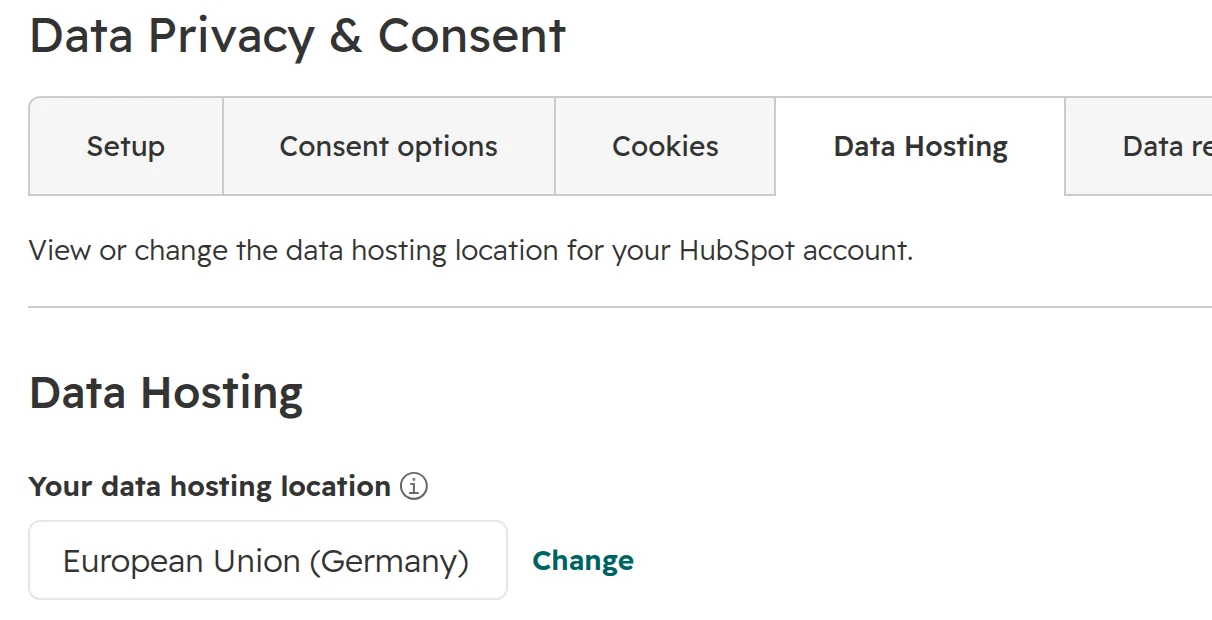
Where HubSpot shows it: Settings > Privacy & Consent > Data Hosting. This account is hosted in the European Union (Germany).
When Pipedrive is the better choice
Pipedrive is the better choice for a sales team that wants to work its pipeline and needs nothing else from the CRM.
When to move from Pipedrive to HubSpot, and when not
Move when marketing and sales need the same customer record. Don’t move because Pipedrive feels small.
Signs it’s time
Marketing can’t see which of its leads became revenue.
Reports across campaigns and deals are built in spreadsheets.
A newsletter tool, a form tool and a help desk run next to Pipedrive, synced by hand or by a connector.
You need records that aren’t deals or people, such as machines, sites or contracts. Those need custom objects.
You hit the 50 automations on Growth, or the leads and deals limit.
Reasons to stay
The team uses Pipedrive every day, and the problems sit in the process.
Nobody will own HubSpot after go-live.
The wish comes from one manager or one rep, and nobody can name the need behind it.
Avoid the half move: Pipedrive for sales and HubSpot for marketing, kept in sync. The half move works for a few months. Then owners, stages and reports drift apart, and nobody trusts either system. If you must run both for a while, decide which system owns each field.
HubSpot’s Smart Transfer moves Pipedrive people, organisations, deals, products, notes and activities. Logged emails and some history don’t move. The order of work, step by step, is in our CRM migration guide.
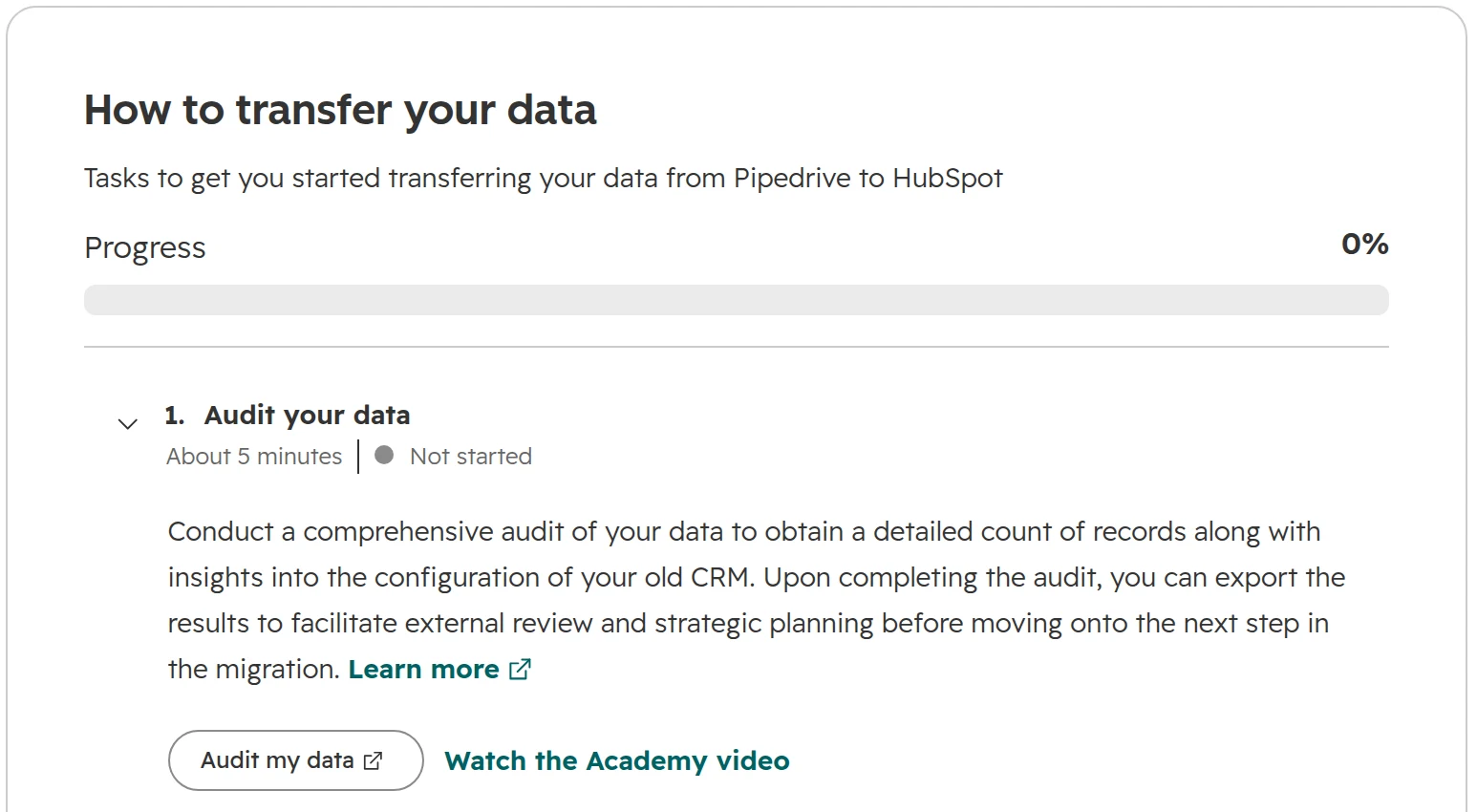
HubSpot’s Smart Transfer connected to a Pipedrive account. It audits the Pipedrive data first, then prepares the portal and syncs the records.
Mistakes when choosing between HubSpot and Pipedrive
Comparing the demo, not the plan you’ll buy. HubSpot demos usually show Professional. Starter has no workflows or sequences. Pipedrive’s Lite has no automation and no email sync.
Leaving out HubSpot’s onboarding fee and credits. On the new pricing, marketing email and workflow actions use credits.
Counting seats, not tools. Pipedrive plus a newsletter tool plus a help desk is three contracts and two syncs.
Buying a full seat for everyone. In HubSpot, managers who only read dashboards need a free view-only seat.
Deciding on the first week. Reps like whatever is quickest to learn. Ask what the sales head and marketing must see in twelve months.
How we help you choose
We set up HubSpot, so we’re not neutral, and we don’t pretend to be. If Pipedrive fits your team better, we say so. This is the order we work in.
Step 01
Map the process
Where leads come from, who touches them, what you report today, and which systems hold customer data.
Step 02
Write the 12-month needs
Marketing, service, ERP and reporting. What has to be true in a year decides more than what the team wants this week.
Step 03
Price both for your team
Seats, add-ons, credits, onboarding and the tools each one needs next to it, over three years at list prices.
Step 04
Test with your own deals
Twenty real deals in a trial of each, worked by two reps for a week.
Step 05
Decide and plan
A set-up or a move with a fixed order, so sales keeps selling while it happens.
Frequently asked questions
Is HubSpot better than Pipedrive?
Not for every team. HubSpot is better when marketing, sales and service work from one customer record. Pipedrive is better for a sales-only team that wants a quick, lower-cost pipeline tool.
Is Pipedrive a good CRM?
Yes, for a sales team that works its pipeline and needs nothing else from the CRM. Pipedrive runs well after an afternoon of set-up, and its board shows which deal has no next activity planned. Pipedrive has no help desk and no custom objects.
What are the disadvantages of Pipedrive?
No help desk, no custom objects, marketing email only as an add-on, and automation limits per plan, such as 50 automations on Growth. Every seat in an account is on the same plan.
What are the disadvantages of HubSpot?
HubSpot keeps workflows and sequences for Professional, and Professional and Enterprise must buy a one-off onboarding package. On the new pricing for Europe, marketing email and workflow actions use credits. HubSpot Professional also needs someone who owns the data model, at least part time.
Is HubSpot or Pipedrive cheaper?
Pipedrive is cheaper at list prices. For five sellers with automation, Pipedrive Growth costs €7,020 over three years and HubSpot Professional €16,200, plus onboarding. For five users with a pipeline only, Pipedrive Lite costs €2,520 and HubSpot Starter €3,600. Annual billing, before VAT, as of October 2026.
How much does Pipedrive cost per month?
Per seat a month with annual billing: Lite €14, Growth €39, Premium €59, Ultimate €79. With monthly billing: €24, €49, €79 and €99. Before VAT, as of October 2026. There’s no free plan, only a 14-day trial.
How much does HubSpot cost for new customers in Europe?
Since 1 October 2026, new customers in Europe buy one edition with seats. Per seat a month with annual billing: Starter €20 at list, Professional €90, Enterprise €175. Professional and Enterprise add a one-off onboarding fee. A free edition covers up to 2 users.
Is HubSpot free?
HubSpot has a free edition for up to 2 users, with 1 pipeline and up to 3,000 records. Workflows and sequences need Professional.
Is HubSpot or Pipedrive easier to use?
Pipedrive is easier to start with. A sales team can work in Pipedrive after an afternoon of set-up. HubSpot Professional does more and needs someone who owns the set-up after go-live.
Can Pipedrive do marketing automation?
Partly. The Campaigns add-on sends newsletters with simple automations. Landing pages, a website and reports from campaign to revenue need other tools.
Can we use Pipedrive for sales and HubSpot for marketing?
Yes. HubSpot has a Pipedrive app that syncs records. The sync suits a transition. Over time owners, stages and reports drift apart, so decide which system owns each field.
How do you move from Pipedrive to HubSpot?
HubSpot’s Smart Transfer moves Pipedrive people, organisations, deals, products, notes and activities. Logged emails and some history don’t move. Decide first which data to bring, then test with a few records before the full move.
Choose on facts, not on the demo
We look at your process and systems, and tell you whether HubSpot fits, before you sign anything.