HubSpot vs Microsoft Dynamics 365 Sales: which CRM fits a Microsoft company
For companies already on Microsoft 365: how each CRM works with Business Central, Outlook and Teams, what ten sellers cost a year, and when Dynamics 365 Sales is the better choice.
Updated · 15 minutes·By Matthew Labrooy, Managing Director
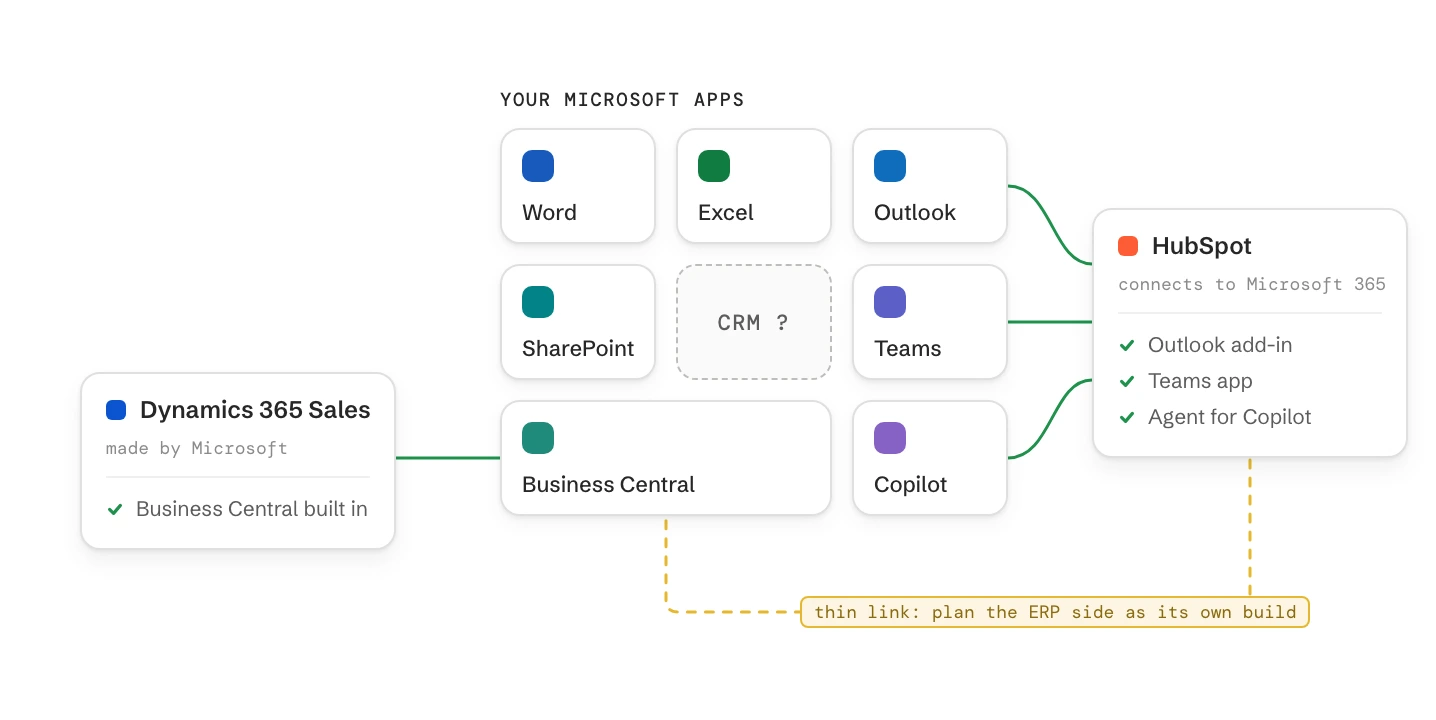
Dynamics 365 Sales is the better choice when your sales team works from Business Central data: customers, prices, stock and orders. Microsoft builds that link itself. Users who already have Business Central Premium can add Sales Enterprise for $20 a user a month instead of $105 (US list). Plan for a partner or an in-house admin to shape it.
HubSpot is the better choice when marketing and sales must work from one customer record and the team should sell within weeks. HubSpot works with the Microsoft 365 you already have: an Outlook add-in, a Teams app and an agent for Copilot. HubSpot’s own Business Central app syncs only four objects, so plan the ERP side as a separate build.
Dynamics 365 Sales
Professional €56.30, Enterprise €91.00, Premium €130.00 per user a month, billed annually. Copilot from Enterprise. A 30-day trial, no free plan
HubSpot
New customers in Europe: Starter €20, Professional €90, Enterprise €175 per seat a month, billed annually, plus a one-off onboarding fee from Professional. Free for up to 2 users
Business Central
Dynamics: Microsoft’s own sync of customers, contacts, items, prices, opportunities, orders and posted invoices. HubSpot: its own app syncs four objects and turns customers into contacts
Microsoft 365
Includes no CRM licence. Both CRMs log email from Outlook and work with Teams
Ten sellers, one year
Dynamics Sales Enterprise €10,920, HubSpot Professional €10,800 plus onboarding. List prices before VAT, as of October 2026
Dynamics 365 vs HubSpot: which to choose in five situations
Pick by two things: which system owns customer, price and order data, and who will change the CRM after go-live. Those two answers decide more than any feature list. Being on Microsoft 365 doesn’t decide it: Dynamics 365 Sales and HubSpot both work in Outlook and Teams.
Your situation
Choose
Why
Business Central runs quotes and orders, and sales needs stock and prices next to the deal
Dynamics 365 Sales Enterprise
Microsoft’s own sync for customers, items, prices, orders and invoices. Cheaper as an attach licence for Business Central Premium users
Marketing brings most leads through the website, events and campaigns
HubSpot Professional
Forms, emails, scoring and deals on one record, without a second marketing licence
10 to 50 sellers, no full-time CRM admin, go-live within a quarter
HubSpot Professional
Set up through settings pages. A deal board and reports from day one
Territories, several business units, approvals or your own apps on Power Platform
Dynamics 365 Sales Enterprise
Built to be shaped with forms, process flows and Power Automate, by a partner or an admin
A small team with a simple pipeline and a tight budget
Compare Dynamics Sales Professional and HubSpot Starter
Both cost less, and both have hard limits. Check them against next year’s needs
What’s the real difference between HubSpot and Dynamics 365 Sales?
HubSpot is a finished application for marketing, sales and service that you set up through its settings. Dynamics 365 Sales is an application on Microsoft’s Power Platform that an admin or a partner shapes to your process.
The difference shows on day one. A new HubSpot account has a deal board, a record page and reports ready to use. A Dynamics 365 Sales environment opens a full sales app, but languages, mailboxes, views, forms and process stages are set up before the team starts.
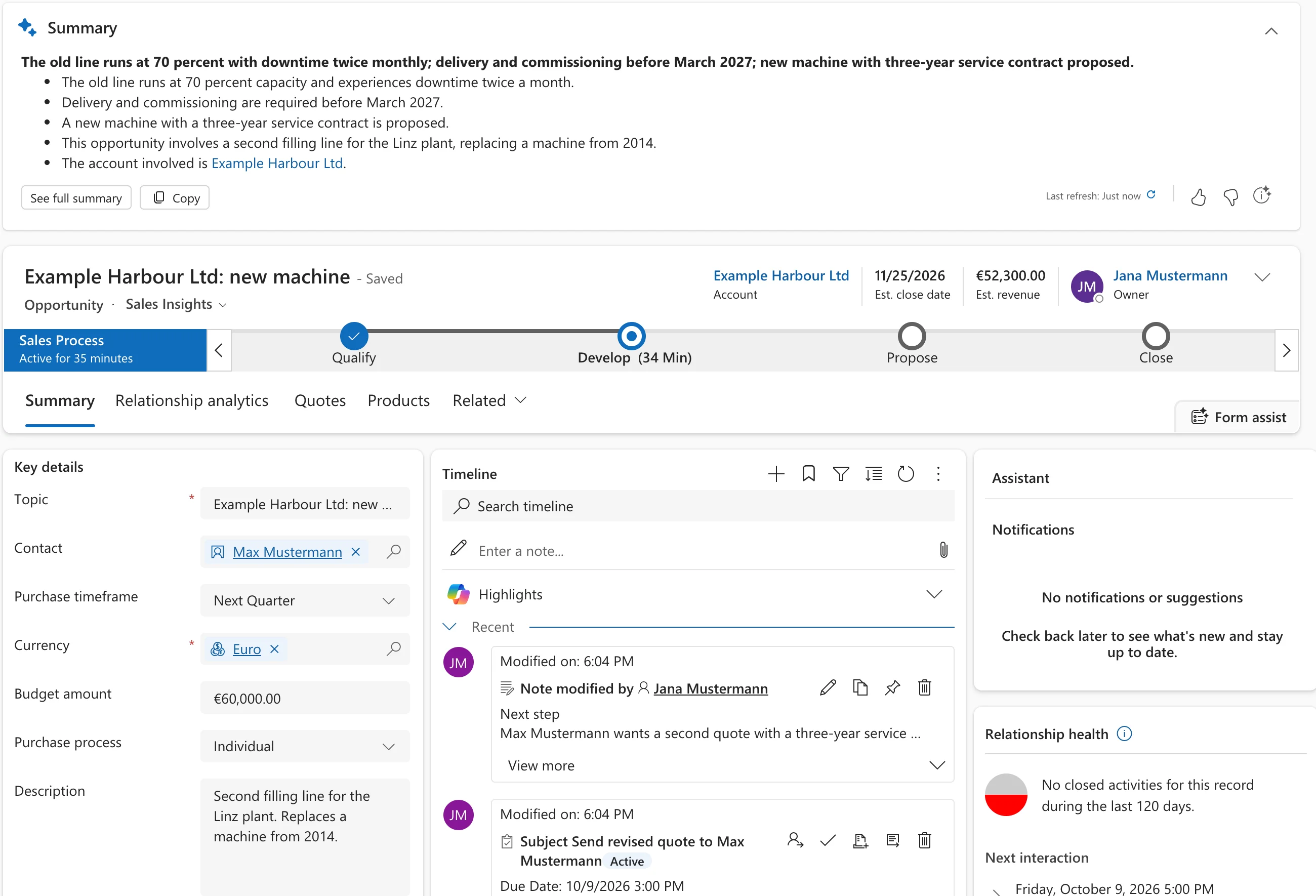
Dynamics 365 Sales: the opportunity record with Copilot’s summary on top, the sales process bar, key details and the timeline. The summary needs Sales Enterprise or Premium.
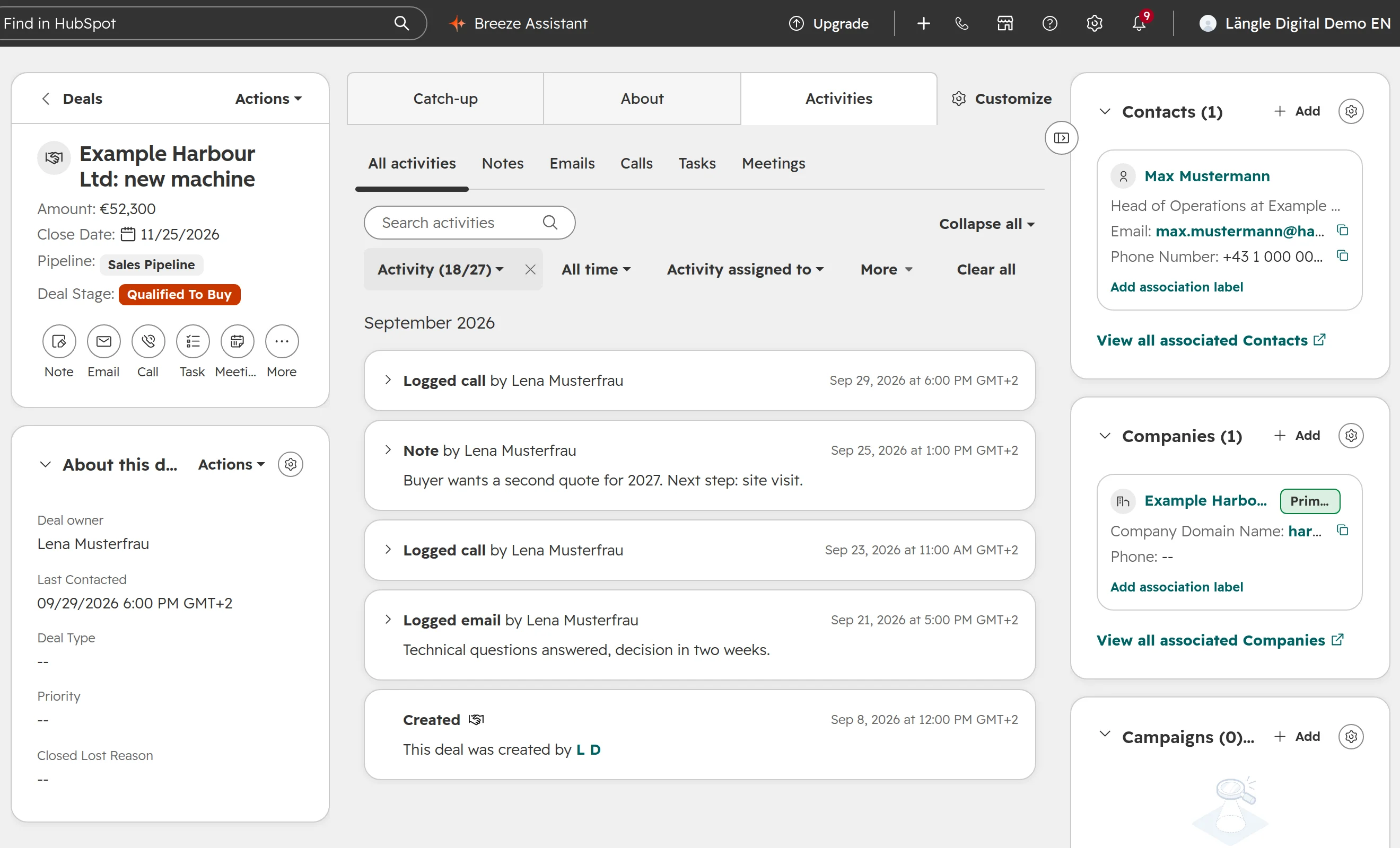
The same deal in HubSpot: deal details on the left, activities in the middle, contact and company on the right.
Topic
Dynamics 365 Sales
HubSpot
How you set it up
Power Apps: tables, forms, views, process flows, security roles
Power Automate flows and process flows. Flows with premium connectors need their own licence
Workflows and sequences from Professional
Reports
Charts, dashboards and Power BI. Professional allows 5 custom reports, charts or dashboards
Report builder and dashboards from Professional
AI
Copilot in Sales, Outlook and Teams from Enterprise. Agents run on Copilot Credits
Breeze Assistant on every plan. Agents run on HubSpot Credits
Marketing
Customer Insights, a separate licence per tenant
Marketing tools on the same seat for new customers in Europe. Marketing email uses credits
What does a sales rep see every day in HubSpot and Dynamics 365?
HubSpot and Dynamics 365 Sales both show the pipeline, the record and the next task. The two differ in what’s ready before anyone configures them.
The pipeline
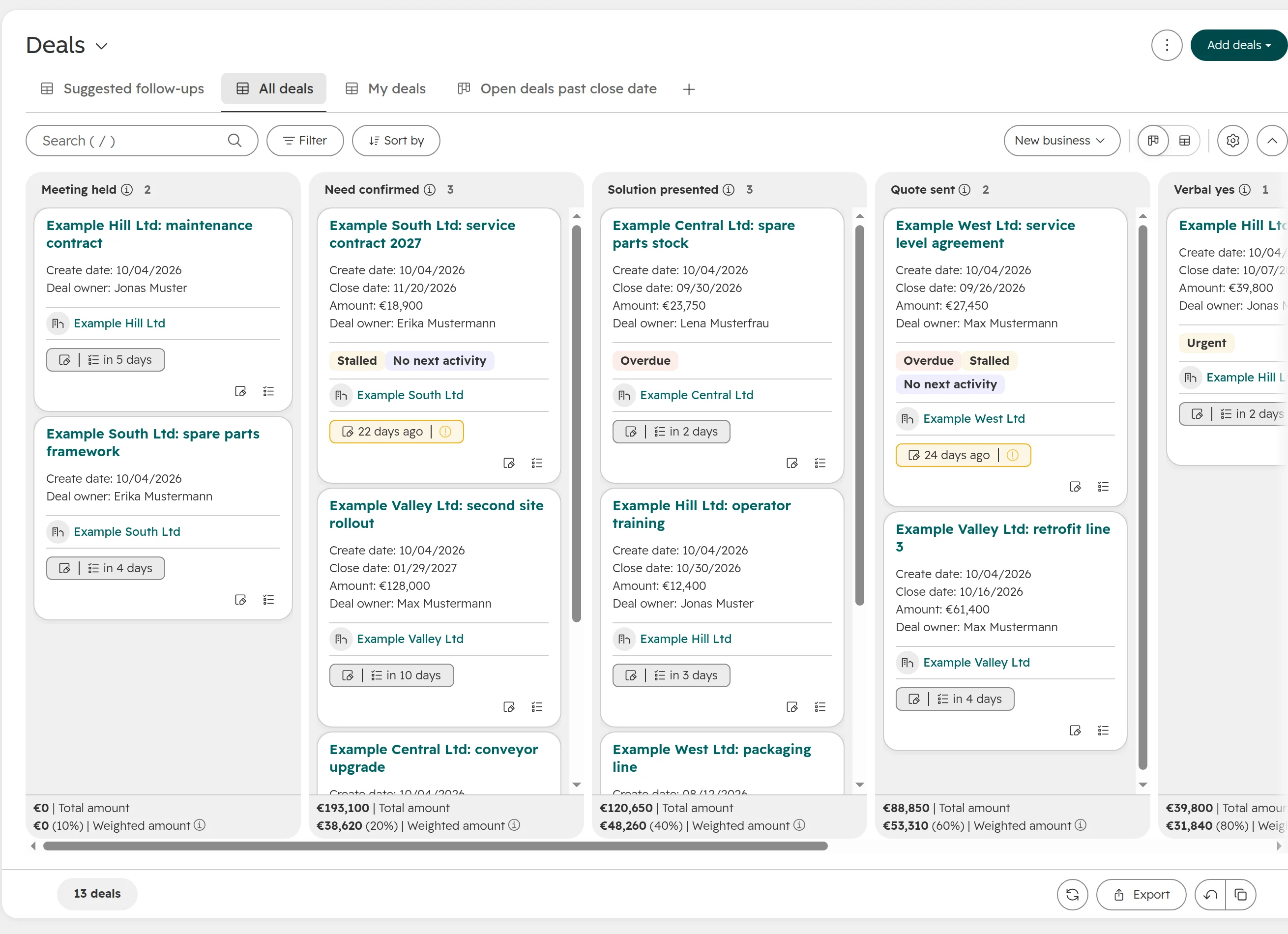
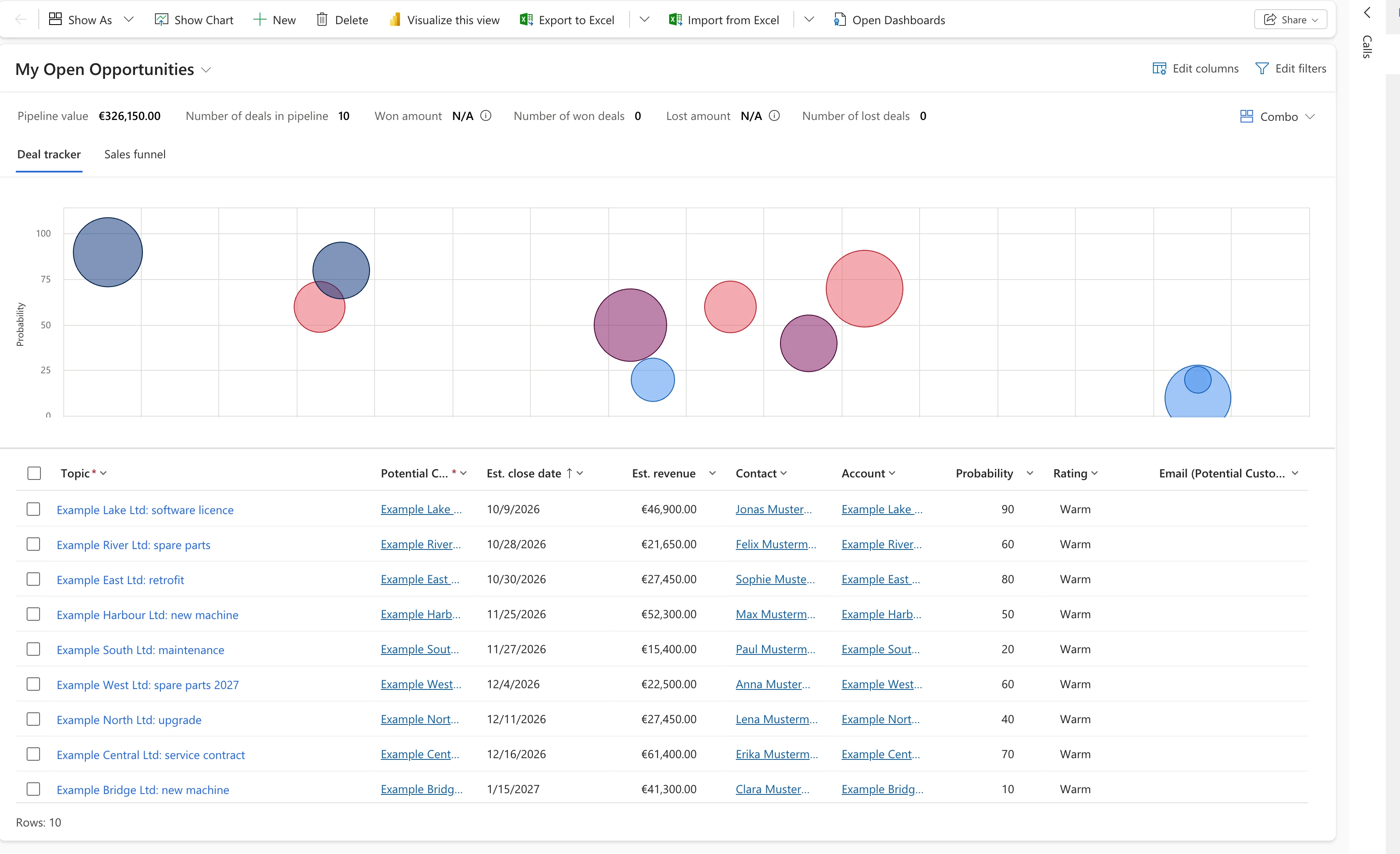
HubSpot opens deals as a board: one column per deal stage, one card per deal, and each column’s total and weighted amount at the bottom. Dynamics 365 Sales opens My Open Opportunities: a list with a deal tracker chart and a sales funnel above it. A drag-and-drop board for opportunities isn’t on by default. An admin adds it.
HubSpot’s deal board. Reps drag a card to the next stage, and each column shows its total and weighted amount.
Dynamics 365 Sales: the pipeline as a list with a deal tracker. Bubbles show probability over close date, sized by revenue.
The dashboard
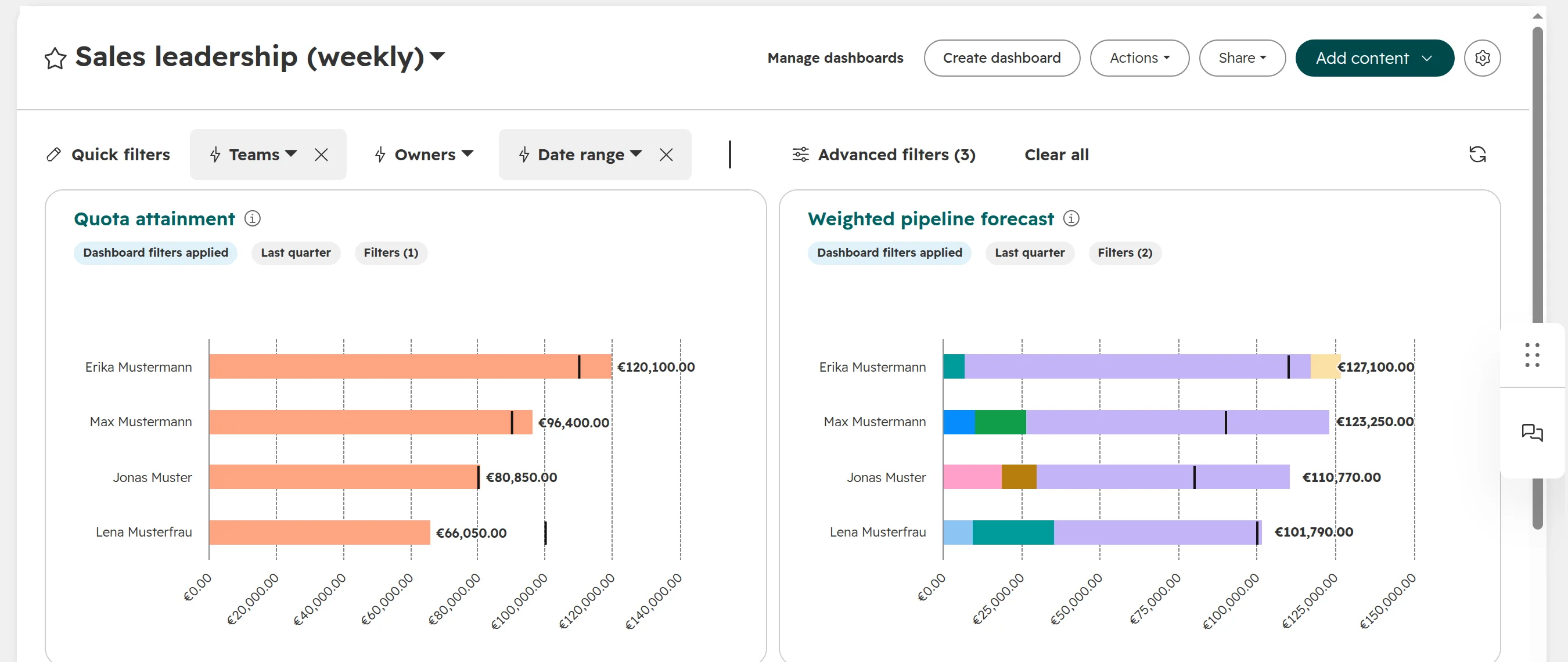
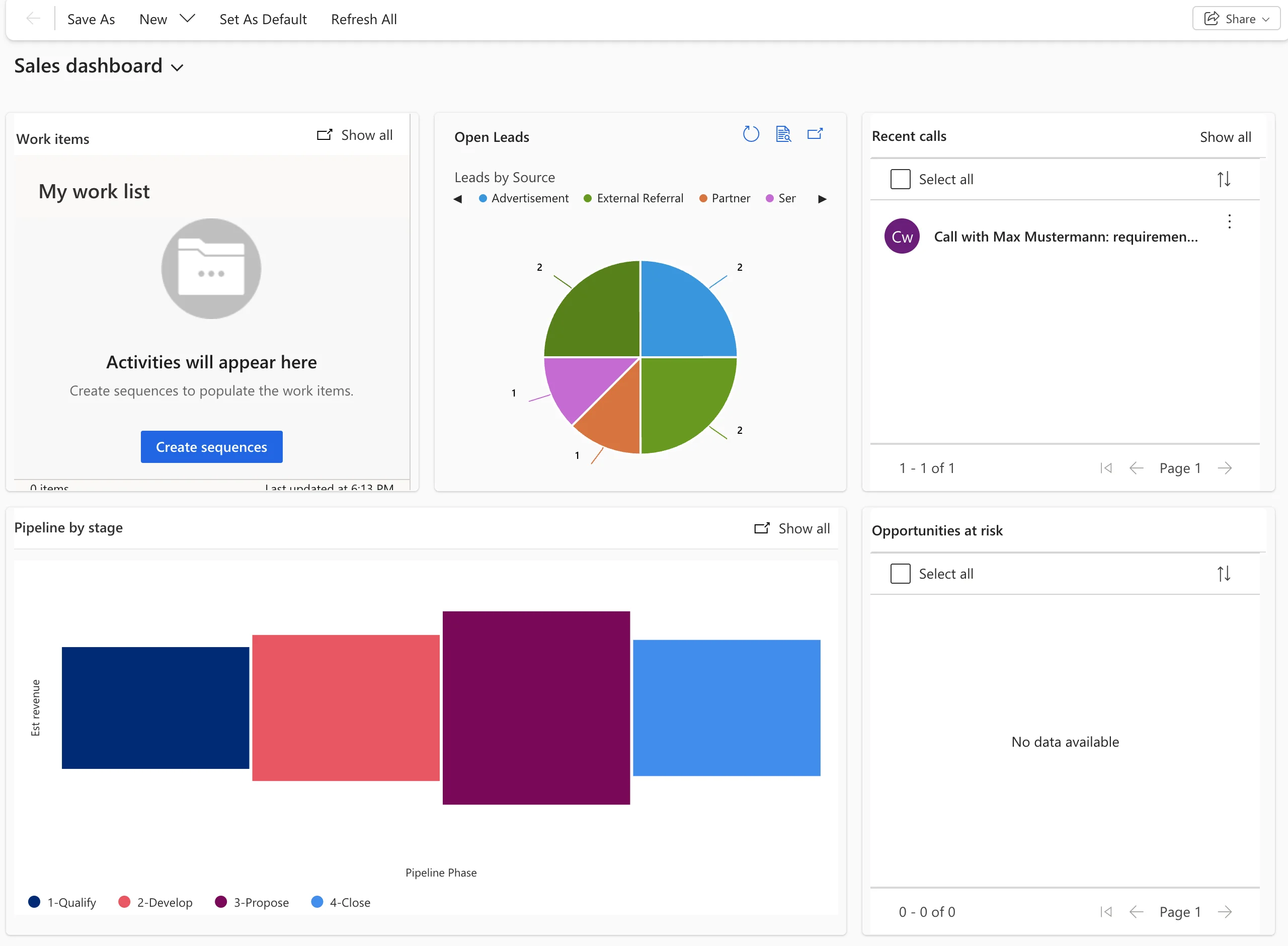
Dynamics 365 Sales starts on a sales dashboard with work items, open leads by source, recent calls, pipeline by stage and opportunities at risk. Some tiles stay empty until you set up sequences and scoring. HubSpot starts with a dashboard library, and Professional adds a report builder for the reports a sales head needs.
A HubSpot dashboard for a sales head: quota attainment and the weighted pipeline forecast per owner, with quick filters. Custom reports like these need Professional.
Dynamics 365 Sales’ standard dashboard. Work items and opportunities at risk fill only after sequences and scoring are set up.
Email and calendar
In Dynamics 365 Sales, the App for Outlook tracks emails and meetings to records. The app runs on server-side synchronization with Exchange Online: an admin approves and tests each mailbox first, and a tracked item can take up to 15 minutes to arrive.
In HubSpot, the Outlook add-in logs and tracks single emails, and the connected inbox logs by rule. A Microsoft 365 admin can deploy the add-in to everyone.
Business Central with Dynamics 365 Sales or HubSpot: what syncs
Business Central is where Dynamics 365 Sales leads most clearly. Microsoft builds the link between Business Central and Dynamics 365 Sales itself, through Dataverse. HubSpot’s own Business Central app syncs four objects and turns every Business Central customer into a HubSpot contact.
What syncs between Business Central and each CRM, out of the box
Data
Dynamics 365 Sales
HubSpot
Customers
Business Central customers and accounts, both ways
Business Central customers become contacts, not companies
Contacts
People at a customer, both ways
See customers
Products and prices
Items and resources as products, both ways. Price groups and prices to Sales
Items as products
Opportunities
Both ways
Opportunities to deals
Sales orders
Released orders to Sales. Both ways if you switch it on
Sales orders to HubSpot orders
Posted invoices
To Sales
Not synced
Stock
Item availability, updated every 30 minutes
Not synced
Quotes
Not in the standard mapping
Not synced
Standard mappings as of October 2026: Microsoft Learn for Dynamics 365 Sales, HubSpot’s Business Central app for HubSpot. HubSpot’s app needs Business Central online.
Customers and contacts are rarely the hard part. The work is quote to order: quotes, sales orders, invoices and products. Neither system maps quotes to Business Central out of the box, so decide where a quote is written before you choose.
The Business Central licence also changes the price. Users with Business Central Premium can add Sales Enterprise as an attach licence for $20 a user a month, against $105 for Sales Enterprise on its own. Both are US list prices in Microsoft’s licensing guide, billed annually, as of October 2026. The guide gives no euro attach price.
With HubSpot, Business Central is a build of its own: which system owns customers, prices and orders, how companies match, and where quotes live. Our Business Central guide shows what HubSpot’s app does and where it breaks. The ERP guide covers connectors and custom builds.
Outlook, Teams and Copilot: what Microsoft 365 already gives you
No Microsoft 365 plan includes a CRM licence, not even E5. The plans give you Outlook, Teams and limited Power Apps rights, and both CRMs build on those.
Dynamics 365 Sales
HubSpot
Outlook
App for Outlook in every Sales licence. Server-side sync; an admin approves each mailbox
Outlook add-in and connected inbox on every plan. A Microsoft 365 admin can deploy the add-in
Teams
Records shared in Teams. Copilot in Teams, such as call insights and deal rooms, needs extra licences
HubSpot app for Teams on every plan: notifications, records, meetings and call logging. Some features need Teams admin settings
Copilot
Copilot in Sales, Outlook and Teams from Enterprise. Premium adds 1,000 Copilot Credits a user a month
HubSpot Agent for Copilot reads HubSpot data in Microsoft 365 Copilot. Needs a Microsoft 365 Copilot licence or the Copilot Chat add-on
The Microsoft 365 argument for Dynamics is narrower than it sounds. Dynamics 365 Sales lives inside your tenant, with one login and one admin center. HubSpot connects to the same Outlook and Teams from outside. For a sales rep, both CRMs log email from Outlook.
What do HubSpot and Dynamics 365 Sales cost?
For ten sellers, Dynamics 365 Sales Enterprise and HubSpot Professional cost about the same in licences: €10,920 and €10,800 a year. List prices with annual billing, before VAT, as of October 2026, from Microsoft’s Austrian price list and HubSpot’s pricing for new customers in Europe.
Team, one year
Dynamics 365 Sales
HubSpot
10 sellers, pipeline and email
Professional: €6,756
Starter: €2,400
10 sellers, automation and AI
Enterprise: €10,920
Professional: €10,800, plus onboarding
10 sellers who already have Business Central Premium
Enterprise as attach: about $2,400 (US list)
Professional: €10,800, plus onboarding and the ERP build
10 sellers, 2 marketers, a newsletter to 5,000 contacts a month
Enterprise €10,920 plus Customer Insights attach €10,398: €21,318
Professional, 12 seats €12,960 plus €6,600 to €7,800 for email credits: €19,560 to €20,760, plus onboarding
List prices before VAT, as of October 2026. Dynamics: Microsoft’s Austrian price list. HubSpot: pricing for new customers in Europe since 1 October 2026; HubSpot Starter at list, without the current discount.
Billing terms change the Dynamics price. In the Microsoft 365 admin center, Sales Premium costs €130 a user a month when you pay yearly, €136.50 on a one-year term paid monthly and €156 on a monthly term.
What the numbers leave out
Set-up. Dynamics 365 Sales is usually set up with a Microsoft partner. HubSpot Professional and Enterprise need a one-off onboarding fee and someone who owns the account. Get both as days of work, in writing.
Admin time. A Dynamics system needs someone who can change forms, flows and security roles, in-house or at the partner, for as long as you run it. Budget that time like a licence.
Sequences and scoring. Sales Enterprise covers sequences for up to 1,500 records and predictive scoring for up to 1,500 records per environment a month. More needs Premium or Sales Insights.
Power Platform licences. Flows with premium connectors, shared Power BI reports and your own Power Apps can each need a licence.
Credits. Agents run on credits in both. Dynamics Premium includes 1,000 Copilot Credits a user a month. HubSpot Professional includes 10,000 credits for the account, and new customers pay marketing email from them.
Existing HubSpot customers keep their seat pricing: a Sales Seat costs €100 on Professional and €150 on Enterprise. Our seats and credits guide explains both models.
Set-up effort for Dynamics 365 Sales and HubSpot, and who runs it afterwards
Plan a Dynamics project with a partner and an admin who stays. Plan HubSpot with an owner who knows the sales process, and help for the ERP side.
Before a Dynamics 365 Sales team can start
Languages. An environment starts with its base language. German is a language pack an admin turns on, and each user picks it.
Mailboxes. Each user’s mailbox is approved and tested before Outlook tracking works.
Sample data. Trial environments come with Microsoft’s sample companies and people. Delete them before you import your own.
Views, forms and stages. The opportunity board, extra fields, process stages and dashboards are changed in Power Apps or the app designer.
Security roles and business units, which decide who sees and edits which records.
Before a HubSpot team can start
Pipelines, stages and properties in settings, with required fields per stage.
Users, seats and permissions, including free view-only seats for managers who only read.
Outlook and Teams. Each user connects the inbox; a Microsoft 365 admin deploys the add-in and approves the apps.
The ERP side as a project of its own, with an owner per field.
Who changes the CRM after go-live matters more than the go-live date. A Dynamics system only the partner can change gets slow and expensive to adjust. A HubSpot account nobody owns fills up with duplicates and unused properties.
When Dynamics 365 Sales is the better choice, and when HubSpot is
You can run both: HubSpot for marketing, Dynamics 365 Sales for sales. HubSpot’s Microsoft Dynamics 365 app syncs records one or two ways and can create Dynamics sales orders from deals. Running both means two licences and a sync to look after, so decide which system owns each field.
Mistakes when choosing between HubSpot and Dynamics 365
Assuming Microsoft 365 includes a CRM. No Microsoft 365 plan does, not even E5. Dynamics 365 Sales is its own licence.
Buying Sales Professional for an Enterprise process. Professional has no forecasting or territories, allows 15 custom tables and 5 custom reports, and can’t share an environment with Enterprise.
Expecting Copilot on Professional. Copilot in Sales, Outlook and Teams starts at Enterprise.
Treating HubSpot’s Business Central app as the ERP integration. The app syncs four objects and makes customers into contacts. Plan companies, quotes and invoices separately.
Pricing licences only. Partner days, Power Platform licences, HubSpot onboarding and credits change the total more than the price per seat.
Starting the wrong Dynamics trial. The trial from Microsoft’s website needs no card. The trial from the Microsoft 365 admin center is an order that turns paid unless someone turns off recurring billing.
Assuming Outlook just works because both are Microsoft. The App for Outlook depends on mailbox approval and server-side sync. Test it with your own reps in the pilot.
Switching CRMs to save on licences.Migration, retraining and rebuilt automations usually cost more than a few euros per seat over several years.
Judging Dynamics by its sample data. Test both with twenty of your own deals, worked by two reps for a week.
How we help you choose
We set up HubSpot, so we’re not neutral, and we don’t pretend to be. If Dynamics 365 Sales fits your Business Central set-up better, we say so. This is the order we work in.
Step 01
Map where data lives
Customers, prices, stock, orders and invoices: which system owns each today, and who enters them.
Step 02
Write the 12-month needs
Marketing, service, ERP and reporting. What has to be true in a year decides more than what the team wants this week.
Step 03
Price both for your team
Licences, attach prices, credits, onboarding, partner days and Power Platform licences, over three years at list prices.
Step 04
Test with your own deals
Twenty real deals in a trial of each, worked by two reps for a week, with Outlook connected. Write down the admin work each needed.
Step 05
Decide and plan
A set-up with a fixed order and an owner for every field, so sales keeps selling while it happens.
Frequently asked questions
Should a company on Microsoft 365 choose HubSpot or Dynamics 365 Sales?
Microsoft 365 alone doesn’t decide it, because HubSpot and Dynamics 365 Sales both log email from Outlook and work with Teams. Choose Dynamics 365 Sales when Business Central runs your quotes and orders, or your sellers already have Business Central Premium. Choose HubSpot when marketing brings most leads and nobody will build the CRM full time.
Is Dynamics 365 Sales included in Microsoft 365?
No. Microsoft 365, including E3 and E5, contains no Dynamics 365 licence. Dynamics 365 Sales costs €56.30 (Professional), €91.00 (Enterprise) or €130.00 (Premium) a user a month with annual billing, before VAT, as of October 2026.
Is HubSpot cheaper than Dynamics 365?
Not at the same level. Sales Enterprise costs €91 a user a month, HubSpot Professional €90 a seat for new customers in Europe, plus a one-off onboarding fee. For ten sellers that’s €10,920 against €10,800 a year, billed annually, before VAT. Dynamics is clearly cheaper for users who already have Business Central Premium, through the attach price.
Does Dynamics 365 Sales Professional include Copilot?
No. Copilot in Dynamics 365 Sales, Outlook and Teams starts with Sales Enterprise at €91.00 a user a month. Sales Premium at €130.00 adds 1,000 Copilot Credits a user a month for agents. Both prices are billed annually, before VAT, as of October 2026.
What does Dynamics 365 Sales cost for Business Central users?
Users with Business Central Premium can add Sales Enterprise as an attach licence for $20 a user a month, against $105 for Sales Enterprise on its own. Both are US list prices from Microsoft’s licensing guide, billed annually, as of October 2026. The guide gives no euro attach price.
Does HubSpot work with Outlook and Teams?
Yes. HubSpot has an Outlook add-in and a connected inbox that log emails and meetings, an app for Teams, and an agent that brings HubSpot data into Microsoft 365 Copilot. The Copilot agent needs a Microsoft 365 Copilot licence or the Copilot Chat add-on.
Can HubSpot connect to Business Central?
Yes, with limits. HubSpot’s own app syncs customers, items, opportunities and sales orders, and maps customers to HubSpot contacts, not companies. Quotes, invoices and company records need a connector or a custom build.
Does Dynamics 365 Sales have a pipeline board like HubSpot?
Not by default. Dynamics 365 Sales opens the pipeline as My Open Opportunities, a list with a deal tracker chart and a sales funnel. An admin can add a drag-and-drop board for opportunities. HubSpot opens deals as a board with one column per stage.
Which is easier to learn, HubSpot or Dynamics 365?
For most sales teams, HubSpot, because it opens with a deal board and is set up through settings. Dynamics 365 Sales can be as easy for reps once forms and views are shaped, but that work comes first.
Can we use HubSpot for marketing and Dynamics 365 for sales?
Yes. HubSpot’s Microsoft Dynamics 365 app syncs records one or two ways and can create Dynamics sales orders from deals. Decide which system owns each field, or the two drift apart.
Is there a free version of Dynamics 365 Sales?
No. Microsoft offers a 30-day trial without a card. HubSpot has a free edition for up to 2 users.
Choose on your data, not on the logo
We look at your process and your Microsoft systems, and tell you whether HubSpot or Dynamics 365 Sales fits better, before you sign anything.